web
You’re offline. This is a read only version of the page.
close
Skip to main content

Notifications

Announcements

No record found.

Community site session details

Community site session details

Session Id :
Microsoft Dynamics CRM (Archived)

Defualt reports as well as custom SSRS reports (fetch based) are not working in CRM

(0) ShareShare
ReportReport
Posted on by

I am using CRM 2015 which sits on one server(windows server 2012 R2) and my SQL 2014(windows server 2012 R2) server resides on other server - Report server resides on SQL server.  Previously i was using CRM 2013 and SQL (forgot the version!) on the same server. Then the network administrator upgraded it to 2015 and separated the CRM and SQL to different servers. It is after this, I got the following error when i tried to run the SSRS reports which i created. 

There are basically two projects I did,

proj 1) Created custom SSRS reports (Fetch xml based) for quotes and saved the RDL files within Workplace->Reports section in CRM

proj 2) Created custom SSRS reports (Fetch xml based) for order and saved these files on Report server. Wrote workflow code which has some functionality to fetch these reports from report server along with data from database and generate PDF's so that the sales team can save them. 

These were working fine until the separation of servers happened. After the servers were moved, the follwoing isues happen.

Issues caused now:

Case1 (proj 1): While checking the quote reports whether they are able to run from CRM after this setup change happened, none of the reports were genearted. I checked the same report in Visual studio 2008 from where i created them, it works fine there with the same connection string that talks to the new crm server. when i previewed the report, it is working fine. The same report when saved within CRM was not working. Then I checked to the default or standard reports whether they were working. But even they didnt work. So after this only I got to know there has been issue in the way that servers has been split and some configuation problem might be there.

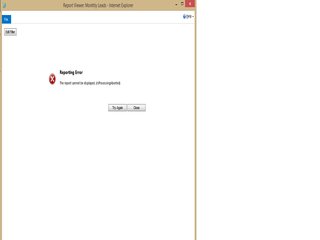
I checked many forums and tried many things they suggested. But still in vain . Following is the error I get
rsz_5F00_1error.jpg

I get "Reporting Error: The report cannot be displayed (isProcessingAborted)" . when i click 'Try again', it shows "Invalid Argument".

If I get to know about the solution for this, then I can proceed with the second issue which is caused in rdl fiels saved in report server.

Please help me on this as it is of high priority in my company because they are not able to generate any reports for clients.

*This post is locked for comments

I have the same question (0)
  • Suggested answer
    Manoj Batchu Profile Picture
    1,691 on at

    Hello,

    Did you try the below options.

    1. Reinstall CRM Reporting Extensions in SQL Reporting Services Server.

    2. Publish Reports using the PublishReports.exe tool.

    Additional steps are mentioned in the below site.

    us.hitachi-solutions.com/.../crm-2011-and-restoring-the-ssrs-server

  • Mahendar Pal Profile Picture
    45,095 on at

    Further enabling tracing should also help you to identify issue, check: msdn.microsoft.com/.../gg197711(v=crm.6).aspx

  • Community Member Profile Picture
    on at

    Hi Manoj,

    Before reinstalling CRM Reporting Extensions, I tried publishing report using PublishReports.exe tool . And all the reports within CRM was  published successfully within the command prompt. But then too I couldnt run the default reports.

    After this I unistalled CRM Reporting Extensions, all the files within Microsoft Dynamics CRM Reporting Extension folder had been deleted. Now am not able to install it. In order to get back Reporting Extensions what am I suppose to do? We cant download it online as well.

    please let me know a soluiton for this as well

    Thanks,

    sharmila

  • Community Member Profile Picture
    on at

    Hi Manoj,

    I installed the CRM Reporting extension now. And ran the PublishReports.exe file. The reports are published successfully. But after this when I tried to run default reports , it gives the following error.

    Reporting Error:

    The report cannot be dislayed (rsErrorLoadingExprHostAssembly)

    rsz_5F00_error_5F00_2.jpg

    Can you please let me know if you have any idea about it.

    Thanks,

    Sharmi

  • Suggested answer
    Manoj Batchu Profile Picture
    1,691 on at

    Hello Sharmi,

    Check the below.

    1. Try accessing the reports directly from ReportServer URL.

    2. Errors/Warnings logged in CRM Server Eventlog when the report is accessed.

    3. Errors/Warnings logged in ReportingServer Log [<Drive:>\Program Files\Microsoft SQL Server\MSRS11.MSSQLSERVER\Reporting Services\LogFiles] when the report is accessed.

    Hope the ReportServer URL is Valid under Deployment Manager settings.

Under review

Thank you for your reply! To ensure a great experience for everyone, your content is awaiting approval by our Community Managers. Please check back later.

Helpful resources

Quick Links

Responsible AI policies

As AI tools become more common, we’re introducing a Responsible AI Use…

Neeraj Kumar – Community Spotlight

We are honored to recognize Neeraj Kumar as our Community Spotlight honoree for…

Leaderboard > 🔒一 Microsoft Dynamics CRM (Archived)

#1
SA-08121319-0 Profile Picture

SA-08121319-0 4

#1
Calum MacFarlane Profile Picture

Calum MacFarlane 4

#3
Alex Fun Wei Jie Profile Picture

Alex Fun Wei Jie 2

Last 30 days Overall leaderboard

Featured topics

Product updates

Dynamics 365 release plans



