web
You’re offline. This is a read only version of the page.
close
Skip to main content

Announcements

No record found.

News and Announcements icon
Community site session details

Community site session details

Session Id :
Finance | Project Operations, Human Resources, ...
Suggested Answer

Email parameters for cloud environments

(0) ShareShare
ReportReport
Posted on by 21

Hello, everyone!

I need to configure email parameters for the client cloud environment, but not realy sure how to do it correctly.

I don't realy know what username and password I have to use(what I need to ask for the client to provide for me)
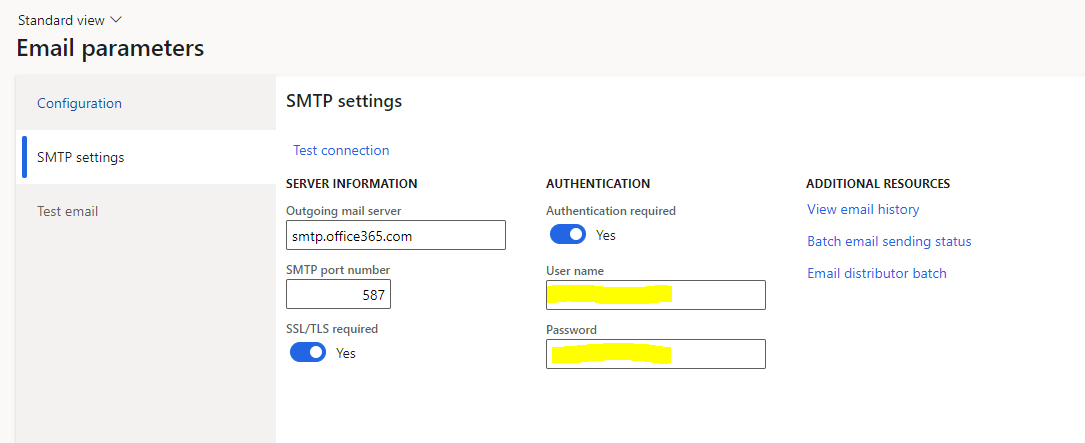
pastedimage1678406217689v1.png

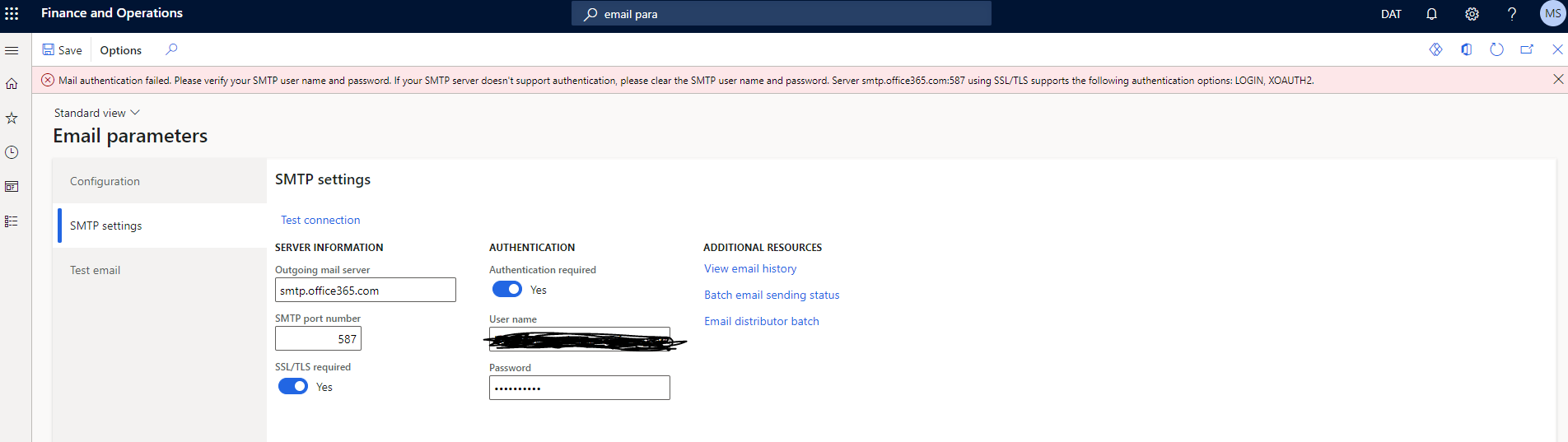
client have created environment user with specific security configuration which has onmicrosoft.com domain, bet when I try to use it I get this error:
pastedimage1678406725060v2.png

I am using username@clientname.onmicrosoft.com as username.

Documentation used:

learn.microsoft.com/.../configure-email

Do I need to to ask the client to do some configuration on his side in azure admin center?

Any help appreciated!

Kind Regards,

Maris

I have the same question (0)
  • Suggested answer
    Mohit Rampal Profile Picture
    12,565 Moderator on at

    Hi Maris, This seems to be discussed before, have you checked this thread, hope it helps you.

    community.dynamics.com/.../authentication-issue-when-using-smtp-in-d365-fo

  • Maris Sausins Profile Picture
    21 on at

    Hi, Mohit!

    Thanks for your fast response!

    I have looked at several threads likes this, but i guess my question wan not stated correctly.

    The user name and password that I used for the parameters was just my wild guess, because that was the only user with domain .onmicrosoft.com.

    So the first question, what I need to answer to my client would be: whose credentials (username and passw) for which account (maybe they need to create some new acc) they need to use. Where the account is created?

    I know that the company uses local mail server, but this can't be used for email parameters, it can't be accesed.

    I hope you understand, what I'm asking?

  • Suggested answer
    Mohit Rampal Profile Picture
    12,565 Moderator on at

    Hi, As per my understanding, your Client's IT team has to create a service account and provide you its credentials. Also, MFA (Multi factor authentication) must be disable don this account. These service accounts are generally generic email accounts like svc-d365fo-email@customername.com but your client can choose any name.

  • Maris Sausins Profile Picture
    21 on at
    Hello, Mohit.
     
    The problem on the client side was not so urgent, so no one was in a hurry to solve it.
    In the end, the problem was on the client's IT side, the configuration was not correct.
    When it was fixed everything worked lika a charm.
     
    Thanks, for your help anyway!

Under review

Thank you for your reply! To ensure a great experience for everyone, your content is awaiting approval by our Community Managers. Please check back later.

Helpful resources

Quick Links

Introducing the 2026 Season 1 community Super Users

Congratulations to our 2026 Super Stars!

Congratulations to our 2025 Community Spotlights

Thanks to all of our 2025 Community Spotlight stars!

Leaderboard > Finance | Project Operations, Human Resources, AX, GP, SL

#1
André Arnaud de Calavon Profile Picture

André Arnaud de Cal... 527 Super User 2026 Season 1

#2
Giorgio Bonacorsi Profile Picture

Giorgio Bonacorsi 473

#3
Adis Profile Picture

Adis 284 Super User 2026 Season 1

Last 30 days Overall leaderboard

Product updates

Dynamics 365 release plans
