web
You’re offline. This is a read only version of the page.
close
Skip to main content

Notifications

Announcements

No record found.

Community site session details

Community site session details

Session Id :
Small and medium business | Business Central, N...
Unanswered

Duplicate Data within [Jet Reports] G/L Trial Balance

(0) ShareShare
ReportReport
Posted on by 3,510

Hi:

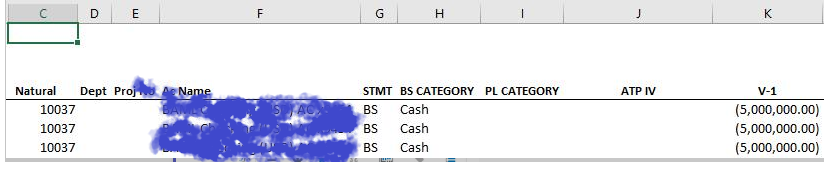
I'm getting duplicate data in a Jet Reports trial balance, as shown in the first screenshot above. Instead of giving me three accurate amounts in column K, the report is displaying the first amount of the account number from column C three times.

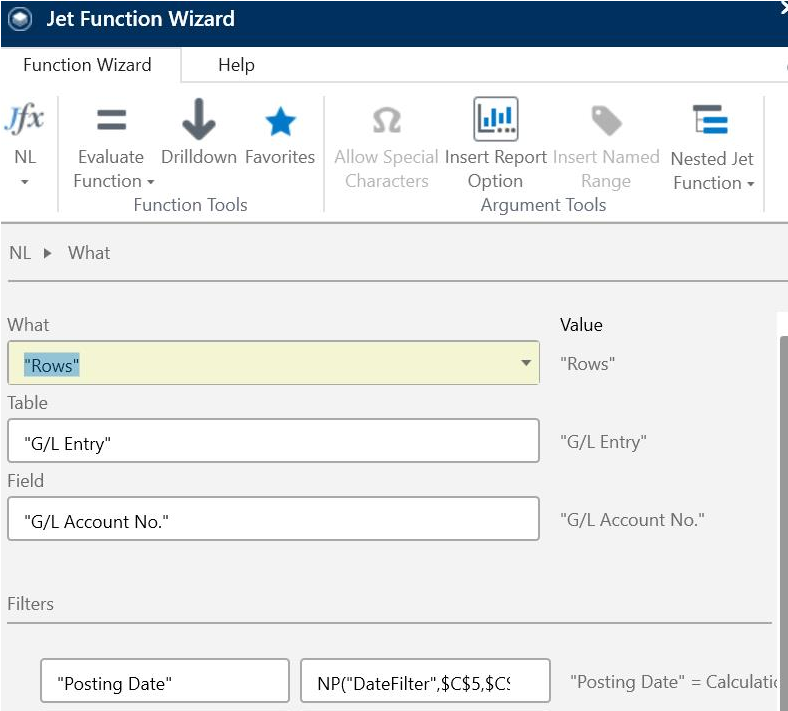
So, it's obviously not matching the data in General Ledger Entries of Business Central. The other two screenshots show the Jet NL Functions that I'm using for column C and K respectively.

Now, it is true that column K is to only reference Department Code 700 as shown in the final screenshot. And, it is true that account number 10037 is posted to three times as shown in my first screenshot.

But, I want for column K to show that amount only once and for the row that it applies to based on the Department Code for that row.

Does anyone have any ideas as to what I'm doing wrong? Thanks!

Thanks!

John
84357.Capture.PNG

0602.Capture2.PNG

6622.Capture3.png

I have the same question (0)
  • Alfredo_Iorio Profile Picture
    1,262 on at

    Try with an NL Sum in column K.

  • john.ellis Profile Picture
    3,510 on at

    Hi Alfredo:

    Thank you, for the suggestion!

    Unfortunately, this yielded the same results.

    John

  • Alfredo_Iorio Profile Picture
    1,262 on at

    I wonder how you use the filter on the Department code.

    Is the filter on Department code hardcoded in the NL sum in column K? If yes you will get duplicates.

    If you need one row for each G/L and the sum of entries by department ( I assume it's a dimension) you need another NL row to show the different department codes for each entry. Then you can use NL sum with two dynamic filters: The first in column C for the G/L and the second maybe in column G for the department.

    Then you can get the value in columns K as a sum by G/L and by Department

  • john.ellis Profile Picture
    3,510 on at

    Hi All:

    The solution is to use Jet's "NF" function to create a key (or "anchor" as I call it), create hidden columns based on Natural segment, Department Dimension, and Amount, and use "If, Then" statements for the departmental amount columns.

    John

  • Guy McKenzie Profile Picture
    1,336 on at

    Yes, your problem here was you were expanding the same set of rows within the same set of rows. 

  • Sourave Profile Picture
    10 on at

    Hi John,

    I have entirely different issue, I want jet to display the duplicates, data base - Dynamics 365. Jet seems to hide duplicates.

    If I code =NL("Linkfield","Sales Line","Document No.")

    I will get one Document No with one part, when same Document no will have multiple part numbers.

    Can you help me out

Under review

Thank you for your reply! To ensure a great experience for everyone, your content is awaiting approval by our Community Managers. Please check back later.

Helpful resources

Quick Links

Responsible AI policies

As AI tools become more common, we’re introducing a Responsible AI Use…

Neeraj Kumar – Community Spotlight

We are honored to recognize Neeraj Kumar as our Community Spotlight honoree for…

Leaderboard > Small and medium business | Business Central, NAV, RMS

#1
OussamaSabbouh Profile Picture

OussamaSabbouh 2,990

#2
Jainam M. Kothari Profile Picture

Jainam M. Kothari 1,576 Super User 2025 Season 2

#3
YUN ZHU Profile Picture

YUN ZHU 1,028 Super User 2025 Season 2

Last 30 days Overall leaderboard

Featured topics

Product updates

Dynamics 365 release plans