web
You’re offline. This is a read only version of the page.
close
Skip to main content

Notifications

Announcements

No record found.

Community site session details

Community site session details

Session Id :
Microsoft Dynamics CRM (Archived)

Multi-series chart from same entity

(0) ShareShare
ReportReport
Posted on by 465

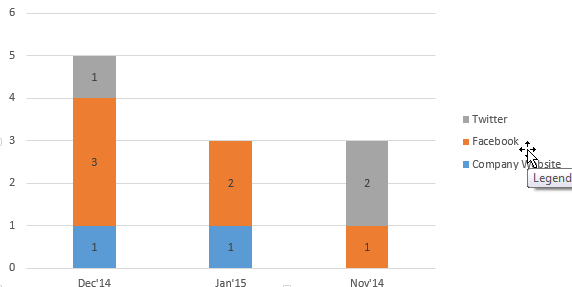
Ok, I'm sure I'm just dense and can't figure this out, but I'm trying to make a chart that shows the number of leads entered, by lead source (facebook, twitter, website, etc.) by month.  I'll attach a couple pictures so you can see what I'm trying to achieve.  Any thoughts?
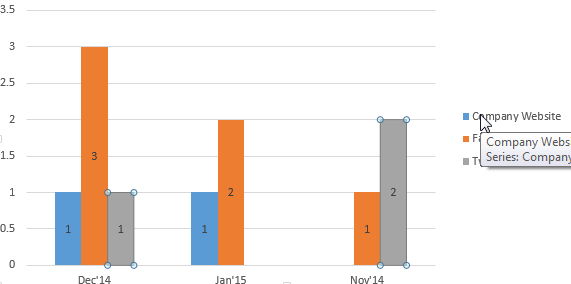
2015_2D00_01_2D00_19-16_5F00_49_5F00_39_2D00_Book1-_2D00_-Excel.png

*This post is locked for comments

I have the same question (0)
  • Community Member Profile Picture
    on at

    Hello Multiguy:

    First don't down grade yourself.

    I normal will make a View of what I need and then will make a Chart based on that View.

    So example if you create a View within Leads place all the fields you want and then have a sort I would use one for Lead Sources.

    Then create your Chart based on the View you created. When you make the Chart you can tell the what you want list on the Legends and Horizontal axis.

    You will need to play with these selections.

    All this is done within Setting-->Customizations-->Customized System

    Select the Entity you want. Make a New View. Make a new chart.

    Hope this helps

    _damon

  • multiguy Profile Picture
    465 on at

    Thanks. I've done that and all the fields are there.  I just cant seem to get the chart to display by groups of Month (based on Created On date) and then the count of records based on the Lead Source.  I'll keep playing with it.

  • Community Member Profile Picture
    on at

    Multiguy:

    Make sure you are using that View you created.

    _damon

  • Verified answer
    multiguy Profile Picture
    465 on at

    I figured it out, Damon.  It's a little strange since I had to put the same field in as a Series as well as a Category.  But then it worked. Thanks for your help!

Under review

Thank you for your reply! To ensure a great experience for everyone, your content is awaiting approval by our Community Managers. Please check back later.

Helpful resources

Quick Links

Responsible AI policies

As AI tools become more common, we’re introducing a Responsible AI Use…

Neeraj Kumar – Community Spotlight

We are honored to recognize Neeraj Kumar as our Community Spotlight honoree for…

Leaderboard > 🔒一 Microsoft Dynamics CRM (Archived)

#1
SA-08121319-0 Profile Picture

SA-08121319-0 4

#1
Calum MacFarlane Profile Picture

Calum MacFarlane 4

#3
Alex Fun Wei Jie Profile Picture

Alex Fun Wei Jie 2

Last 30 days Overall leaderboard

Featured topics

Product updates

Dynamics 365 release plans