web
You’re offline. This is a read only version of the page.
close
Skip to main content

Announcements

News and Announcements icon
Community site session details

Community site session details

Session Id :
Small and medium business | Business Central, N...
Suggested Answer

How to apply validation to my return/replace foekd

(0) ShareShare
ReportReport
Posted on by 75

Here I have quantity 2 and when I ship /invoice 1 quantity, I should only return sales order for remaining two quantity,
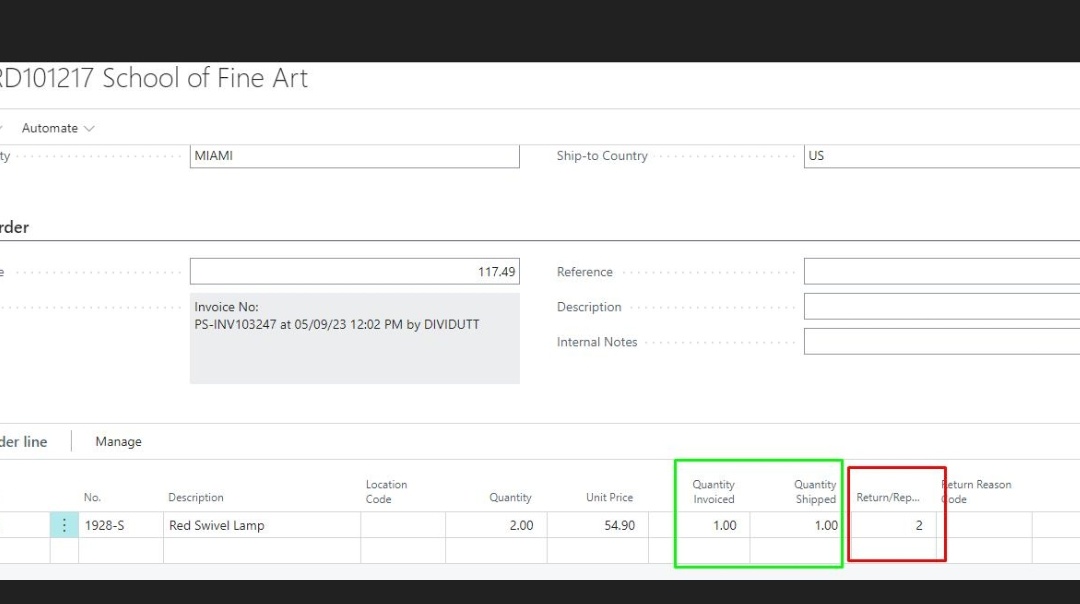
Screenshot_5F00_20230510_2D00_102224_5F005F00_01.jpg

In my field when I enter quantity 2 or more i should get error,

Because I have only one quantity left so I should send return for that, i have done validation for more that 2 quantity, but need for quantity Shipped and remaining quantity only need to send, please need help in this part.

This is my code:

trigger OnValidate()

var

cu_ItemVatCalculation: Codeunit ItemVatCalculation;

rec_Item: Record Item;

itemVat: Decimal;

rec_SalesLine: Record "Sales Line";

enum_DocumentType: Enum "Sales Document Type";

begin

Rec.VAT := Rec."Unit Price" * Rec."Return/Replace";

if (Rec."Return/Replace" > rec.Quantity) or (Rec."Return/Replace" < 0) then begin Error('Please provide valid Return/Replace quantity');

end;

I have the same question (0)
  • KasparsSemjonovs Profile Picture
    4,851 Super User 2026 Season 1 on at

    I am not a Developer, but from what I can see Your quantity is 2, and in the Return/Replace You also Enter 2.

    Error is given only when Return/Replace is higher than Quantiy or below 0.

    So adjust Your code there. I guess You need to compare the Shipped Quantity not Quantity.

  • Shankar Profile Picture
    75 on at

    I need to compare ship quantity , if my ship quantity is 1  and I enter 1 in my return replace field, i should not get error ,but if I enter more than 1 in return replace field then I should get error,

    So how to do that in al/code

    Please help.

  • Suggested answer
    KasparsSemjonovs Profile Picture
    4,851 Super User 2026 Season 1 on at

    Then adjust this place:

    if (Rec."Return/Replace" > rec.Quantity) or (Rec."Return/Replace" < 0)

    Change Quantity to Shipped Quantity

  • Suggested answer
    Govinda Kumar Profile Picture
    2,310 Moderator on at

    Hi Shankar,

    Based on your code, an error will only be triggered if the return/replace quantity more than original quantity. As your original quantity is 2 and you have already shipped 1, entering 2 in the return/replace field will not get an error.

    for that you should set the return/replace quantity to be greater than shipped quantity, as suggested by Kaspars..

    Rec."Return/Replace" > Rec."Quantity Shipped"

    Regards

Under review

Thank you for your reply! To ensure a great experience for everyone, your content is awaiting approval by our Community Managers. Please check back later.

Helpful resources

Quick Links

Season of Sharing Community Challenge Winners!

Congratulations to our community stars!

Women in Power Builds Momentum

Expanding mentorship, skilling, and AI innovation

Congratulations to the July Top 10 Community Leaders

These are the community rock stars!

Leaderboard > Small and medium business | Business Central, NAV, RMS

#1
OussamaSabbouh Profile Picture

OussamaSabbouh 566 Super User 2026 Season 2

#2
YUN ZHU Profile Picture

YUN ZHU 347 Super User 2026 Season 2

#3
Grigorios Mavrogeorgis Profile Picture

Grigorios Mavrogeorgis 327 Super User 2026 Season 2

Last 30 days Overall leaderboard

Featured topics

Microsoft Training Manuals

Product updates

Dynamics 365 release plans
