web
You’re offline. This is a read only version of the page.
close
Skip to main content

Notifications

Announcements

No record found.

Community site session details

Community site session details

Session Id :
Microsoft Dynamics CRM (Archived)

Error : Metadata contains reference that cannot be resolved: D365 online

(0) ShareShare
ReportReport
Posted on by

Hi guys,,

I'm trying to create web service (ASMX) to connect with the D365.

But when I'm trying to connect to the D365, I got this error message :-
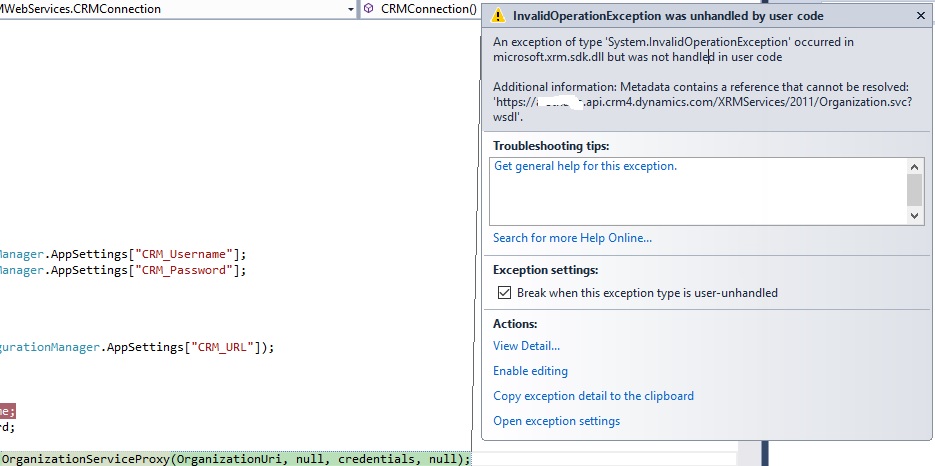
D36-Error.jpg

I tried to change the DLL to the latest version but still gave me same error. For more details about my code :-

 public class CRMConnection
    {
        public OrganizationServiceProxy service;
        private ClientCredentials credentials;
        private String UserName = WebConfigurationManager.AppSettings["CRM_Username"];
        private String Password = WebConfigurationManager.AppSettings["CRM_Password"];

        public CRMConnection()
        {
            Uri OrganizationUri = new Uri(WebConfigurationManager.AppSettings["CRM_URL"]);

            credentials = new ClientCredentials();
            credentials.UserName.UserName = UserName;
            credentials.UserName.Password = Password;

            service = new OrganizationServiceProxy(OrganizationUri, null, credentials, null);

            this.service = service;
        }
    }


Error comes in this line :

service = new OrganizationServiceProxy(OrganizationUri, null, credentials, null);

Note : I used same code with other project (Windows Application) and it's working fine.

Your help in this regard will be highly appreciated!

Thanks ..

*This post is locked for comments

I have the same question (0)
  • Verified answer
    ARIFNIIT Profile Picture
    1,391 on at

    I think You are not referring correct version of  assembly  Microsoft.Xrm.Sdk.dll.

  • Community Member Profile Picture
    on at

    If I use latest version of DLL, I got this error :-

    Additional information: Metadata contains a reference that cannot be resolved: 'https://orgname.api.crm4.dynamics.com/.../Organization.svc;sdkversion=8.2'.

    Note : my Target framework is 4.5.2

    Thanks..

  • Community Member Profile Picture
    on at

    I tried many versions , and I changed my project target Framework to 4.6.1.

    still getting same error :( .

  • Suggested answer
    ARIFNIIT Profile Picture
    1,391 on at

    Check organization service is working or not. Try running the organization service URL in browser and check if it works.  

    orgname.api.crm4.dynamics.com/.../Organization.svc

  • Community Member Profile Picture
    on at

    Yes it's working.

  • Venkata Ravi Babu Vakalapudi Profile Picture
    80 on at

    To create an organization service it is good to use CrmServiceClient from Microsoft.Xrm.Tooling.Connector.dll which you can download from nuget packages.

    CRM connection code:
    string connectionString = ConfigurationManager.ConnectionStrings["CRM"].ConnectionString;

    CrmServiceClient client = new CrmServiceClient(connectionString);


    Connection String:
    <add name="CRM" connectionString="AuthType=Office365;Username=myid@mydomain.com; Password=mypassword;Url=organiationuniquename.crm.dynamics.com"/>

    You can find more information here
    http://www.mscrmtutorial.com/2017/09/unable-to-login-to-dynamics.html

  • Verified answer
    Community Member Profile Picture
    on at

    Thanks for trying to help me.

    This case has been resolved.

    The issue was because of the proxy settings .

    Thanks a lot ..  

Under review

Thank you for your reply! To ensure a great experience for everyone, your content is awaiting approval by our Community Managers. Please check back later.

Helpful resources

Quick Links

Responsible AI policies

As AI tools become more common, we’re introducing a Responsible AI Use…

Neeraj Kumar – Community Spotlight

We are honored to recognize Neeraj Kumar as our Community Spotlight honoree for…

Leaderboard > 🔒一 Microsoft Dynamics CRM (Archived)

#1
SA-08121319-0 Profile Picture

SA-08121319-0 4

#1
Calum MacFarlane Profile Picture

Calum MacFarlane 4

#3
Alex Fun Wei Jie Profile Picture

Alex Fun Wei Jie 2

Last 30 days Overall leaderboard

Featured topics

Product updates

Dynamics 365 release plans



