web
You’re offline. This is a read only version of the page.
close
Skip to main content

Announcements

News and Announcements icon
Community site session details

Community site session details

Session Id :
Microsoft Dynamics GP (Archived)
Unanswered

Total Tax is rounding properly

(0) ShareShare
ReportReport
Posted on by 1,821

Hi,

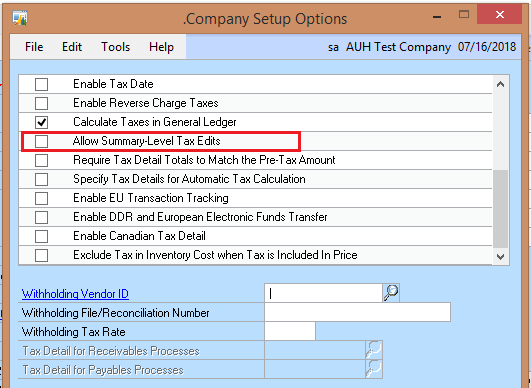
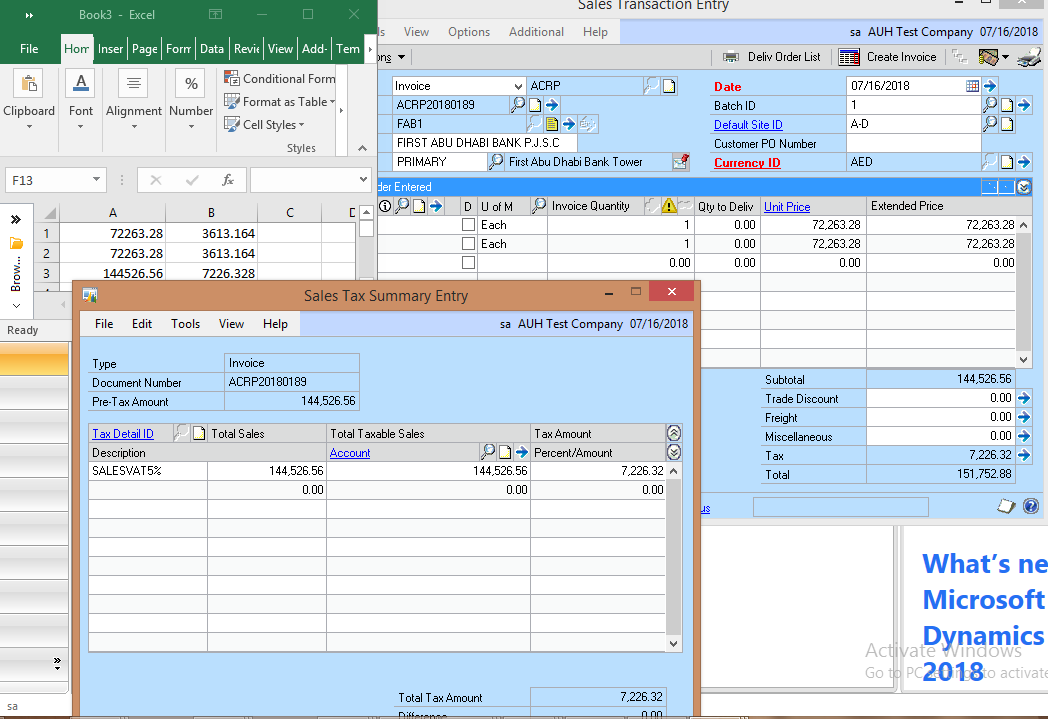
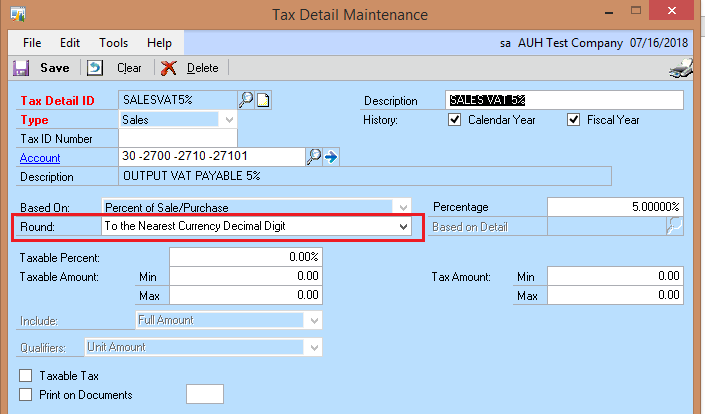
Please find below screen-shots, Total tax is not rounding properly.  Kindly check and provide a solution. We are using to nearest currency decimal, disable allow summary level tax edit option in company setup -> option window.  to avoid for any user editing by mistake.  but how to enable rounding option in tax total in GP.  As mentioned in excel file total tax is 7226.328 so when round it should be 7226.33 but GP calculate 7226.32 - not rounding properly.  Is there any option or setup for this or need to do any customization.  Please let me know.
tax123.png

tax124.png

tax125.png

*This post is locked for comments

I have the same question (0)
  • Richard Wheeler Profile Picture
    75,852 Moderator on at

    The difference is occurring because the rounding happens on each line not on the total amount of the order.

    $7,263.28 x 5% = $3613.164 which rounds up to  $3613.16

    $7,263.28 x 5% = $3613.164 which rounds up to  $3613.16 which adds up to $7226.32 for the sales tax.

  • P NOUSHAD Profile Picture
    1,821 on at

    Hi,

    Thanks for your reply and support.  Please let me know what is solution for this, we need tax total 7226.33 instead of 7226.32.  Kindly let me know which round option need to select in tax detail maintenance  window as shown in image in previous mail to fix this issue.  or any other solution to fix this issue.  Kindly inform.

    Regards,

    Noushad  

  • Richard Wheeler Profile Picture
    75,852 Moderator on at

    Please excuse the use of this expression as I have always despised it but GP sales tax calculation is "working as designed"

    Here is the reason as described in a previous article by Richard Whaley.

    If you enter items a line at a time, the tax liability for each authority (detail) is calculated for the line item, rounded, and added to any prior liability on the order (detail by detail).

    Once you get all of the line items loaded on the transaction, if you recalculate the tax, the system sums up all sales for each tax authority (detail) and calculates the tax on the sum total amount, rounding to the nearest penny.  These two methods often result in a few pennies difference.

    Which is correct?  State taxing authorities do not know!!!  Only Ohio has a statement on their web site that states either calculation is acceptable as long as the total amounts collected are remitted to the state.  In most states, as long as you are using one of these methods and remitting all that is collected (minus your prompt pay "discounts"), you are OK.  To cover yourself against an audit, you should contact your taxing agencies and get a statement from someone in writing that your method of calculation is acceptable.  Keep the document.  Then, if the auditor disagrees, your defense is "Fred said......., and he wrote it down for us! See?"

  • P NOUSHAD Profile Picture
    1,821 on at

    Hi,

    Customer will not accept sales invoice until correct the tax total, what is the solution either for editing this tax total by user or do the proper calculation by system. Now I am manually editing the tax total table before preparing sales invoice.

  • Richard Wheeler Profile Picture
    75,852 Moderator on at

    If you are not going to allow summary tax edits, the only other choice is to modify these values in SQL. Are you sure your client is not using this as an excuse not to pay this invoice? I suppose you could check with the tax jurisdiction in which this tax applies and find out their rules. As long as the tax collected is the tax paid this should be fine. Be very careful with any edits as you run the risk of skewing summary tables.

Under review

Thank you for your reply! To ensure a great experience for everyone, your content is awaiting approval by our Community Managers. Please check back later.

Helpful resources

Quick Links

Season of Sharing Community Challenge Launch!

Jump in, show your community spirit, and win prizes!

Women in Power Builds Momentum

Expanding mentorship, skilling, and AI innovation

Congratulations to the May Top 10 Community Leaders

These are the community rock stars!

Leaderboard > 🔒一 Microsoft Dynamics GP (Archived)

#1
Dan Liebl Profile Picture

Dan Liebl 2

Last 30 days Overall leaderboard

Featured topics

Product updates

Dynamics 365 release plans