web
You’re offline. This is a read only version of the page.
close
Skip to main content

Announcements

No record found.

News and Announcements icon
Community site session details

Community site session details

Session Id :
Customer experience | Sales, Customer Insights,...
Suggested Answer

Queue item Assigned to User queue when Case is assigned to user

(0) ShareShare
ReportReport
Posted on by 188

I have a situation that is giving me some problems.

When a case is created it fires the routing rules correctly which assigns it to an appropriate queue. We also have an additional workflow set up on Queue Items that fires to set the Object(Case) to a generic System User as the Owner of the case so that the case no longer appears in the creators active cases.  This is all that I have told the Work flow to do. However, according to my audit logs it appears that it also updates the Queue Item  Queue field and assigns it to the Generic Users queue and takes it out of the appropriate queue that the routing rules have sent it to. Does anyone see what I might be doing wrong here?

The Records fields Change is set to Queue
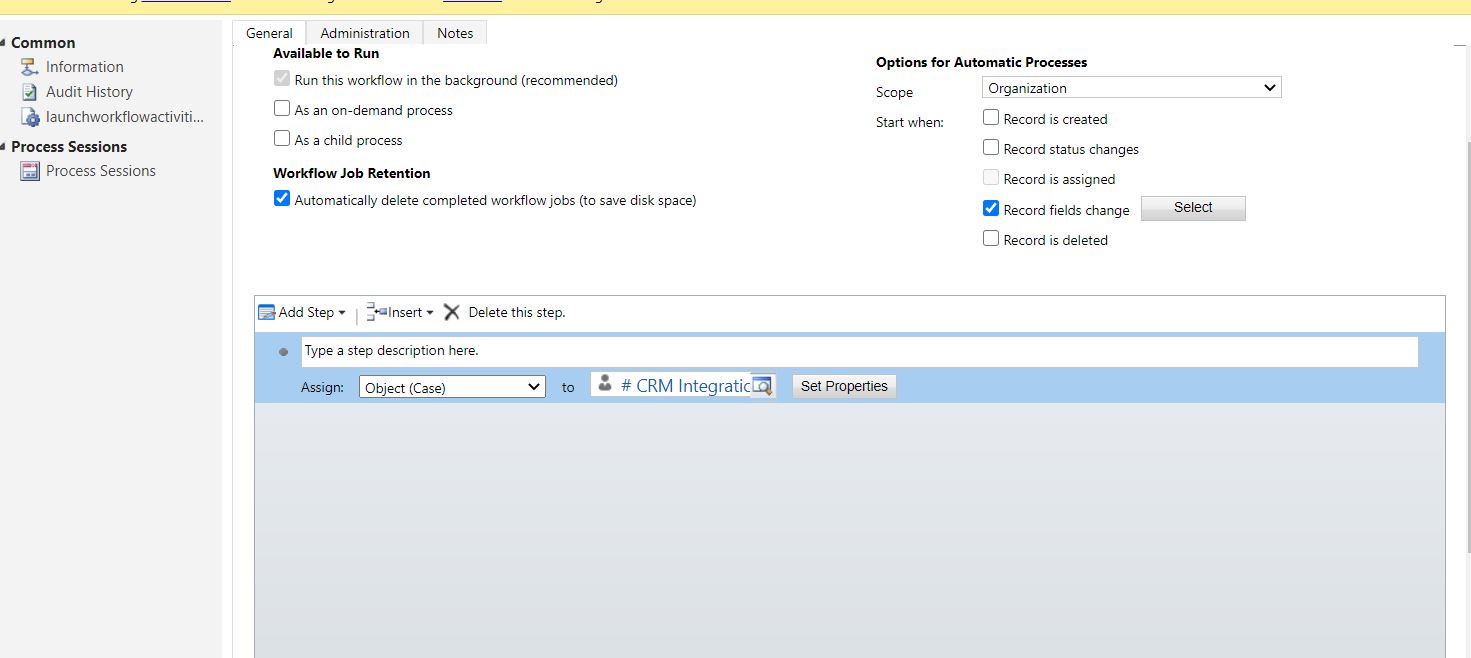
52141.Capture.JPG

8284.Capture2.JPG

I have the same question (0)
  • Kokulan Profile Picture
    18,054 on at

    Shouldn't your workflow on Queue Item be firing on OnCreate of the queue item record? What field it is set to trigger ?

    Check if there are other routing rules as well and I would also check the dependencies of the Queue field of the queue items entity to see if there are other processes updating or triggering on this field?

  • Suggested answer
    Bipin D365 Profile Picture
    28,985 Moderator on at

    Hi,

    Can you please check if Move record to user queue checkbox is unchecked in Entity settings under settings->customization->customize the system->Entity

    xrmdynamicscrm.wordpress.com/.../

    Please mark my answer verified if i were helpful

Under review

Thank you for your reply! To ensure a great experience for everyone, your content is awaiting approval by our Community Managers. Please check back later.

Helpful resources

Quick Links

Introducing the 2026 Season 1 community Super Users

Congratulations to our 2026 Super Stars!

Meet the Microsoft Dynamics 365 Contact Center Champions

We are thrilled to have these Champions in our Community!

Congratulations to the April Top 10 Community Leaders

These are the community rock stars!

Leaderboard > Customer experience | Sales, Customer Insights, CRM

#1
ManoVerse Profile Picture

ManoVerse 75 Super User 2026 Season 1

#2
Muhammad Shahzad Shafique Profile Picture

Muhammad Shahzad Sh... 69 Most Valuable Professional

#3
11manish Profile Picture

11manish 52

Last 30 days Overall leaderboard

Product updates

Dynamics 365 release plans
