web
You’re offline. This is a read only version of the page.
close
Skip to main content

Notifications

Announcements

Community site session details

Community site session details

Session Id :
Supply chain | Supply Chain Management, Commerce
Answered

Splitting of WMS work line into multiple locations and completing through X++ code in D365 F&O

(0) ShareShare
ReportReport
Posted on by 758

Hi Everyone,

I have requirement to split WMS work lines through code.

If we go to below path and open all Works

Warehouse management > Work > Work details 

On Work details, if we select any work and go to Action Pane , under Work section > Complete work

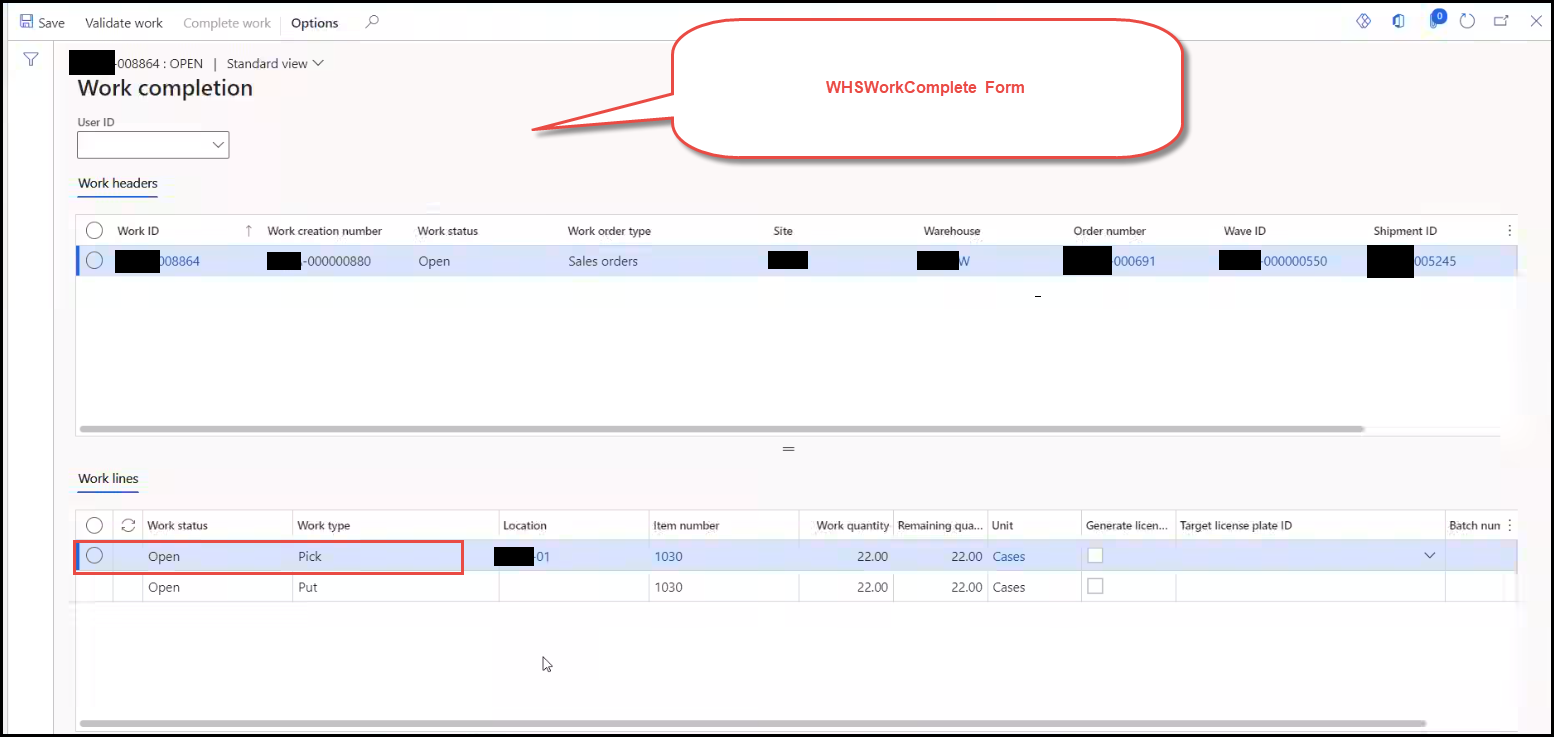
If we click on Complete work, selected specific Work Header and Lines gets populated in form WHSWorkComplete and it has below temporary data sources,

1. WHSTmpCompleteWorkTable

2. WHSTmpCompleteWotkLine

Now, the business requirement is, we need to provide one menu on this form something named like 'Split'; on clicking on it New dialog form will pop up, where it will populate Work Qty and Location of Pick Work line. 

In below reference screenshot, it will populate location as 01 and Work Qty as 22.

Now, on the dialog, user will split above Qty and will set it to different locations. And on clicking on Ok, the existing Qty should get adjusted and new Pick lines must get created with defined Qty and locations.
7853.pastedimage1631119537363v4.png

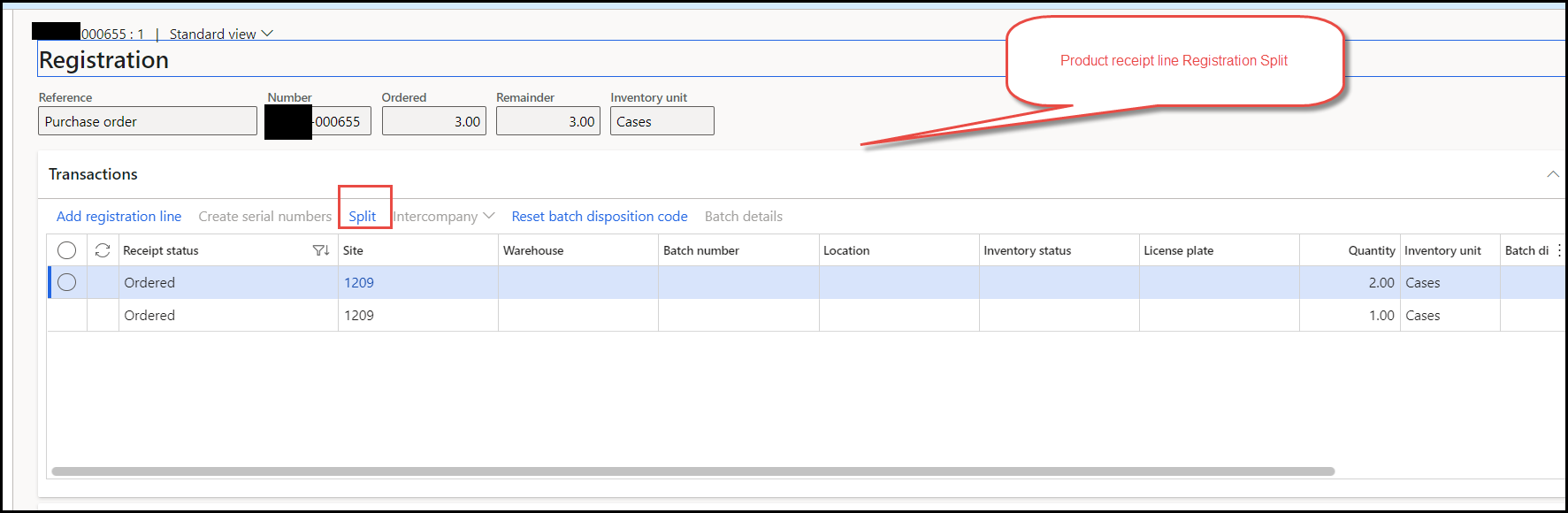
Above process somehow resembles with Split that we do during Product Receipt registration.
5661.pastedimage1631119017765v1.png

So my question here is, how I can proceed for this Customization? What logic I should right on Clicking on Ok? Is there any standard classes that I should utilize for it, as we are adjusting Qty on existing Work line and creating new Work lines as well?

Thank you in advance.

I have the same question (0)
  • Verified answer
    huijij Profile Picture
    19,811 on at

    Hi Rhushikesh,

    The split button during product receipt registration is a menu button that calls the dialog box when clicked, and it extends the runbase class. Clicking the ok button on the dialog will call the run method of the dialog to update and split registration line. You can refer to the implementation of this class named InventTransSplit:

    _5563B783_.PNG

  • Verified answer
    AliceBarendregt Profile Picture
    1,470 on at

    I’m not able to provide technical support. However, before you start with the above modification I would first validate the split work functionality and proceed from there. More information about this functionality can be found via the following post: https://docs.microsoft.com/en-us/dynamics365/supply-chain/warehousing/work-split 

Under review

Thank you for your reply! To ensure a great experience for everyone, your content is awaiting approval by our Community Managers. Please check back later.

Helpful resources

News and Announcements

Season of Giving Solutions is Here!

Quick Links

Responsible AI policies

As AI tools become more common, we’re introducing a Responsible AI Use…

Neeraj Kumar – Community Spotlight

We are honored to recognize Neeraj Kumar as our Community Spotlight honoree for…

Leaderboard > Supply chain | Supply Chain Management, Commerce

#1
Laurens vd Tang Profile Picture

Laurens vd Tang 279 Super User 2025 Season 2

#2
André Arnaud de Calavon Profile Picture

André Arnaud de Cal... 132 Super User 2025 Season 2

#3
Sumit Singh Profile Picture

Sumit Singh 46

Last 30 days Overall leaderboard

Product updates

Dynamics 365 release plans



