web
You’re offline. This is a read only version of the page.
close
Skip to main content

Notifications

Announcements

No record found.

Community site session details

Community site session details

Session Id :
Microsoft Dynamics AX (Archived)

Retail POS Screen Layout

(0) ShareShare
ReportReport
Posted on by 810

Hi Guys,

I am working in AX 2012 R3 POS and below is detail of my question:

I have added two categories in retail category hierarchy form in AX 2013 and also run job 1040 and import in store database successfully.

1. Category1

2. Category2

In Category 1, there are multiple products : Product1,product2 etc..

In Category 2, there are also multiple products : product3,product4,product5 etc..

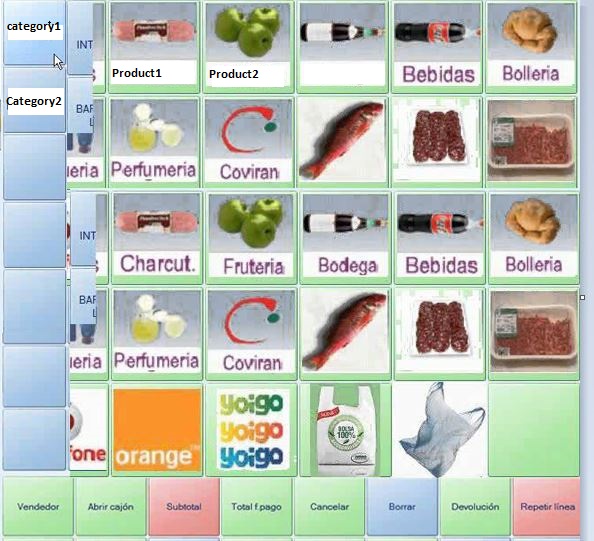
In POS Screen, I added two buttons in button grid with Category1 and Category2 as button name.

when I click on the Category1 button , related multiple products are display in another button grid in same screen and same as category2. How to do this functionality in it?

Here more clarification ,attached image:
4401.New.JPG

*This post is locked for comments

I have the same question (0)
  • UmesH@ Profile Picture
    810 on at

    Hi Guys ,

    did anyone find Solution ?

  • Oksana Kovaliova Profile Picture
    3,597 on at

    Hi Jignesh,

    As I see, your requirement cannot be solved by standard configuration.

    Below are 2 variants that can be achieved by configuration (taken from MS DEMO DB):

    1) Open 'Category search' form: in this variant you configure button to run 'Search' operation and select your Category1/Category2 as parameter.
    When user clicks the button, he/she will see the list of products related to this category:

    2016_2D00_04_2D00_07_5F00_23_2D00_50_2D00_11.jpg

    2) Make static list buttons with links to products. In this case you add in Button grid multiple buttons with operation 'Product sale' and different Product IDs in parameter.
    So POS user will see the list of pictures and when he/she clicks on a button, product will be added to Sale. BUT This is a static list not related to categories.

    2016_2D00_04_2D00_07_5F00_23_2D00_50_2D00_11.jpg
    Regards,
    Oksana

  • UmesH@ Profile Picture
    810 on at

    Thanks Oksana,

               this one i already seen in button properties like, popup,sub menu,product scale and product search.

    Thanks for your reply. i want to confirm this functionality is available in AX 2012 R3 or not.

Under review

Thank you for your reply! To ensure a great experience for everyone, your content is awaiting approval by our Community Managers. Please check back later.

Helpful resources

Quick Links

Responsible AI policies

As AI tools become more common, we’re introducing a Responsible AI Use…

Neeraj Kumar – Community Spotlight

We are honored to recognize Neeraj Kumar as our Community Spotlight honoree for…

Leaderboard > 🔒一 Microsoft Dynamics AX (Archived)

#1
Martin Dráb Profile Picture

Martin Dráb 4 Most Valuable Professional

#1
Priya_K Profile Picture

Priya_K 4

#3
MyDynamicsNAV Profile Picture

MyDynamicsNAV 2

Last 30 days Overall leaderboard

Featured topics

Product updates

Dynamics 365 release plans
