web
You’re offline. This is a read only version of the page.
close
Skip to main content

Notifications

Announcements

No record found.

Community site session details

Community site session details

Session Id :
Microsoft Dynamics 365 | Integration, Dataverse...
Suggested Answer

Environment unable to access the services for Marketing,, Solution only. D365 Marketing application is installed

(0) ShareShare
ReportReport
Posted on by 329

Hi,

Bit confused by this and I have reached out to Microsoft.

My UAT environment, which has the app Marketing installed saying it only as the solution added and not the services 

pastedimage1661176708612v1.png

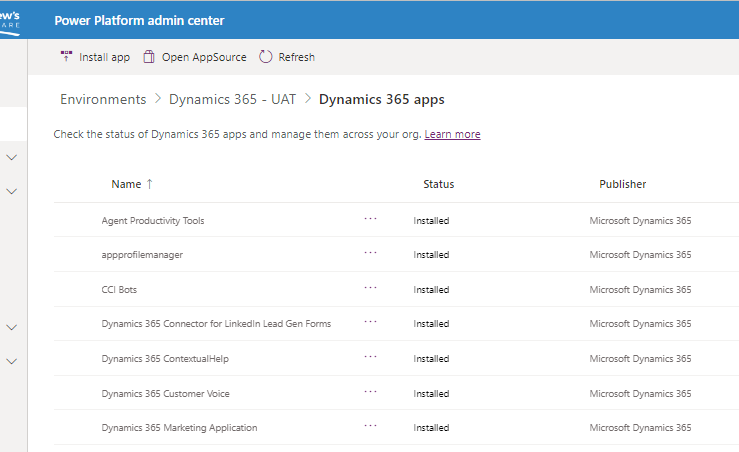
If I access the environment from the Admin centre and click on Resource > Dynamics 365 apps, it shows that I have the Dynamics 365 Marketing application installed.
pastedimage1661176863503v2.png

So I believe the services and solutions should be available.

I was advised to install another Marketing Application??


I have the same question (0)
  • Suggested answer
    Community Member Profile Picture
    on at

    Hi Chris1968,

    If you are seeing this message, it means that you have installed the solution only version of the Marketing App and not a paid or sandbox version.  

    You can find more information here:  docs.microsoft.com/.../purchase-setup ()

    • Dynamics 365 Marketing Application: This is a full Dynamics 365 Marketing application, including both solutions and services. It's intended for production use, but can also be used during development and testing.
    • Dynamics 365 Marketing - Solution Only: This application provides the Dynamics 365 Marketing solutions, including all database entities, but not the services. This means that marketing capabilities aren't available. It provides limited functionality but can be installed on as many test or development environments as needed for no additional charge. More information: How Marketing is licensed.

    Go to admin.powerplatform.microsoft.com and naviagate to Resources > Dynamics 365 apps on the left navigation pane.

    You need manage the Dynamics 365 Marketing Application if you want to stop showing this alert.

    pastedimage1661227282303v1.png

  • Chris1968 Profile Picture
    329 on at

    Hi Leah Ju,

    I can see that two have been configured and these are to the Dev and Live environment.  The Solution only version has not been configured so this ponders another question. How is the UAT environment seeing any of the Marketing components??


    pastedimage1661240163752v1.png

    If I install one of the full versions as it seems we have three unused licenses for the application how can i identify where the other have been hosted to.  

    Apologises I've recently taken on the role and the other applications where installed a few years ago by another admin who as now left.  When loading you have an option to host this on an internal webserver or the Dynamics one

    pastedimage1661240489830v2.png

    Is there away I can identify where the others are???

  • Community Member Profile Picture
    on at

    Hi,

    You can refer the following link:

    docs.microsoft.com/.../portal-optional

Under review

Thank you for your reply! To ensure a great experience for everyone, your content is awaiting approval by our Community Managers. Please check back later.

Helpful resources

Quick Links

Responsible AI policies

As AI tools become more common, we’re introducing a Responsible AI Use…

Neeraj Kumar – Community Spotlight

We are honored to recognize Neeraj Kumar as our Community Spotlight honoree for…

Leaderboard > Microsoft Dynamics 365 | Integration, Dataverse, and general topics

#1
Siv Sagar Profile Picture

Siv Sagar 93 Super User 2025 Season 2

#2
#ManoVerse Profile Picture

#ManoVerse 76

#3
Martin Dráb Profile Picture

Martin Dráb 64 Most Valuable Professional

Last 30 days Overall leaderboard

Product updates

Dynamics 365 release plans
