web
You’re offline. This is a read only version of the page.
close
Skip to main content

Notifications

Announcements

No record found.

Community site session details

Community site session details

Session Id :
Finance | Project Operations, Human Resources, ...
Suggested Answer

Electronic reporting - ANZ Direct Credit Service error when posting Vendor payment journal

(0) ShareShare
ReportReport
Posted on by 375

Hello there,

I have ANZ Direct Credit service Version 1.1 and 1.2 in my system and this is my first time using it.

So I created a new payment method and add ANZ Direct Credit Service to my Export format configuration.

However, when I created a new Vendor payment journal and validated, I got below error:
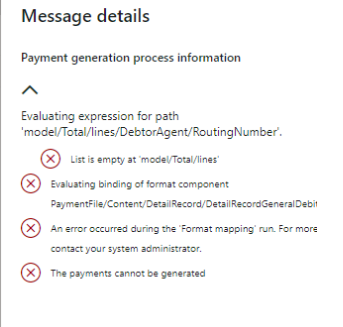
pastedimage1585779843594v2.png

Anybody knows which mapping is missing and how should I find them?

Thank you

L

I have the same question (0)
  • Mea_ Profile Picture
    60,284 on at

    It says RoutingNumber, so its probably empty on a bank account, I always mix vendor and customer, so its either company bank account or vendor bank account or whatever is debtor in your case. 

  • nopainnogain Profile Picture
    375 on at

    Hello ievgen,

    Could you elaborate a bit more clearer? the bank account is empty on the mapping or in the journal itself?

    Thank you

  • Suggested answer
    Ludwig Reinhard Profile Picture
    Microsoft Employee on at

    Hi L Dinh,

    What Ievgen already mentioned is that you should check:

    1. Your vendor and the vendor bank account that is linked and used for this vendor. Can you check whether the routing number field is filled?

    2. In the method of payment that is used in the payment journal, check the bank account that is assigned to this method. Then navigate to the bank account and check whether the routing number field is filled there as well.

    Best regards,

    Ludwig

  • nopainnogain Profile Picture
    375 on at

    Hello Ludwig and ievgen,

    This is Australian preferences, and instead of routing number, we have BSB number and yes, it has been filled in.

  • nopainnogain Profile Picture
    375 on at

    Sorry again,

    The error happened after we clicked onto "Generate Payment", not Validate

  • Jeremy Driscoll Profile Picture
    on at

    Hi L,

    You might have everything set up on the bank account of the vendor, but there's still another place that you need to set this up. Open the vendor and scroll down to the Payments fast tab and select the Bank Account you set up.

    pastedimage1585950876129v1.png

    Then click Save and try generating the payment again.

    Jeremy Driscoll

  • nopainnogain Profile Picture
    375 on at

    Hello Jeremy,

    Checked that and yes, the bank account and bank account number is there under Vendor Payment set-up

    Thank you

  • nopainnogain Profile Picture
    375 on at

    And now I've got error as below:

    pastedimage1586157728071v1.png

  • Jeremy Driscoll Profile Picture
    on at

    Hi L,

    I would recommend opening a support request with Microsoft. They would be able to go through this with you more thoroughly to find the issue.

    Thanks,

    Jeremy Driscoll

  • nopainnogain Profile Picture
    375 on at

    Hello Jeremy,

    I found out that it was because the form was not the latest version. Downloaded the latest version and then it worked.

    Thank you

Under review

Thank you for your reply! To ensure a great experience for everyone, your content is awaiting approval by our Community Managers. Please check back later.

Helpful resources

Quick Links

Responsible AI policies

As AI tools become more common, we’re introducing a Responsible AI Use…

Neeraj Kumar – Community Spotlight

We are honored to recognize Neeraj Kumar as our Community Spotlight honoree for…

Leaderboard > Finance | Project Operations, Human Resources, AX, GP, SL

#1
Martin Dráb Profile Picture

Martin Dráb 611 Most Valuable Professional

#2
André Arnaud de Calavon Profile Picture

André Arnaud de Cal... 529 Super User 2025 Season 2

#3
Sohaib Cheema Profile Picture

Sohaib Cheema 285 User Group Leader

Last 30 days Overall leaderboard

Product updates

Dynamics 365 release plans
