web
You’re offline. This is a read only version of the page.
close
Skip to main content

Announcements

No record found.

News and Announcements icon
Community site session details

Community site session details

Session Id :
Finance | Project Operations, Human Resources, ...
Unanswered

Form ReferenceGroup control does not show value

(0) ShareShare
ReportReport
Posted on by 573

Hi Experts,

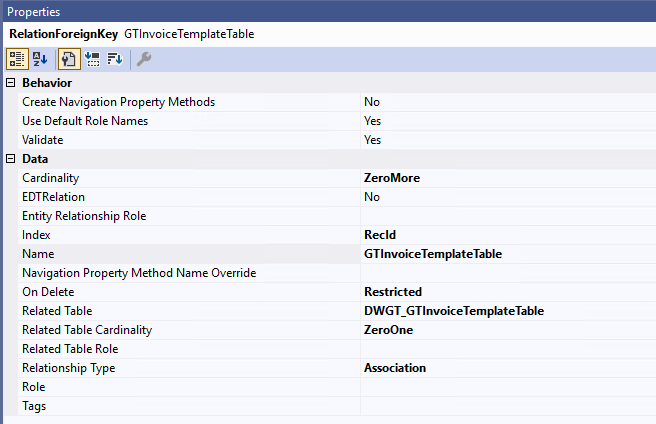
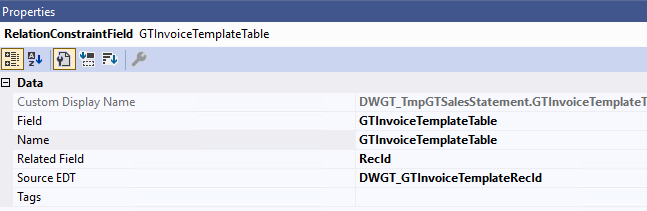
I create a new tempory table with a FK field, and add this field to form via ReferenceGroup control, but it doesn't show any value.

1. The relation of tempory table
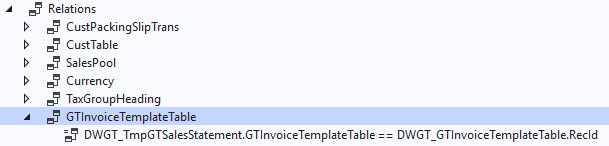
pastedimage1673259513444v5.pngpastedimage1673259534067v6.pngpastedimage1673259551155v7.png

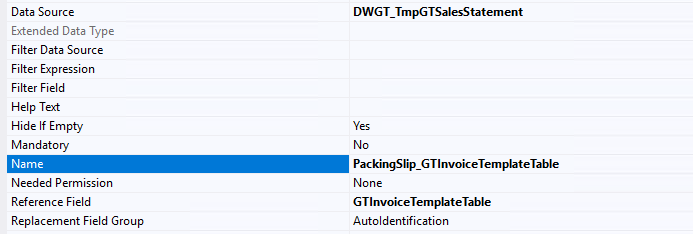
2. The FK field is added to form

pastedimage1673259595760v8.pngpastedimage1673259622326v9.png

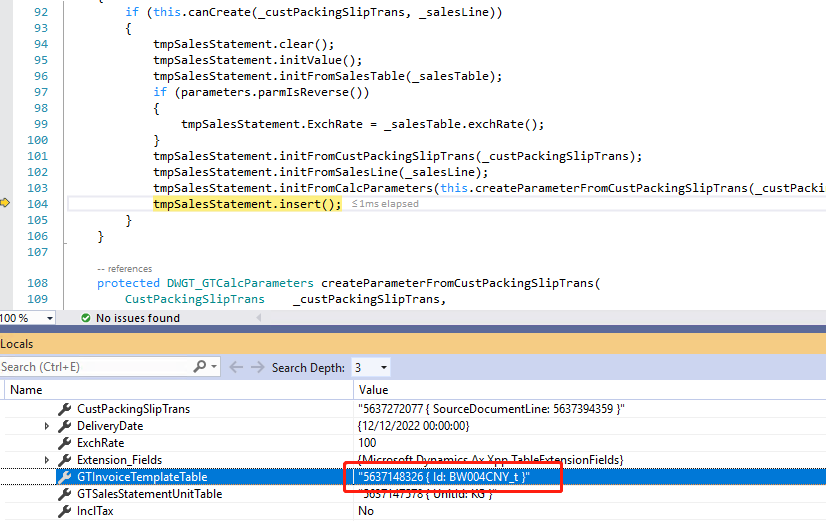
3. The value is set

pastedimage1673259766294v10.png

4.  Control value is empty.

pastedimage1673259912391v11.png

Any suggestion is appreciated.

Thanks in advance.

I have the same question (0)
  • GirishS Profile Picture
    27,843 Moderator on at

    Hi bernardqin,

    Have you checked other fields in the same temp table are showing values? Or only the reference group control value is not showing in the form?

    Thanks,

    Girish S.

  • bernardqin Profile Picture
    573 on at

    Thanks Girish, yes, other fields are shown correctly except ReferenceGroup control.

  • GirishS Profile Picture
    27,843 Moderator on at

    On DWGT_GTInvoiceTemplateTable - Have you set the replacement key on the table property.

    Try setting the replacement key for that table and check.

    Also restart the services and check.

    If the above doesn't work create one int64 control and map that DataSource and GTInvoiceTempTable field. See whether its showing RecId values. So, we can confirm that the issue is related to reference group control.

    Thanks,

    Girish S.

  • bernardqin Profile Picture
    573 on at

    Yes, the replacement key is set, and the ReferenceGroup on other form (with regular table with field reference to DWGT_GTInvoiceTemplateTable) is shown correctly.

  • GirishS Profile Picture
    27,843 Moderator on at

    I guess it may be due to the temp table.

    I cannot confirm that temp table doesn't support reference group control. I am not sure on that point.

    From my suggestion you can create string control to resolve this issue.

    Thanks,

    Girish S.

  • bernardqin Profile Picture
    573 on at

    The odd thing was that I have another form can show the exactly value with the same situation.

  • GirishS Profile Picture
    27,843 Moderator on at

    But that form won't have temp table as a datasource right?

    It is a regular table right?

    Thanks,

    Girish S.

  • GirishS Profile Picture
    27,843 Moderator on at

    You can do one thing - Create new int64 EDT and set the Reference table property to "DWGT_GTInvoiceTemplateTable".

    Now in your temp table drag that newly created EDT into fields node and it will ask for foreign key relation - Upon clicking yes it will create new foreign key relation. Now add that field to form design.

    Also, I found out that temp table will support foreign key related fields.

    Thanks,

    Girish S.

  • bernardqin Profile Picture
    573 on at

    First, answer your previous question, the DS on another form is also temp table.

    The relation of table is created automatically via int64 EDT.

  • GirishS Profile Picture
    27,843 Moderator on at

    Oh, have you created int64 control and mapped the DataSource and field to check whether its showing RecId values?

    So, you already confirmed that same fields in temp table showing values in the form. Make that fields as editable and see whether its showing lookup and upon selecting the values and it's showing the values or not. First try the same in the table browser URL and see whether it works.

    Thanks,

    Girish S.

Under review

Thank you for your reply! To ensure a great experience for everyone, your content is awaiting approval by our Community Managers. Please check back later.

Helpful resources

Quick Links

Introducing the 2026 Season 1 community Super Users

Congratulations to our 2026 Super Stars!

Meet the Microsoft Dynamics 365 Contact Center Champions

We are thrilled to have these Champions in our Community!

Congratulations to the April Top 10 Community Leaders

These are the community rock stars!

Leaderboard > Finance | Project Operations, Human Resources, AX, GP, SL

#1
Giorgio Bonacorsi Profile Picture

Giorgio Bonacorsi 608

#2
André Arnaud de Calavon Profile Picture

André Arnaud de Cal... 591 Super User 2026 Season 1

#3
CP04-islander Profile Picture

CP04-islander 430

Last 30 days Overall leaderboard

Product updates

Dynamics 365 release plans