web
You’re offline. This is a read only version of the page.
close
Skip to main content

Notifications

Announcements

No record found.

Community site session details

Community site session details

Session Id :
Microsoft Dynamics RMS (Archived)

Questions About Setting Up RMS for a Beer Shop, HELP!

(0) ShareShare
ReportReport
Posted on by 30

I am brand new to Microsoft RMS and am currently building the database that will be home to 750+ beer, along with wine, sake, sodas, etc... To stay organized, track my inventory, and watch sales trends I'd like to set up three things:

Item Type (Beer, Wine, Sake, Soda, Food, etc...)

Country/State (State or Country)

Style (Style of Beer)

Now, to my questions... When I received training, I was instructed to put these as my subcategories, like I have done in the picture. 
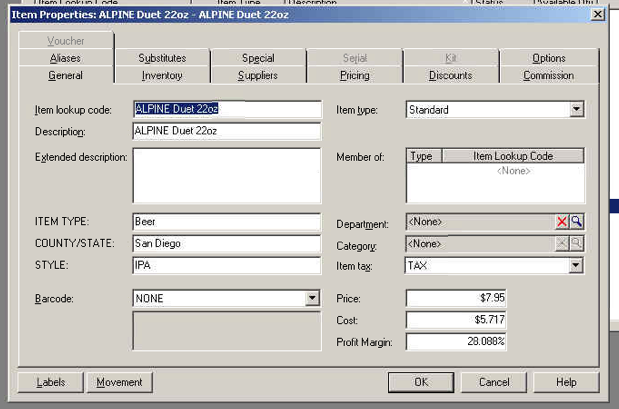
Would it be smarter to make these Departments and Categories instead? Can I run a report or inventory list of only beers within a certain subcategory? Now that I am looking at the system, it seems like it may be smarter to set these up at Departments and Categories so I can track the sales/inventory easier. Please let me know before I get too much work done and have to backtrack too much!

*This post is locked for comments

I have the same question (0)
  • Ron Rahhal Profile Picture
    545 on at

    It's definitely better to start with Departments and Categories.  Departments could be Beer, Wine, Liquor, Snacks, Misc.  This depends on the mix in your store. Categories of Beer could be Imported and Domestic. For Liquor, you have Gin, Vodka, Whiskey, etc. If you'd like to drill down further, use Subdescription 1, 2 and 3, as per your screen shot. For example: Department: Beer, Category: Imported, Style:IPA. Example 2: Department: Wine, Category: Domestic, Style: Merlot.  Note that if you use Imported as a Category for Beer, you cannot use it as a Category for Wine (change the spelling, or call it something else, e.g. Beer Imported and Wine Imported).

    One reason for this is that, if you have $10,000 in sales in a given period, it's more important to know how much of that is represented by Beer, Wine and Liquor.  Next is, how does this break down within departments?  Then, if it's important to you, you can drill down to IPA, MicroBrews, etc.

    Hope this helps.

    Ron Rahhal

    Best POS Sales

  • Community Member Profile Picture
    on at

    Ron

    You are wrong about the Import as a Category for both Beer and Wine.  You can have the same name for a category as long as the Code is different.  

    DrinkGoodBeer,

    You also might want to take a look at  Lot Matrix Items.  This will allow you to order 30pks or 24pks and break out or ring 6pks but use the one barcode with a prompt to select the pack size at the time of sale.

    Also make sure you look at the Special Tab under item properties.  This will allow out to use the parent child item structure to automatically break out packs of larger sizes to sell as smaller sizes.

    Thanks

    Ed Boyer

    bmepos.com

  • Ron Rahhal Profile Picture
    545 on at

    While it's true that you can use IMPORTED as a category for both Beer and Wine, this would not be recommended.  In Reports, under the Category filter, IMPORTED would show up twice - and it would not be obvious which department it belonged to.  Hence my recommendation to use unique names.

    Ron Rahhal

    Best POS Sales

  • Gerald Rothaus Profile Picture
    2,934 on at

    My beer & wine customers, and I have a lot of them, generally set up beer departments as beer, soda, tea/drinks, returns, etc, then categories will be craft, premium, import, domestic. For wine, the cats are Italian, german, etc.

    The trick is this:

    Departments show up on your z, so use them for daily,sales analysis. Categories help you build your department's stock.

    -Jerry

    JR Data

Under review

Thank you for your reply! To ensure a great experience for everyone, your content is awaiting approval by our Community Managers. Please check back later.

Helpful resources

Quick Links

Responsible AI policies

As AI tools become more common, we’re introducing a Responsible AI Use…

Neeraj Kumar – Community Spotlight

We are honored to recognize Neeraj Kumar as our Community Spotlight honoree for…

Leaderboard > 🔒一 Microsoft Dynamics RMS (Archived)

Last 30 days Overall leaderboard

Featured topics

Product updates

Dynamics 365 release plans



