web
You’re offline. This is a read only version of the page.
close
Skip to main content

Notifications

Announcements

No record found.

Community site session details

Community site session details

Session Id :
Customer experience | Sales, Customer Insights,...
Suggested Answer

Over ride created on date for bulk note import migration to Dynamics not working

(0) ShareShare
ReportReport
Posted on by 265

Hello Everyone, 

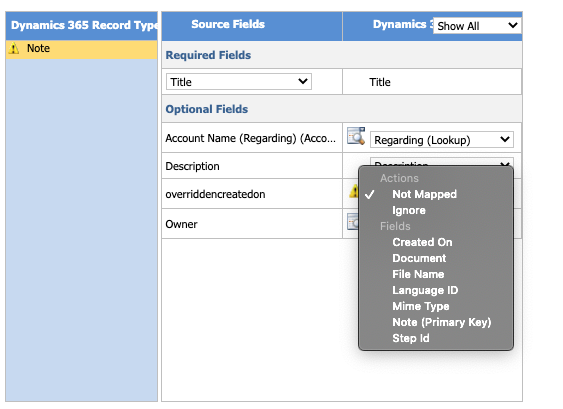
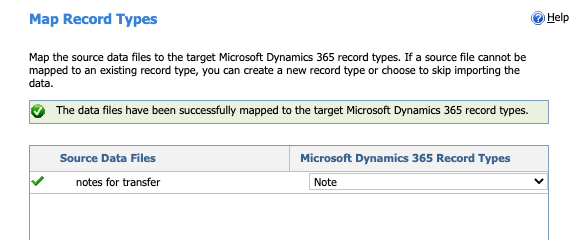
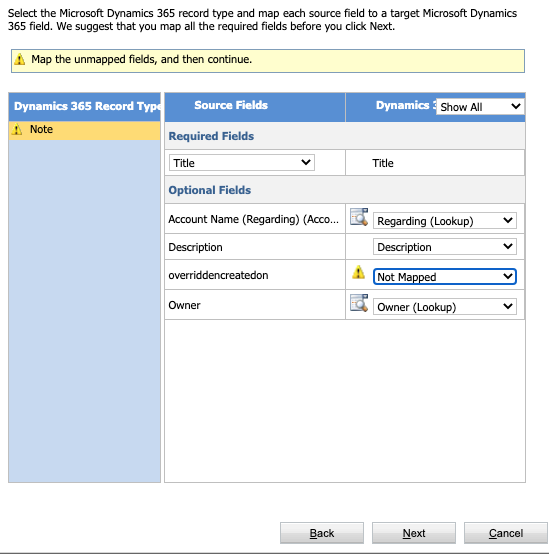
I have been able to successfully import hundreds of notes all to separate accounts by creating a .csv form with the appropriate fields. I have added the fields to my import form, "overriddencreatedon" and also tried the display name of 'Record Created On'. I want the notes to reflect the original date created before using Dynamics. 

Screen-Shot-2020_2D00_07_2D00_17-at-4.16.28-PM.png

Screen-Shot-2020_2D00_07_2D00_17-at-4.16.49-PM.png

When I import and map either "overriddencreatedon" or 'Record Created On' it does not map to anything.
Screen-Shot-2020_2D00_07_2D00_17-at-4.19.06-PM.pngScreen-Shot-2020_2D00_07_2D00_17-at-4.19.39-PM.pngScreen-Shot-2020_2D00_07_2D00_17-at-4.19.48-PM.pngblacked-out.png

  • I have tried to assign it to "created on" hoping it will overwrite and it does not.
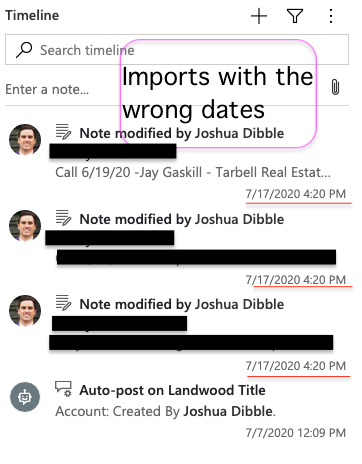
    • The date of import still shows on all the notes. 
  • I can build this form manually from the CRM and export it with the column header of 'Record Created On" but it will not map back in. 
  • I am a System Admin and have "overriddencreatedon" privileges 

Is there any way to do this outside of having to do some advanced custom import i.e. plugins, third party migration service, etc...? 

Thank you for helping me. 

Josh

I have the same question (0)
  • Bipin D365 Profile Picture
    28,983 Moderator on at

    Hi,

    Overrise/created on mapping is working perfectly fine.

    Timestamp which you see on Timeline is modified on field and that is why you see incorrect date time. Modified on field will show as notes imported date.But when you check Notes record in advanced find you will see created on field is in fact mapped to the same date you have given in import file.

    To confirm my theory I have imported below notes records and mapped created on field while importing.

    CQ55.PNG

    When I checked imported notes in advanced to check record create on, I can see it is correctly set.

    CQ54.PNG

    If found helpful, Please mark my answer verified.

  • Dribblej Profile Picture
    265 on at

    Hi Bipun, Can you tell me how to find "Check the notes record in advanced"?

    Thank you so much for your help.

    ***edit*** I finally found the advanced workaround after looking into the custom settings -> notes entity -> Notes advanced find view.

    Currently, there is no way to add the "created on" field to your view. Maybe it's possible to add it to the advanced filter but I'm not sure yet. 

    Screen-Shot-2020_2D00_07_2D00_17-at-11.50.03-PM.png

    Screen-Shot-2020_2D00_07_2D00_17-at-11.52.04-PM.png

    I was able to use the make.powerapps style to add the column which did allow me to see that when I imported the notes with the field "created on" that the meta.data was in the system. I just can't figure out a way to actually view this created on date within the social pane itself or within a note. 

    Thanks again for sending me off in the right direction Bipun. 

  • Suggested answer
    Bipin D365 Profile Picture
    28,983 Moderator on at

    HI,

    Can you tell me how to find "Check the notes record in advanced"?

    I was actually asking you to check it from below highlighted button in red color which is available on Home page from my image.

    CQ56.PNG

    Now coming back to your question - I just can't figure out a way to actually view this created on date within the social pane itself or within a note. 

    Unfortunately it is not possible to customize Notes field on Timeline/social pane. Timeline used Card form to show field on social pane. However it is not possible to modify card form for notes entity or create new card form. However Other activities such as email, task or appointment which are also visible on Timeline and fields for those enitties can be customized by moddifying the card form.

    CQ57.PNG

    If found helpful, Please mark my answer verified.

  • Suggested answer
    antc Profile Picture
    2,909 on at

    Hi Josh,

    As Bipin has stated you are seeing modified on in timeline.

    To set/override the modifiedon time create a plugin on Create of note(annotation) as pre operation -> synchronous.

    Have a field that holds the date you want i.e. doc_overriddenmodifiedon and import the records.

    public void Execute(IServiceProvider serviceProvider)

           {

               IPluginExecutionContext context = (IPluginExecutionContext)serviceProvider.GetService(typeof(IPluginExecutionContext));

               Entity entity = (Entity)context.InputParameters["Target"];

               if(entity.LogicalName == "annotation")

               {

                   DateTime modDate = (DateTime)entity["doc_overriddenmodifiedon"];

                   entity["modifiedon"] = modDate;

                }

           }

    You should now have modified on showing the date you want.

Under review

Thank you for your reply! To ensure a great experience for everyone, your content is awaiting approval by our Community Managers. Please check back later.

Helpful resources

Quick Links

Responsible AI policies

As AI tools become more common, we’re introducing a Responsible AI Use…

Neeraj Kumar – Community Spotlight

We are honored to recognize Neeraj Kumar as our Community Spotlight honoree for…

Leaderboard > Customer experience | Sales, Customer Insights, CRM

#1
Tom_Gioielli Profile Picture

Tom_Gioielli 170 Super User 2025 Season 2

#2
#ManoVerse Profile Picture

#ManoVerse 70

#3
Jimmy Passeti Profile Picture

Jimmy Passeti 50 Most Valuable Professional

Last 30 days Overall leaderboard

Product updates

Dynamics 365 release plans