web
You’re offline. This is a read only version of the page.
close
Skip to main content

Notifications

Announcements

No record found.

Community site session details

Community site session details

Session Id :
Customer experience | Sales, Customer Insights,...
Suggested Answer

Emails blocked: Email missing required fields ...

(0) ShareShare
ReportReport
Posted on by 35

Hello everyone !
If I understood right, the error "email missing required fields" will appear when the contact has one of the dynamic fields empty.

In the body of my email I used only  2 dynamic fields : Title and full name. Title is a custom field.
I'm noticing that those contacts with the title field empy didn't receive the email.
Is this normal to block an email just because one of the dynamic fields is empty?
I don't see this limitation being mentioned in the official documentation.

In my email I have "Dear {{contact.contact_mso_title_mso_titleid.mso_name}} {{contact.fullname}}".

Supposedly one of the contacts - John Malkovitch - has the field "title" empty. Is it normal that this contact should not receive the email because the title field is not filled? I find that a bit strange...
I thought that the email will be sent anyway, even if some values are missing. Could someone please help us with a confirmation/ ideas?
Otherwise...the solution is not to use dynamic fields, which I think will be a shame.

Many thanks for all your help,

A.
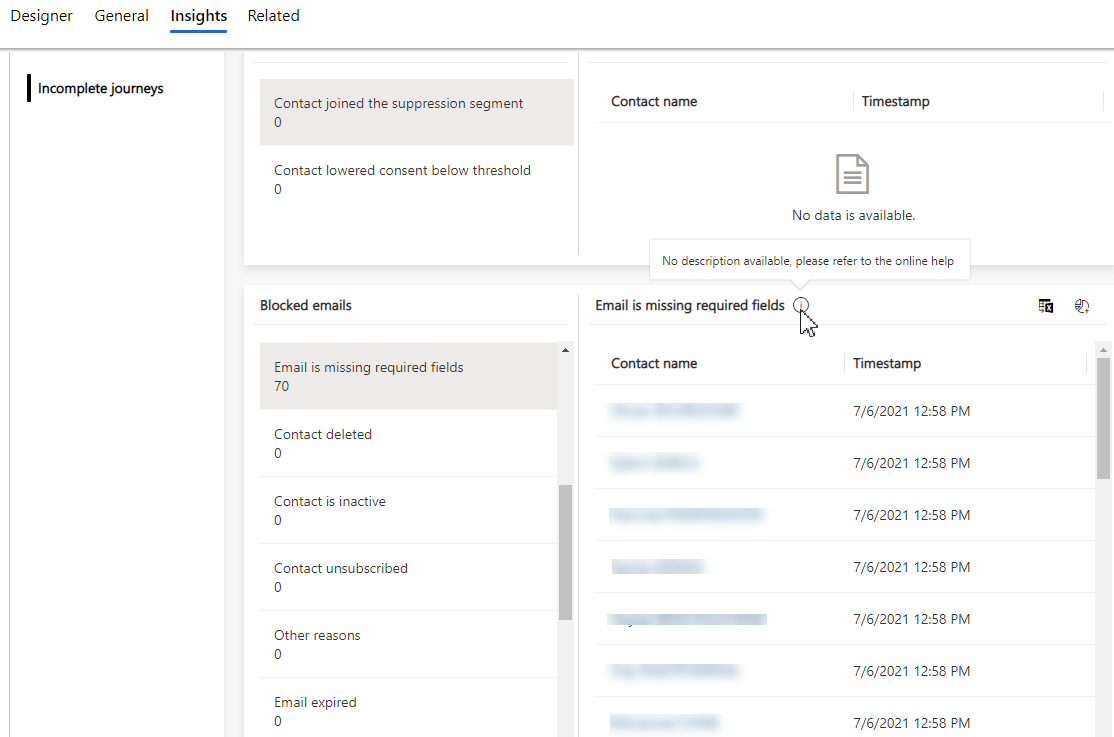

pastedimage1625849366103v1.png


So i've read these posts before writing here:

https://community.dynamics.com/365/marketing/f/dynamics-365-for-marketing-forum/377898/error-message-email-is-missing-required-content/1003633#1003633

https://community.dynamics.com/365/marketing/f/dynamics-365-for-marketing-forum/411415/required-fields-for-contact

https://community.dynamics.com/365/marketing/f/dynamics-365-for-marketing-forum/314076/email-is-missing-required-fields---newby-question/1001770#1001770

https://community.dynamics.com/365/marketing/f/dynamics-365-for-marketing-forum/377898/error-message-email-is-missing-required-content

I have the same question (0)
  • Suggested answer
    Aga M Profile Picture
    on at

    Hi ABCH_21,

    Thank you for the question!


    Yes, this is existing behavior. D365 Marketing won't send emails if some of the dynamic data used in emails is missing.
    It's documented here: https://docs.microsoft.com/en-us/dynamics365/marketing/insights#blocked-emails

    However, in Customer Journey Orchestration, we are bringing the concept of default value -> so in in case dynamic data is missing but default value is specified, we will be sending default value instead of blocking emails.


    Hope this clarifies.

    -Aga

  • ABCH_21 Profile Picture
    35 on at

    Thank you loads Aga for your help and time!

    I consulted the article and from what I can notice this behaviour concerns required fields only on the form, i am right?

    The title field in our case is not a required field (all the required fields are filled on the contact form).

    The concept of default value is pretty helpful too ! I'm just not quite sure how the default value would work for the "title" field, as we have "Ms. Mr, Mrs", and other titles too in this field, putting a default value might be problematic...

    Many thanks for your help,

    A.

Under review

Thank you for your reply! To ensure a great experience for everyone, your content is awaiting approval by our Community Managers. Please check back later.

Helpful resources

Quick Links

Responsible AI policies

As AI tools become more common, we’re introducing a Responsible AI Use…

Neeraj Kumar – Community Spotlight

We are honored to recognize Neeraj Kumar as our Community Spotlight honoree for…

Leaderboard > Customer experience | Sales, Customer Insights, CRM

#1
Tom_Gioielli Profile Picture

Tom_Gioielli 170 Super User 2025 Season 2

#2
#ManoVerse Profile Picture

#ManoVerse 70

#3
Jimmy Passeti Profile Picture

Jimmy Passeti 50 Most Valuable Professional

Last 30 days Overall leaderboard

Product updates

Dynamics 365 release plans
