web
You’re offline. This is a read only version of the page.
close
Skip to main content

Announcements

No record found.

News and Announcements icon
Community site session details

Community site session details

Session Id :
Business Central forum

Without Using DotNet Variables

(0) ShareShare
ReportReport
Posted on by 245

Hello Experts.,

  In AL I replaced DotNet Variable  " RootNode : DotNet System.Xml.XmlNode With  RootNode : XmlNode  "  (I need to Write code without using DotNet Variables that's why I am using XMLNode Type in My code)

But While using this I am Getting below error :
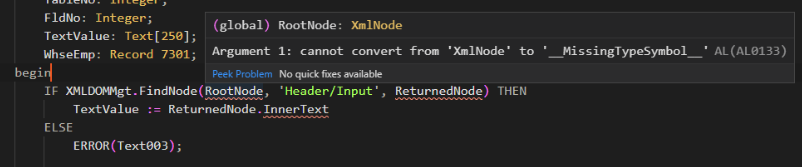
XMLNode.PNG

Can any one Suggest me the Solution.

Thanks in Advance.

Categories:
I have the same question (0)
  • Suggested answer
    Stefano Demiliani Profile Picture
    37,166 Most Valuable Professional on at

    You can retrieve xml nodes from an xml document with:

    YourXmlDocument.SelectNodes('//...',YourXmlNodeList) then begin
    foreach YourXmlNode in YourXmlNodeList do

    ...

    You can retry the InnerText property in the following way:

    YourXmlNode.AsXmlElement.InnerText

  • Manikanta_501 Profile Picture
    245 on at

    Thanks For your Reply .

    I Wrote Code Like below

    RootNode.SelectSingleNode('Header/Input', RootNode);

    TextValue := ReturnedNode.AsXmlElement().InnerText;

    Here : RootNode is XMLNode type variable;

              'Header/Input'  is Path

    Can I Write like this ..

  • Suggested answer
    Community Member Profile Picture
    on at

    Hi,

    Try:

    IF (RootNode.SelectSingleNode('Header/Input', ReturnedNode)) then 

        TextValue := ReturnedNode.AsXmlElement().InnerText;

    It looks like the 2nd variable in the call should return the node if found.

    Tero

Under review

Thank you for your reply! To ensure a great experience for everyone, your content is awaiting approval by our Community Managers. Please check back later.

Helpful resources

Quick Links

November Spotlight Star - Khushbu Rajvi

Congratulations to a top community star!

Forum Structure Changes Coming on 11/8!

In our never-ending quest to help the Dynamics 365 Community members get answers faster …

Dynamics 365 Community Platform update – Oct 28

Welcome to the next edition of the Community Platform Update. This is a status …

Leaderboard > Business Central

Last 30 days Overall leaderboard

Featured topics

Product updates

Dynamics 365 release plans
