web
You’re offline. This is a read only version of the page.
close
Skip to main content

Announcements

No record found.

News and Announcements icon
Community site session details

Community site session details

Session Id :
Finance | Project Operations, Human Resources, ...
Suggested Answer

Making Tax Digital

(0) ShareShare
ReportReport
Posted on by

Hello everyone or anyone, really could use some help.

Setup my F&O environment  for MTD and also created my account on the HMRC developers hub. However when I create a new obligation request and send report, I get the below message
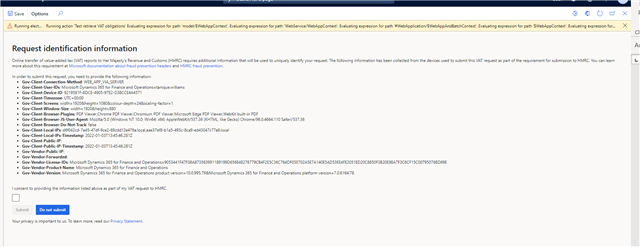
MTD-Error.png_2D00_640x480.png

From a previous thread a community member advise on setting up Gov client Public IP and Gov vendor Public IP to resolve the issue

I then navigate to Electronic reporting workspace>Reporting configurations>Electronic Messages framework model> MTD VAT web request headers format (UK), Click configuration >Setup on the action pane set my Gov client Public IP xxxx.xxxx.xxxx.xxxx (see screen shot) got my public ip from google, which base on error message its not recognising.

GOV.png

How do I go about finding  Gov Client Public IP ,Gov-Vendor Public IP and Gov Vendor Forwarded

Thanks in advance

I have the same question (0)
  • WillWU Profile Picture
    22,363 on at

    Hi partner,

    Your screenshot is not very clear.

    Did you enable TLS 1.2?

    And please start with MS document:

    docs.microsoft.com/.../emea-gbr-mtd-vat-integration-setup

  • Suggested answer
    Mia07 Profile Picture
    95 on at

    Hi,

    So i had the same error message and i did the following:

    Gov-Client-Public-IP: https://test-api.service.hmrc.gov.uk

    Gov-Vendor-Public-IP: IP address (***.***.***.**)

    pastedimage1652874883866v1.png

    That cleared the error message. 

    Let me know how you get on or if you found a better fix. 

Under review

Thank you for your reply! To ensure a great experience for everyone, your content is awaiting approval by our Community Managers. Please check back later.

Helpful resources

Quick Links

Introducing the 2026 Season 1 community Super Users

Congratulations to our 2026 Super Stars!

Congratulations to our 2025 Community Spotlights

Thanks to all of our 2025 Community Spotlight stars!

Leaderboard > Finance | Project Operations, Human Resources, AX, GP, SL

#1
André Arnaud de Calavon Profile Picture

André Arnaud de Cal... 509 Super User 2026 Season 1

#2
Giorgio Bonacorsi Profile Picture

Giorgio Bonacorsi 375

#3
Adis Profile Picture

Adis 268 Super User 2026 Season 1

Last 30 days Overall leaderboard

Product updates

Dynamics 365 release plans
