web
You’re offline. This is a read only version of the page.
close
Skip to main content

Notifications

Announcements

No record found.

Community site session details

Community site session details

Session Id :
Microsoft Dynamics 365 | Integration, Dataverse...
Answered

Universal Search issue

(0) ShareShare
ReportReport
Posted on by

Hi everyone

When I search for a contact using Universal Search I get the following info:
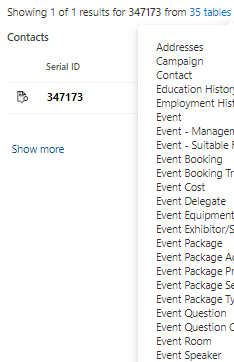
pastedimage1670498527857v1.png

I only really want the Contact and Organisation Entities / Tables in my Universal Search, so I popped over to the Settings section in Administration to remove the 33 others. But I found this...
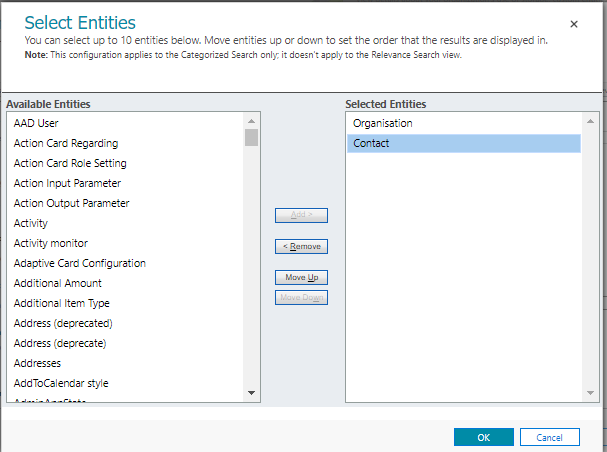
pastedimage1670498599326v2.png

Why would the Universal Search say that it's searching 35 tables and yet I can only see 2 in the Admin section?

Many thanks
Jon

I have the same question (0)
  • Verified answer
    Leco Lv Profile Picture
    on at

    Hi Jon,

    You may have misunderstood it. The second picture you provided means that you can find all the results of the type of contact and organization through global search, so it will retrieve all tables that contain both types. And it does not represent the table you think. I think global search is by design not customizable. The following is an introduction to global search.

    Global Search provides the ability to:

    • Search all records in all CRM entities (including custom entities) at once from inside the CRM workspace
    • Search all records using the CRM plug-in within Microsoft Outlook
    • View search results grouped by entities at a single glance
    • Filter results in the column headers of each entity
    • Configure entities to search, attributes to search by, and information to display
    • Search the contents of an attachment
    • Search custom entities (Search by Lookup fields)
    • Export search results to Excel

    Note: This configuration applies to the Categorized Search only; it doesn't apply to the Relevance Search view

    pastedimage1670564644218v2.png

  • JonClay Profile Picture
    on at

    Hi Leco Lv 

    Thank you so much for your reply.

    Yes, it was me getting very confused with the searches

    Best wishes
    Jon

Under review

Thank you for your reply! To ensure a great experience for everyone, your content is awaiting approval by our Community Managers. Please check back later.

Helpful resources

Quick Links

Responsible AI policies

As AI tools become more common, we’re introducing a Responsible AI Use…

Neeraj Kumar – Community Spotlight

We are honored to recognize Neeraj Kumar as our Community Spotlight honoree for…

Leaderboard > Microsoft Dynamics 365 | Integration, Dataverse, and general topics

#1
Siv Sagar Profile Picture

Siv Sagar 93 Super User 2025 Season 2

#2
#ManoVerse Profile Picture

#ManoVerse 80

#3
Martin Dráb Profile Picture

Martin Dráb 64 Most Valuable Professional

Last 30 days Overall leaderboard

Product updates

Dynamics 365 release plans
