web
You’re offline. This is a read only version of the page.
close
Skip to main content

Notifications

Announcements

No record found.

Community site session details

Community site session details

Session Id :
Microsoft Dynamics CRM (Archived)

Help required customising default Quote template

(0) ShareShare
ReportReport
Posted on by

Hello! I was wondering if someone could provide a pointer for fixing a small issue I have?

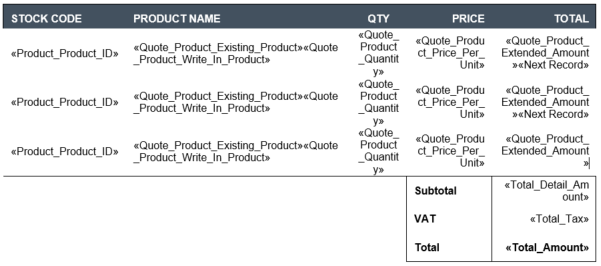
I'm trying to customise the standard Quote template that comes out-of-the-box with CRM Online. Most importantly, I'm trying to place the Subtotal, Tax, and Total AFTER the list of Products (and not BEFORE it, as is the case in the default template. See below for an example of what I'm trying to do:
MailMergeNNR.PNG

However, because I only have one product in the quote, the NextRecord entry seems to break the rest of the mail merge. See the blank, incomplete mail merge fields for Subtotal, VAT and Total.

EndResult2.PNG

If I *don't* use <<Next Record>>, then the mail merge breaks at the Product listing, but the Subtotal, VAT and Total fields are correctly populated (as well as further mail-merge fields used later in the document).
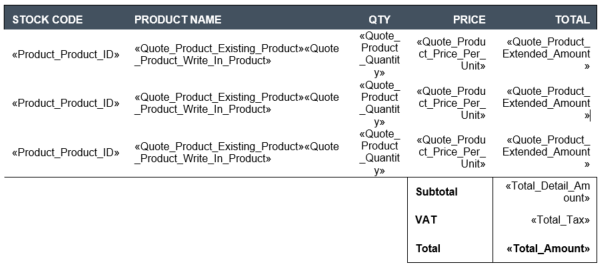
End result:

My question is - how do I set the Mail Merge fields so that the last item in Products "closes" out the product section, and then the mail merge continues as normal (if you see what I mean)?

The template should be able to deal with multiple Products in a quote, hence the three listed fields for products.

Any insight would be most appreciated. Thanks! :)

*This post is locked for comments

I have the same question (0)
  • Suggested answer
    Mahadeo Matre Profile Picture
    17,021 on at
  • Community Member Profile Picture
    on at

    The merge field is not set.

    Settings-->Templates-->Mail Merge Templates

    Select the mail merge template your using.

    A Window will open. Look for a button called Data Fields.

    Click on that another window open look for Total Tax and place a check mark next to it

    Note you will only be allowed to select 62 fields so you might have to delete some.

    Select the OK button.

    Click Save and Close

    That it.

    Hope this helps you. Please mark my post as "Verified" If it helped to solve your problem 

  • Community Member Profile Picture
    on at

    Hi folks! Thanks for the input so far, but I'm still struggling with this a bit. I can confirm that the mail merge fields ARE present, and that they ARE being populated correctly. See the data from Word when the Mail Merge is first run:

    MMNRc.PNG

    I originally tried placing <<Next Record>> at the END of a row, to no effect.

    MMNRc1.PNG

    I then tried moving the <<Next Record>> to the beginning of each row, but the result was the same:

    However, if I tailor the rows to match the number of Product Items exactly, then the Mail Merge works!

    Ideally - what I'm trying to achieve is to have a table that will automatically expand/contract to the number of Products listed in the quote. It shouldn't care whether there's one item listed, or five (or more!).

    Any further thoughts on this? Thanks guys, for the replies so far!

  • Tamim AlKhiamy Profile Picture
    135 on at

    Hello Stanley,

    I wish I read your post before spending a lot of time, cause I reached the same results you mentioned in your last post, so did find any way to resolve this issue and make the template flexible to accommodate different numbers of product items

    Thanks  

  • Community Member Profile Picture
    on at

    Hi Tamim,

    Did you state that you did find a resolution to this issue?

    Thanks.

    -Tony Collopy

Under review

Thank you for your reply! To ensure a great experience for everyone, your content is awaiting approval by our Community Managers. Please check back later.

Helpful resources

Quick Links

Responsible AI policies

As AI tools become more common, we’re introducing a Responsible AI Use…

Neeraj Kumar – Community Spotlight

We are honored to recognize Neeraj Kumar as our Community Spotlight honoree for…

Leaderboard > 🔒一 Microsoft Dynamics CRM (Archived)

#1
SA-08121319-0 Profile Picture

SA-08121319-0 4

#1
Calum MacFarlane Profile Picture

Calum MacFarlane 4

#3
Alex Fun Wei Jie Profile Picture

Alex Fun Wei Jie 2

Last 30 days Overall leaderboard

Featured topics

Product updates

Dynamics 365 release plans



