web
You’re offline. This is a read only version of the page.
close
Skip to main content

Notifications

Announcements

No record found.

Community site session details

Community site session details

Session Id :
Microsoft Dynamics CRM (Archived)

Report data not visible in CRM

(0) ShareShare
ReportReport
Posted on by 175

I have created a simple custom report that pulls data from SalesOrder entity (I have tested with both entity (SalesOrderBase) and view (SalesOrder)) but the data is not visible when i run the report in CRM. When I run the same report from Report Configuration Manager, it runs perfectly showing all data.

6685.report.PNG

I am logged in with a user who has System Administrator role in CRM. 

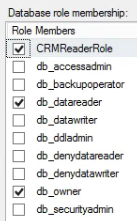
In SQL server in the CRM Database Security,  I have tried adding the following schema/role membership to the User:

0410.report2.PNG 5280.report3.PNG

and tried adding the following schema/role membership to the Reporting Group:

6761.report5.PNG4213.report4.PNG

I am using Microsoft Dynamics CRM 2016 on prem and SQL Server 2012. with the Report Extension version report6.PNG

Somebody please help me out with this. Thanks in advance.

*This post is locked for comments

I have the same question (0)
  • Suggested answer
    Syed Ibrahim Profile Picture
    6,257 on at

    Are you using commonDataSource in for your connection? If so please check the CRM related folder name is modified under the report server.

  • innovativeaj Profile Picture
    175 on at

    thanks for your interest in this matter, could you please elaborate a bit? where will i find this option?

  • Suggested answer
    Syed Ibrahim Profile Picture
    6,257 on at

    in you data source connection is shared and if there is any change in your folder structure of your report server. Then you will not able to get anything from the report. In addition, pls check your event viewer for more accurate error info.

  • innovativeaj Profile Picture
    175 on at

    I am not using a shared data source. Event viewer doesn't show any errors. Also, for your information same issue is for standard reports as well.

  • Suggested answer
    Syed Ibrahim Profile Picture
    6,257 on at

    can pls take a screenshot how you are connecting

  • Community Member Profile Picture
    on at

    Hi A J,

    I would like to know about the sql query you are using.

    If you are directly using SalesOrderBase as table name in query CRM will not give you the data.

    You are suppose to use filtered views which will be exposing the data to a CRM user.

    Filtered view Name: FilteredSalesOrder.

    Hope this helped.

    Thanks

    Phanidhar

Under review

Thank you for your reply! To ensure a great experience for everyone, your content is awaiting approval by our Community Managers. Please check back later.

Helpful resources

Quick Links

Responsible AI policies

As AI tools become more common, we’re introducing a Responsible AI Use…

Neeraj Kumar – Community Spotlight

We are honored to recognize Neeraj Kumar as our Community Spotlight honoree for…

Leaderboard > 🔒一 Microsoft Dynamics CRM (Archived)

#1
SA-08121319-0 Profile Picture

SA-08121319-0 4

#1
Calum MacFarlane Profile Picture

Calum MacFarlane 4

#3
Alex Fun Wei Jie Profile Picture

Alex Fun Wei Jie 2

Last 30 days Overall leaderboard

Featured topics

Product updates

Dynamics 365 release plans