web
You’re offline. This is a read only version of the page.
close
Skip to main content

Notifications

Announcements

No record found.

Community site session details

Community site session details

Session Id :
Microsoft Dynamics 365 | Integration, Dataverse...
Suggested Answer

Moving through selected records - no arrows / shortcut in new UI?!

(1) ShareShare
ReportReport
Posted on by 84

I see there have been queries about this, but i just want to check - in the new UI, is there really no arrow / button nor shortcut function to move through selected records?!  That seems like a MAJOR flaw.  It adds a ton of time to review work if you have to keep jumping back and forth to the list view and find the next record each time. 

I have the same question (0)
  • cloflyMao Profile Picture
    25,210 on at

    Hi GBarkin,

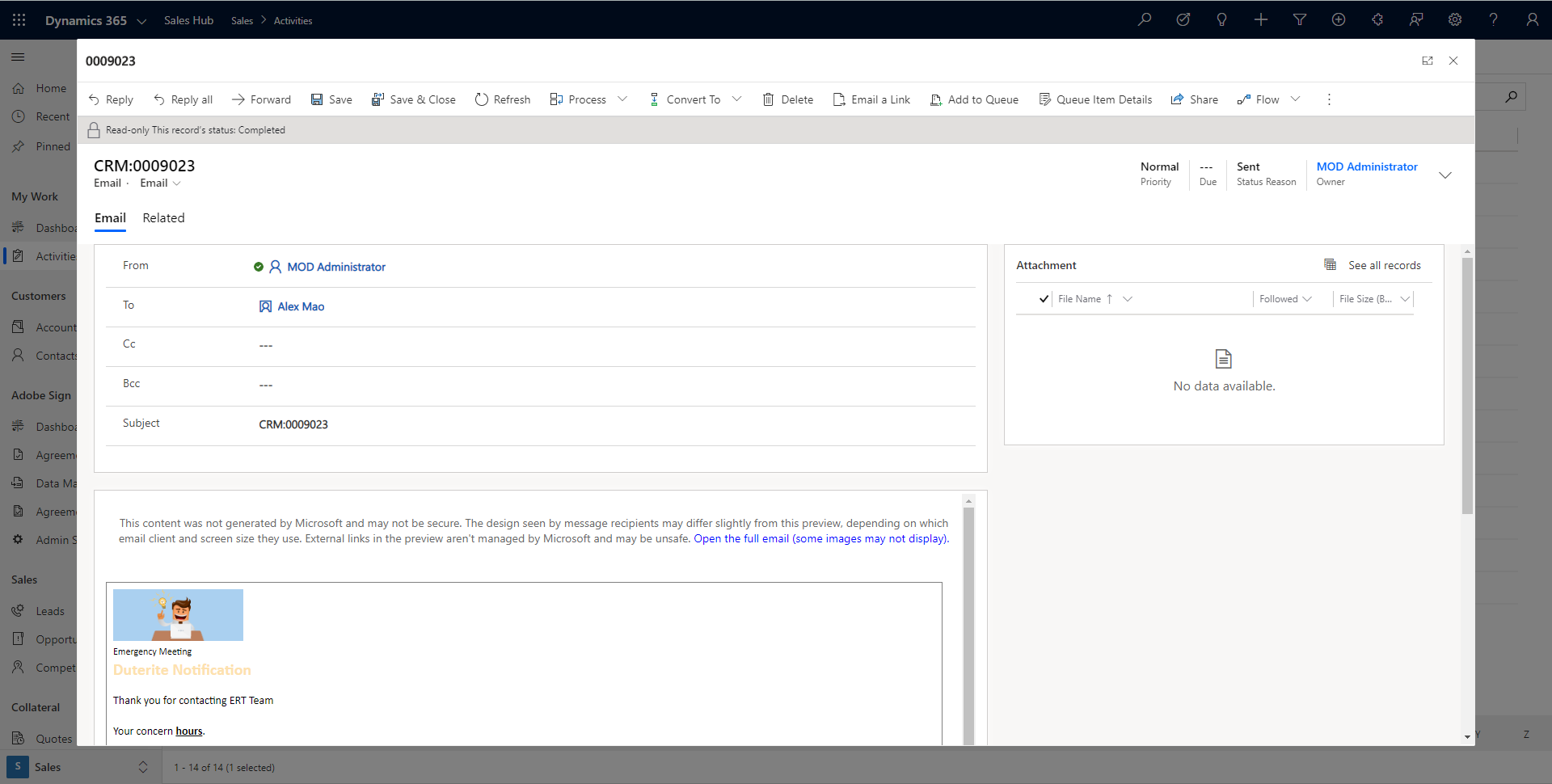
    When opening an activity record, a modal dialog of form will pou up.

    Would this feature be what you expect?
    pastedimage1587541854118v1.png

    If so, currently there is no similar OOB setting for us to apply such behavior to other entities.

    In other word, it's a very new feature from 2020 wave 1 release, and only activity entities are supported at present.

    However, we could still achieve it with some customization.

    1. Download latest Ribbon Workbench and import it in your environment.

    2. Create a solution which contains an entity which you would like to add customization, and select one view.

    3. Copy an existing button, e.g: Add to marketing list, because this button will only display when only one record is selected.

    Then change properties of the copied.

    pastedimage1587540963113v2.png

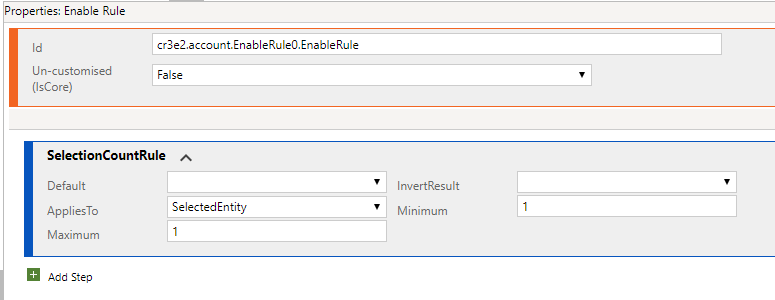
    4. Create an Enable Rule:

    only display custom button when only one entity record is selected.
    pastedimage1587541094570v3.png

    create a simple Display Rule:

    pastedimage1587541147803v4.png

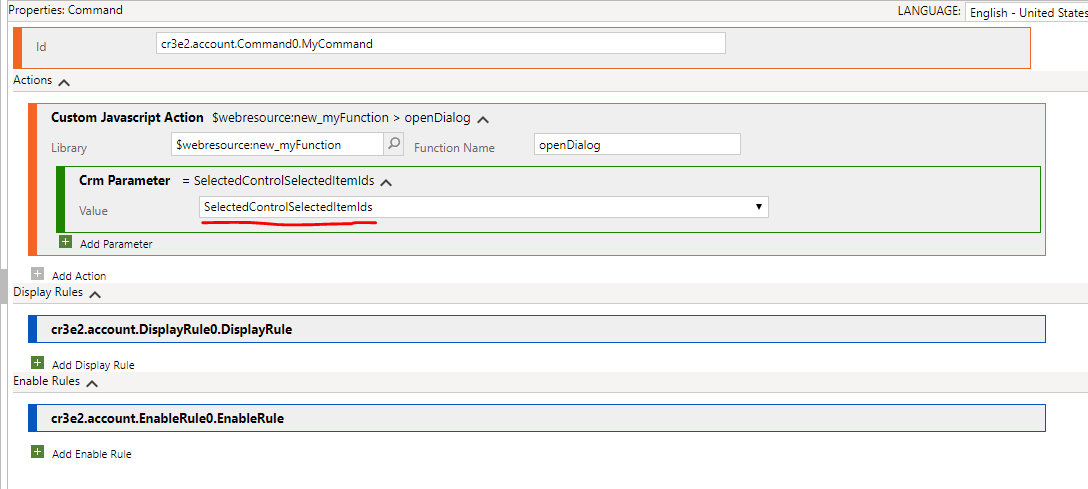
    create a custom javascript action command, pass "SelectedControlSelectedItemIds" parameter to our custom function,

    this parameter stands for GUID of selected record;

    then apply two rules for the command.
    pastedimage1587541179482v5.png

    5. function code:

    function openDialog(selectedRecord) {
        var pageInput = {
            pageType: "entityrecord",
            entityName: "account",
            formType: 2,
            entityId: selectedRecord[0]
        };
        var navigationOptions = {
            target: 2,
            width: { value: 80, unit: "%" },
            position: 1
        };
        Xrm.Navigation.navigateTo(pageInput, navigationOptions);
        console.log(selectedRecord);
    }

    Xrm.Navigation.navigateTo is a new client API which could open a record in dialog.

    Result:

    When I selected an account record, the button will appear:

    pastedimage1587541489007v6.png

    A dialog will open for selected record.

    pastedimage1587541522817v7.png 

    In addition, there are other methods to open a record:

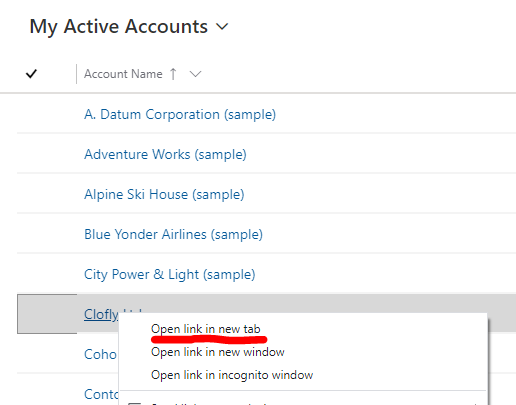
    1. we could also right click a record and "Open link in new tab" to view record in a new tab, while list view will keep open.
    pastedimage1587541592891v8.png

    2. When we opened a record form, click caret at upper left corner,

    it will display  all rows of current  entitylist page in a panel.

    e.g: In All Accounts view, there are 3 pages record, open a record in page 2.

    pastedimage1587568393971v1.png

    All rows in page 2 will display in left panel, we can move throught selected record without leave.
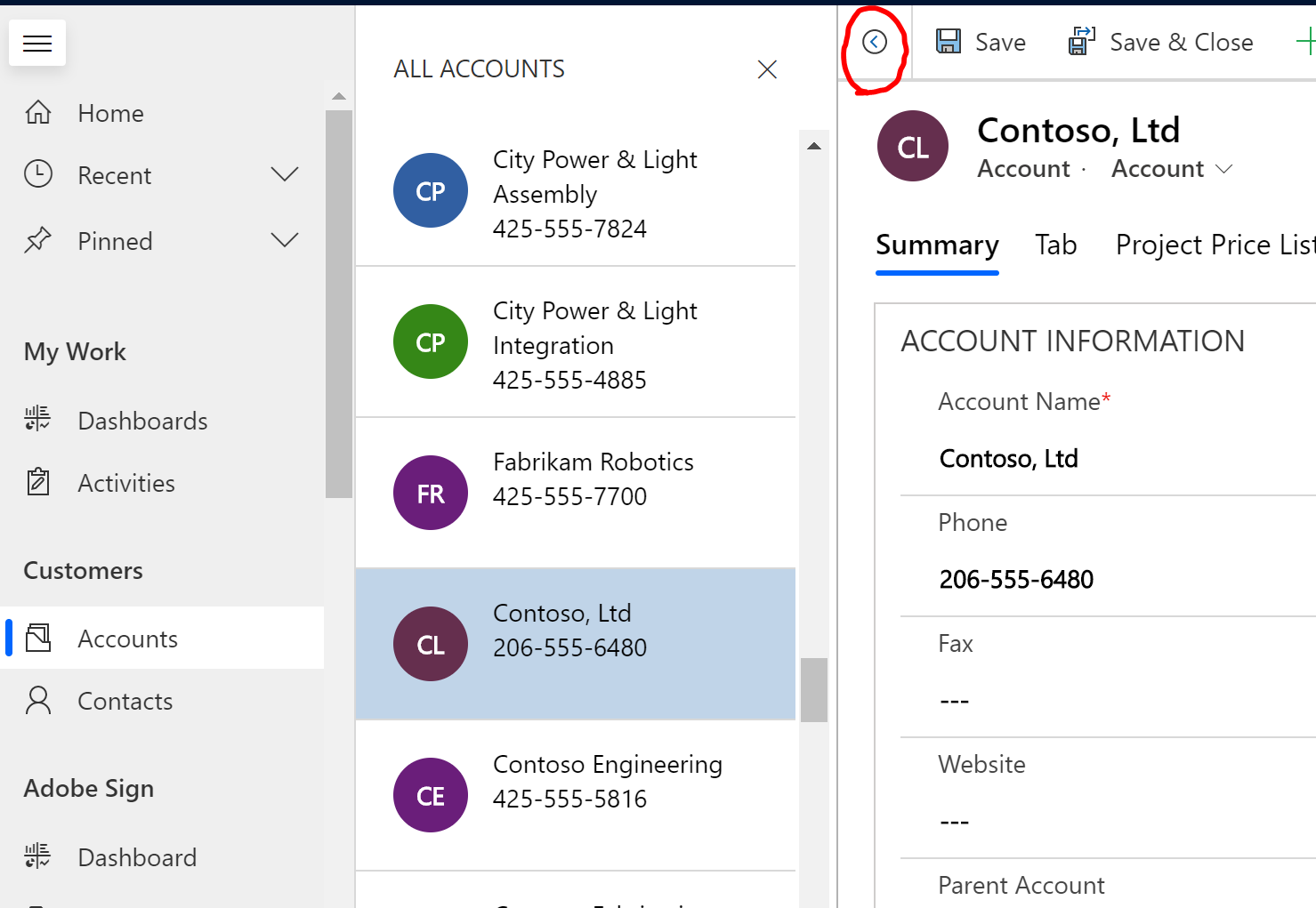
    pastedimage1587568462848v2.png

    Finally, you could submit your requirement to Ideas forum.

    Regards,

    Clofly

  • Suggested answer
    StefanS365 Profile Picture
    3,575 Most Valuable Professional on at

    Hi GB,

    You know about the option to navigate trought records of a view?

    pastedimage1587561099747v1.png

  • GBarkin Profile Picture
    84 on at

    Yes, but (a) having a keyboard shortcut is faster and (b) opening that side window changes some forms -- on my laptop, for instance, it makes some of our 3-column forms into a one-column form.  We spent a lot of time making the forms 2- and 3-column so we can view the data in a certain way.  

    Also, that View column is not available on Advanced Find results. We use Advanced Find all the time to filter based on content.

    So it's helpful, kind of, sometimes, and still slower than using arrows or keyboard shortcuts.  Again, a BIG flaw in the new UI. 

  • GBarkin Profile Picture
    84 on at

    Thanks.  I might try that, but you gotta admit, that's a TON of work on each entity / form (we have dozens if not hundreds of forms) to build a function that (a) pretty much every database / CRM has as a native function; (b) was present in the old UI; and (c) makes it much harder to use the system without a native tool for scrolling through records.

  • cloflyMao Profile Picture
    25,210 on at

    Hi GBarkin,

    You could select a record, press Enter to open it in entity form.

    Then press Alt + Left arrow to back to entity list view.

    (If your browser is Chrome.)

    Regards,

    Clofly

  • GBarkin Profile Picture
    84 on at

    Thanks.  Unfortunately, that is not at all what we need. 

Under review

Thank you for your reply! To ensure a great experience for everyone, your content is awaiting approval by our Community Managers. Please check back later.

Helpful resources

Quick Links

Responsible AI policies

As AI tools become more common, we’re introducing a Responsible AI Use…

Neeraj Kumar – Community Spotlight

We are honored to recognize Neeraj Kumar as our Community Spotlight honoree for…

Leaderboard > Microsoft Dynamics 365 | Integration, Dataverse, and general topics

#1
Martin Dráb Profile Picture

Martin Dráb 51 Most Valuable Professional

#2
André Arnaud de Calavon Profile Picture

André Arnaud de Cal... 38 Super User 2025 Season 2

#3
#ManoVerse Profile Picture

#ManoVerse 31

Last 30 days Overall leaderboard

Product updates

Dynamics 365 release plans




