web
You’re offline. This is a read only version of the page.
close
Skip to main content

Announcements

No record found.

News and Announcements icon
Community site session details

Community site session details

Session Id :
Small and medium business | Business Central, N...
Suggested Answer

Getting only distinct values

(0) ShareShare
ReportReport
Posted on by 436

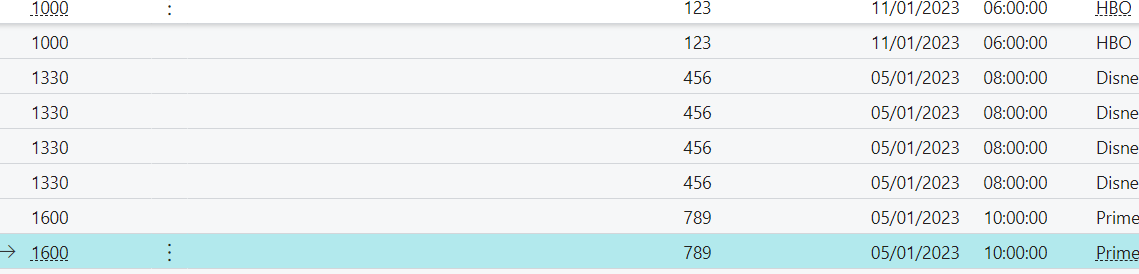
Hey community, I want to ask that how can I only get unique Production ID i.e. 1000, 1330 and 1600 and I don't want it to be repetitive like it is in the picture below. It should consist of only three lines each for one Production ID. Kindly suggest how can I do that.
pastedimage1673445852352v1.png

I have the same question (0)
  • Suggested answer
    Mohana Yadav Profile Picture
    61,204 Super User 2026 Season 1 on at

    Is it a custom table/page?

    How are you filling this table now?

    can you show the code?

  • Muhammad Anas Naeemi Profile Picture
    436 on at

    Actually I am getting the data from a query. and yes I'm inserting it in a custom table. the query contains repetitive values. this is how I'm getting values but they are repetitive as shown in the above image

    pastedimage1673448290353v1.png

  • Ayala Profile Picture
    112 on at

    Hi,

    If you have the option to work with query object. You can create some like this:

    query 60100 DistinctValues
    {


        elements
        {
            dataitem(SalesLine; "Sales line")
            {
                column(LineNo; "Line No.")
                {

                }

                column(Count)
                {
                    Method = Count;
                }
            }
        }


    }
    It will return dataset with unique line no. You can find more information on Aggregate and sort data in a query - Training | Microsoft Learn
    I hope this will help you
  • Suggested answer
    Ayala Profile Picture
    112 on at

    HI,

    On query to get unique values you must group only for those unique fields you need to obtain.

  • Suggested answer
    Teddy Herryanto (That NAV Guy) Profile Picture
    14,302 Super User 2026 Season 1 on at

    Check if your query has at least one aggregate column to trigger the distinct.

    Refer to below link for more information.

    thatnavguy.com/.../

  • Suggested answer
    YUN ZHU Profile Picture
    99,144 Super User 2026 Season 1 on at

    Hi, You can also directly add a loop that inserts a new row if it doesn't exist and modifies the record if it exists, which is also more convenient.
    But defining in Query is the best performance.

    Hope this helps as well.

    Thanks.

    ZHU

  • Muhammad Anas Naeemi Profile Picture
    436 on at

    Hey, still unclear. Can you show me the code for this?

  • Muhammad Anas Naeemi Profile Picture
    436 on at

    Yes teddy I have used Method=Sum but it's not working. I tried to use count but my fields are integer and not code.

  • Suggested answer
    Teddy Herryanto (That NAV Guy) Profile Picture
    14,302 Super User 2026 Season 1 on at

    The query should retrieve the distinct records for all the fields specified in the query object, not the ones specified in your procedure logic.

    You didn't post your query, but I can see that you commented out some of the query fields on your screenshot.

    Things like uerMember or Description also being considered as part of distinct value.

Under review

Thank you for your reply! To ensure a great experience for everyone, your content is awaiting approval by our Community Managers. Please check back later.

Helpful resources

Quick Links

Introducing the 2026 Season 1 community Super Users

Congratulations to our 2026 Super Stars!

Meet the Microsoft Dynamics 365 Contact Center Champions

We are thrilled to have these Champions in our Community!

Congratulations to the March Top 10 Community Leaders

These are the community rock stars!

Leaderboard > Small and medium business | Business Central, NAV, RMS

#1
OussamaSabbouh Profile Picture

OussamaSabbouh 1,902 Super User 2026 Season 1

#2
YUN ZHU Profile Picture

YUN ZHU 1,067 Super User 2026 Season 1

#3
Khushbu Rajvi. Profile Picture

Khushbu Rajvi. 580 Super User 2026 Season 1

Last 30 days Overall leaderboard

Featured topics

Product updates

Dynamics 365 release plans
