web
You’re offline. This is a read only version of the page.
close
Skip to main content

Notifications

Announcements

No record found.

Community site session details

Community site session details

Session Id :
Supply chain | Supply Chain Management, Commerce
Answered

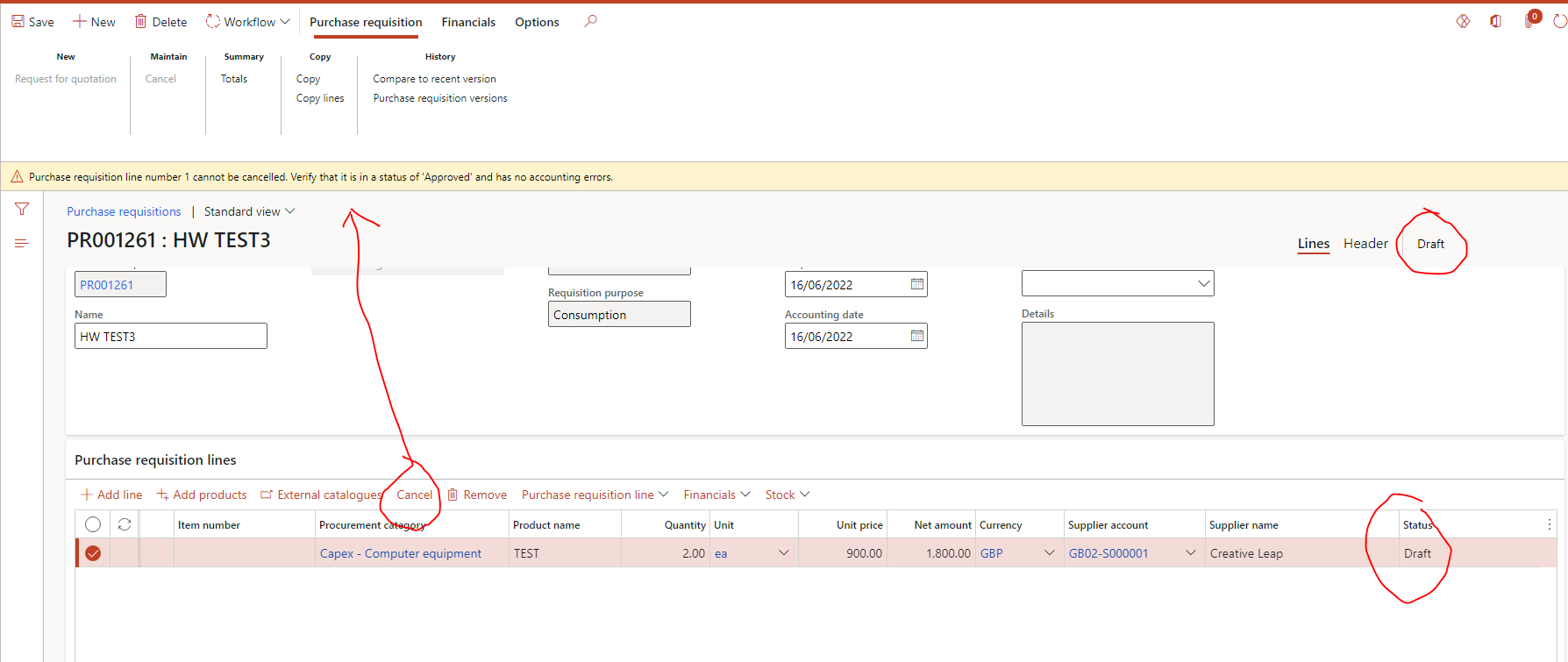
Why I can't cancel a line on a draft status purchase requisition

(0) ShareShare
ReportReport
Posted on by 40

This is a purchase requisition I submitted to workflow but has been rejected, so I have recall it and the status is now "draft", I want to cancel the line to add a new line, but the error says it can't be canceled as it's "approved" status? I'm confused, could anyone help me on this issue? thanks!
pastedimage1655388899184v1.png

I have the same question (0)
  • BillurSamdancioglu Profile Picture
    19,703 Most Valuable Professional on at

    Can you please put the field line number on the form?

  • Helen2021 Profile Picture
    40 on at

    Hi BillurSamdancioglu, yes, please refer to this screenshot. the line number is 1.

    pastedimage1655480652062v1.png

  • Suggested answer
    Danny Bilodeau Profile Picture
    4,918 Super User 2025 Season 2 on at

    Hello Helen,

    Have you tried deleting the PR line instead of cancelling it?  If that does not work, you should log a support ticket with Microsoft.  Users have to be able to remove lines from draft PRs.

  • Verified answer
    Guy Terry Profile Picture
    28,924 Moderator on at

    Hi Helen

    The error actually means that you cannot cancel it because the status is not Approved.

    i.e. only Approved lines can be cancelled.

    Just Remove the line instead, and create a new one.

  • Suggested answer
    Helen2021 Profile Picture
    40 on at

    Thank you Guy, now I understood, have a nice day:)

Under review

Thank you for your reply! To ensure a great experience for everyone, your content is awaiting approval by our Community Managers. Please check back later.

Helpful resources

Quick Links

Responsible AI policies

As AI tools become more common, we’re introducing a Responsible AI Use…

Neeraj Kumar – Community Spotlight

We are honored to recognize Neeraj Kumar as our Community Spotlight honoree for…

Leaderboard > Supply chain | Supply Chain Management, Commerce

#1
Siv Sagar Profile Picture

Siv Sagar 283 Super User 2025 Season 2

#2
Laurens vd Tang Profile Picture

Laurens vd Tang 196 Super User 2025 Season 2

#3
André Arnaud de Calavon Profile Picture

André Arnaud de Cal... 139 Super User 2025 Season 2

Last 30 days Overall leaderboard

Featured topics

Product updates

Dynamics 365 release plans
