web
You’re offline. This is a read only version of the page.
close
Skip to main content

Notifications

Announcements

Community site session details

Community site session details

Session Id :
Supply chain | Supply Chain Management, Commerce
Unanswered

Sales tax setup recommended for Retail Stores

(2) ShareShare
ReportReport
Posted on by

If you have any issues regarding sales tax (net amount) rounding between Retail store transactions and posted sales invoice voucher transactions, you should check at first Sales tax setup.

The recommended setup for sales tax which should be used when ‘Price include sales tax’ is enabled on a Store:

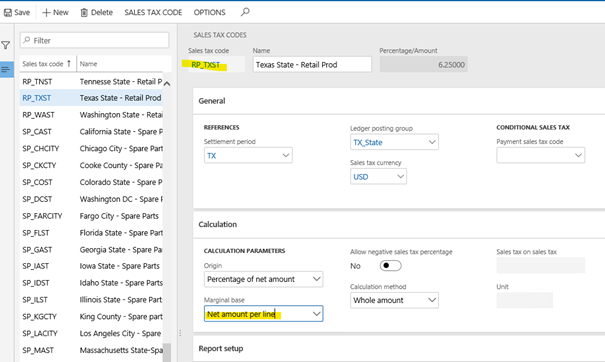
  1. ‘Marginal base’ to set up as ‘Net amount per line’ for Sales tax code:
pastedimage1603635883704v1.png

Tab Calculation:

  • Origin= Percentage of net amount
  • Marginal base= Net amount per line
  • Calculation method= Whole amount

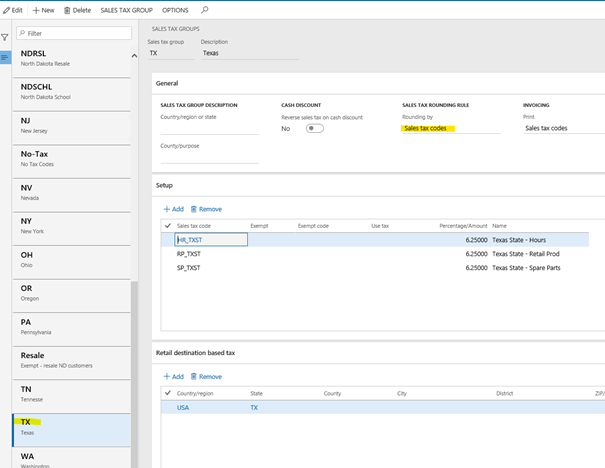
       2. â€˜Rounding by’ recommended to have ‘Sales tax codes’ for Sales tax group:
pastedimage1603637816329v2.png

It is very important to know that once you did some changes on sales tax setup in HQ, you should run Job 1080 (Tax) and then be sure that Retail server is restarted, because changed tax setup might be cached.

With that setup you should always get the same calculation of all amounts (Net amount and Sales tax amount) in POS/Retail and in HQ transactions.

Also a suggestion to change sales tax setup only after working hours when nobody is working to be sure that the changes are done correctly, distributed to POS and there are no differences between POS and HQ.

The same setting is valid for AX2012 and D365.

I have the same question (0)
  • Ramune Profile Picture
    on at

    Some docs related to sales tax + useful links:

    1. Calculation of tax exemption - available after 10.0.13:

    docs.microsoft.com/.../tax-exempt-price-inclusive

    There is also a document with detailed repro steps in standard Contoso environment for Stores with Prices tax inclusive:

    Tax-exempt_5F00_Store-Tax-inclusive-scenario.docx

    2. Configure sales tax for online orders:

    docs.microsoft.com/.../sales-tax-config

    There is also a document with one of scenarios and repro steps in standard Contoso environment about Destination-based Sales tax configuration for Online stores in D365:

    Destination_2D00_based-Sales-tax-configuration-for-Online-stores_5F00_D365.docx

  • Revathy  Profile Picture
    4 on at

    Hi Ramune,

    Thank you for these inputs and the Word Document it is really helpful.

    I need inputs on the following.

    Retail Destination Based Tax. I have added 2 countries to one of the Sales Tax group. I want to add the same countries for example Australia and New Zealand to another Sales tax group but the system is not allowing to do so and throwing an error as below. Please advise.

    Retail-Des-Tax-setup.docx

  • Ramune Profile Picture
    on at

    Hi Revathy,

    can you please create a support ticket for your question?

Under review

Thank you for your reply! To ensure a great experience for everyone, your content is awaiting approval by our Community Managers. Please check back later.

Helpful resources

News and Announcements

Season of Giving Solutions is Here!

Quick Links

Responsible AI policies

As AI tools become more common, we’re introducing a Responsible AI Use…

Neeraj Kumar – Community Spotlight

We are honored to recognize Neeraj Kumar as our Community Spotlight honoree for…

Leaderboard > Supply chain | Supply Chain Management, Commerce

#1
Laurens vd Tang Profile Picture

Laurens vd Tang 243 Super User 2025 Season 2

#2
André Arnaud de Calavon Profile Picture

André Arnaud de Cal... 160 Super User 2025 Season 2

#3
Sagar Suman Profile Picture

Sagar Suman 78 Super User 2025 Season 2

Last 30 days Overall leaderboard

Product updates

Dynamics 365 release plans



