
web
You’re offline. This is a read only version of the page.
close
Skip to main content

Announcements

No record found.

News and Announcements icon
Community site session details

Community site session details

Session Id :
Microsoft Dynamics AX (Archived)

How to enable edit field?

(0) ShareShare
ReportReport
Posted on by 535

6864.Capture10.PNG

Hi All,

I am very new to Dynamics AX 2009. I have one requirement to solve, Inventory Management -> Journals-> Item transaction -> Transfer. In that form, Choose Lines button in right corner. In that form , I can't edit From color & To color Field. I am checked in Table level, form level and I have found out in form setup the edit content field was disabled (mentioned in below image).
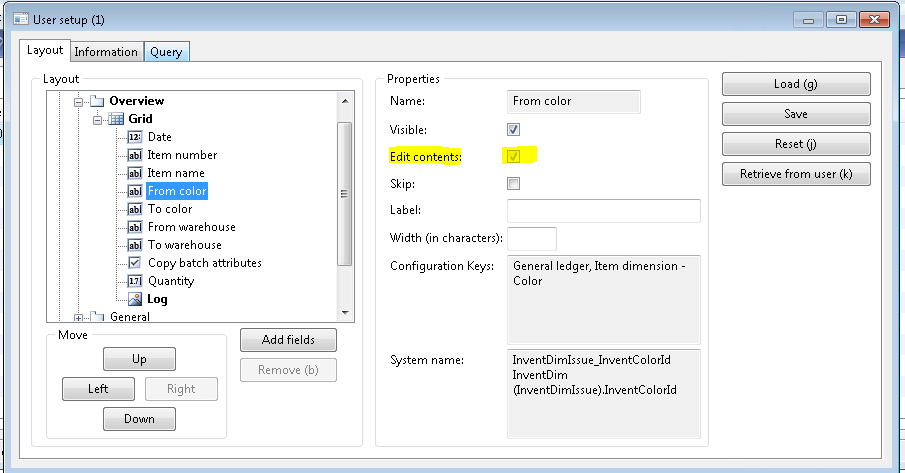
 1588.Capture11.PNG

anyone knows tell me how to resolve this issue?

Thanks in advance and regards,

vignesh

*This post is locked for comments

I have the same question (0)
  • Crispin John Augustine Profile Picture
    37,081 on at

    This will be disabled for Transfer Journal / order under the following reasons.

    * the item does not have a Color Dimension. So From Color will be disabled

    * to Color automatically takes the from Color. so it will/should never be editable

  • Vignesh R Profile Picture
    535 on at

    Hi Crispin,

    Thanks for your kind response. So we can not change this two fields into editable right!

    Regards,

    Vignesh

  • Crispin John Augustine Profile Picture
    37,081 on at

    It is advisable not to override the Code to Change it.

    You can although try creating a Transfer Journal for an item which has more than one Color (and a variant with these Colors)

    You will see, the from Color field is enabled in this case.

  • Vignesh R Profile Picture
    535 on at

    Hi Crispin,

    Okay Crispin. I will not override the code for this issue.  How to create a transfer Journal for an item . I am very new to ax 2009. Please refer me a link to do this process .

    Thanks and regards,

    Vignesh

  • Crispin John Augustine Profile Picture
    37,081 on at

    You can find good help from search engines.. Anyway here are some good links:

    Transfer Journal  ashishpanth.blogspot.com/.../concepts-of-transfer-journal-movement.html

    Transfer order   www.dynamicsaxtraining.com/.../transfer-orders

  • Vignesh R Profile Picture
    535 on at

    Thank you very much Crispin for providing links. If I have any doubt , I will ask you in future. Thanks for spending your valuable time for me.

    Regards,

    Vignesh

Under review

Thank you for your reply! To ensure a great experience for everyone, your content is awaiting approval by our Community Managers. Please check back later.

Helpful resources

Quick Links

Introducing the 2026 Season 1 community Super Users

Congratulations to our 2026 Super Stars!

Meet the Microsoft Dynamics 365 Contact Center Champions

We are thrilled to have these Champions in our Community!

Congratulations to the March Top 10 Community Leaders

These are the community rock stars!

Leaderboard > 🔒一 Microsoft Dynamics AX (Archived)

#1
CP04-islander Profile Picture

CP04-islander 39

#2
Michel ROY Profile Picture

Michel ROY 14

#3
imran ul haq Profile Picture

imran ul haq 8

Last 30 days Overall leaderboard

Featured topics

Product updates

Dynamics 365 release plans
