Hi Guys,
I am new in d365 commerce and react js, I am trying to pull product details using product code, i have created control for upload excel file by creating custom module and using excel will get product codes and quantity, i am trying to get product details using this product codes but i am not able use existing data actions like get-full-products, get-full-products-by-refine-search-text and get-simple-products but not able to fetch it.
Below is my code for excel upload control :
import { CSVReader } from 'react-papaparse';
import { IProductQuickorderData } from './product-quickorder.data';
import { IProductQuickorderProps } from './product-quickorder.props.autogenerated';
// import {getScanResult, GetScanResultInput} from '@msdyn365-commerce-modules/retail-actions';
// import classnames from 'classnames';
// import { debounce } from 'lodash';
import { observable } from 'mobx';
import React from 'react';
// import getSimpleProducts from '@msdyn365-commerce-modules/retail-actions';
// export interface IProductQuickorderViewProps extends IProductQuickorderProps<IProductQuickorderData> {}
/**
*
* ProductQuickorder component
* @extends {React.PureComponent<IProductQuickorderProps<IProductQuickorderData>>}
*/
class ProductQuickorder extends React.PureComponent<IProductQuickorderProps<IProductQuickorderData>>{
@observable
// private cancellabelDebounce: debounce;
// private readonly waitTime: number = 500;
handleOnDrop = (data: object) => {debugger;
// if (this.cancellabelDebounce) {
// // eslint-disable-next-line @typescript-eslint/no-unsafe-member-access, @typescript-eslint/no-unsafe-call -- existing code.
// this.cancellabelDebounce.cancel();
// }
// const {
// // telemetry,
// context
// } = this.props;
console.log('---------------------------');
console.log(data);
console.log('---------------------------');
if(typeof data !='undefined')
{
for(var i=1;i<data.length;i++)
{
const query =data[i].data[0];
// const product = getSimpleProducts;
// product.getProductList(query,this.props);
// this.cancellabelDebounce = debounce(() => {
// getScanResult(
// new GetScanResultInput(
// context.actionContext.requestContext.apiSettings,
// query,
// context.actionContext.requestContext.apiSettings.channelId
// ),
// this.props.context.actionContext)
// .then(results => {debugger;
// this.setState({
// productResponse: results?.Product,
// productDimensions: results?.ProductDimensionFull,
// isQuickOrderFormExpanded: true
// });
// })
// .catch(error => {debugger;
// this.setState({ productText: '' });
// telemetry.exception(error);
// telemetry.debug('Unable to get scan results');
// });
// }, this.waitTime);
}
}
// setTimeout(() => {
// // eslint-disable-next-line @typescript-eslint/no-unsafe-call -- Existing code.
// this.cancellabelDebounce();
// }, 0);
// return(
// <div>
// {data }
// </div>
// );
}
handleOnFileLoad = (data: any) => {debugger;
console.log('---------------------------');
console.log(data);
console.log('---------------------------');
}
public render(): JSX.Element {debugger;
return (
<div>
<CSVReader
onDrop={this.handleOnDrop}
// onFileLoad={this.handleOnFileLoad}
onError={this.handleOnError}
addRemoveButton
// removeButtonColor='#659cef'
onRemoveFile={this.handleOnRemoveFile}
>
<span>Drop CSV file here or click to upload.</span>
</CSVReader>
{/* <div className="board-row">{this.getProductsData()}</div> */}
</div>
);
}
handleOnError = (err: any, file: any, inputElem: any, reason: any) => {debugger;
console.log(err);
}
handleOnRemoveFile = (data: any) => {debugger;
console.log('---------------------------')
console.log(data)
console.log('---------------------------')
}
}
export default ProductQuickorder;
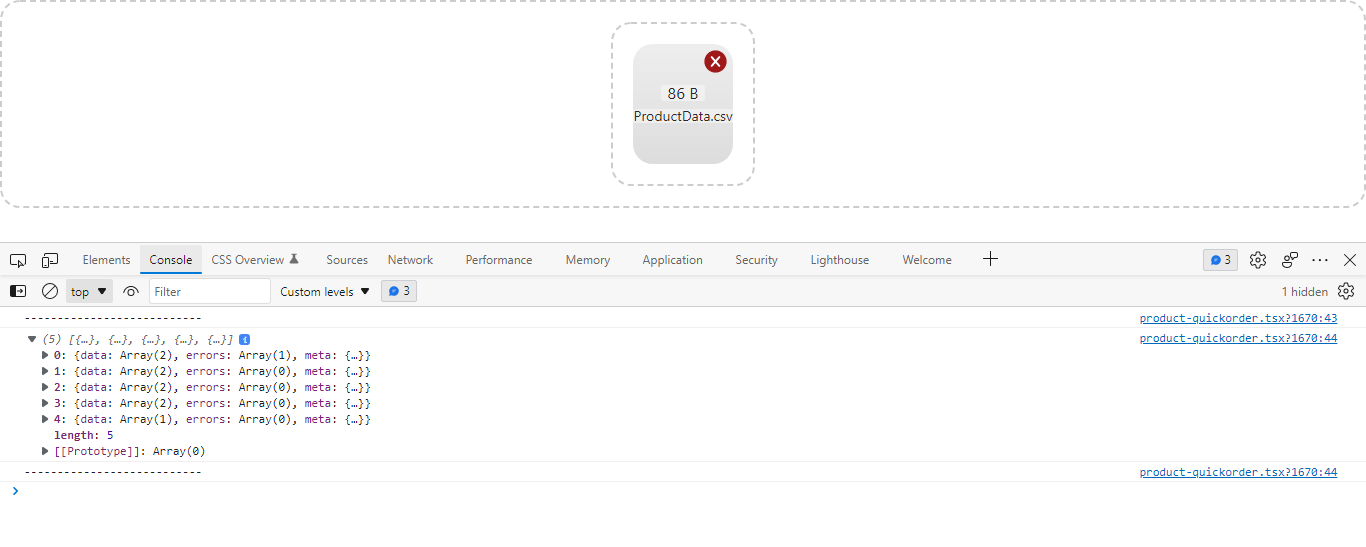
Output of this code is :