web
You’re offline. This is a read only version of the page.
close
Skip to main content

Announcements

No record found.

News and Announcements icon
Community site session details

Community site session details

Session Id :
Microsoft Dynamics AX (Archived)

Payment by Check Error - Check Number must be filled

(0) ShareShare
ReportReport
Posted on by

Hi all,

When I want to pay invoice with check method.

Error message below appeared:
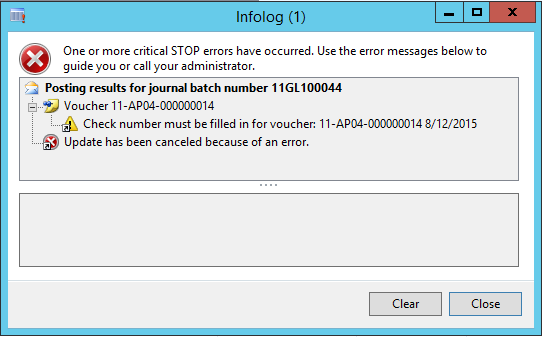
Payment-by-Check-_2D00_-Error.png

But when I check the check number field, it is grey out.

So I cannot fill the number.

How is the correct process?

Thanks,

M.H.

*This post is locked for comments

I have the same question (0)
  • Sohaib Cheema Profile Picture
    49,677 Super User 2026 Season 1 on at

    kindly read basics of vendor payment process

    vsdynamicsfinance.wordpress.com/.../vendor-payment-journals

  • Suggested answer
    AX1 Profile Picture
    522 on at

    Hi,

    Please check below things for Payment to a vendor.

    Create check for a Bank through Bank master > Manage payment > Check.

    Method of payment = Check with Export format.

    Steps:

    1. Vendor payment journal - Method of payment = Check

    2. Function > generate payment.

    3. Select Method of payment, Export format and bank account.

    4. Click dialog button and verify From filed (it shows check number).

    5. Click ok and execute the process.

    6. Verify payment status changes to Sent and Check number same as above dialog form appeared.

    Regards

    Sanjay Gupta

Under review

Thank you for your reply! To ensure a great experience for everyone, your content is awaiting approval by our Community Managers. Please check back later.

Helpful resources

Quick Links

Introducing the 2026 Season 1 community Super Users

Congratulations to our 2026 Super Stars!

Congratulations to our 2025 Community Spotlights

Thanks to all of our 2025 Community Spotlight stars!

Leaderboard > 🔒一 Microsoft Dynamics AX (Archived)

#1
Joris dG Profile Picture

Joris dG 5

#2
Pratik Bhosle Profile Picture

Pratik Bhosle 2

#2
Alexey Lekanov Profile Picture

Alexey Lekanov 2

Last 30 days Overall leaderboard

Featured topics

Product updates

Dynamics 365 release plans
