web
You’re offline. This is a read only version of the page.
close
Skip to main content

Notifications

Announcements

No record found.

Community site session details

Community site session details

Session Id :
Microsoft Dynamics AX (Archived)

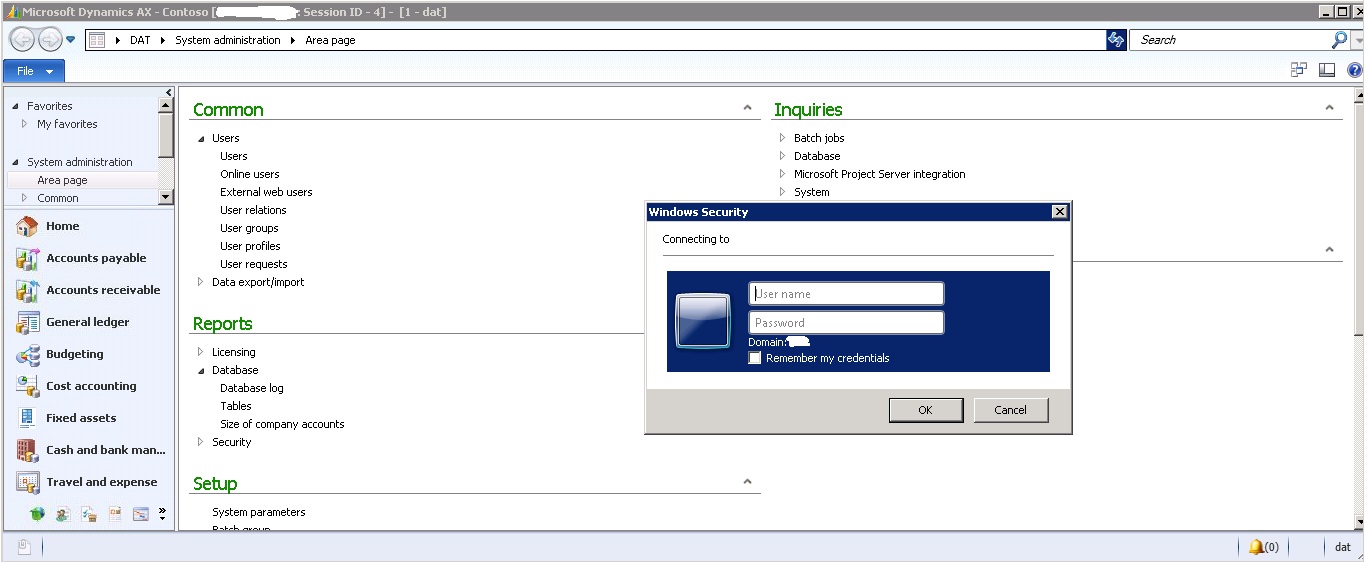
How to remove the annoying Windows Security Dialog Box when Launching AX 2012

(1) ShareShare
ReportReport
Posted on by

Hi Everyone,

How to remove this annoying popup. It keeps on showing every time I launch AX 2012. It also shows itself when launching the Enterprise Portal from AX

Here is the current setup

  • Internet Explorer Enhanced Security Configuration is already disabled
  • User Account setting is configured to be - Never notify
  • Added the Enterprise Portal link to the Local Intranet of this machine
  • Could not add the Enterprise Portal link to the Trusted Sites since is is already present on the local intranet
  • Security settings > Internet - Enabled Protected Mode
  • Local Intranet > Added the EP Site to it
  • Trusted Site - Enabled Protected Mode
  • Using Internet Explorer 9


This is driving me crazy! literally

Hope you can help me on this.

Regards

*This post is locked for comments

I have the same question (0)
  • Suggested answer
    Somanna G.L Profile Picture
    on at

    got to server manager and goto "configure IE CSC" and then turn off both for administrator and user's.

    your problem will be solved.

  • Community Member Profile Picture
    on at

    Yes already tried that.. i find it peculiar.

    I already disabled IE ESC on both. but still having the issues.

    We are using IE 9

  • Ajit Profile Picture
    8,755 on at

    Go to system administrator and remove url from below marked location(as you are not going to use role center on your client) -

  • Verified answer
    Filip Vlad-Catalin Profile Picture
    365 on at

    F4812.4.jpg"/resized-image.ashx/__size/550x0/__key/CommunityServer-Discussions-Components-Files/33/7065.sites.JPG" border="0" />

    2. On the Security Tab > Trusted Sites > Custom level  make sure that Automatic logon only in Intranet zone is selected.


  • Umesh Pandit Profile Picture
    9,315 User Group Leader on at

    Same issues with us, however the solutions provided are not working for us! Any updates or help?

  • Suggested answer
    Kangeyan Dhanapalan Profile Picture
    30 on at

    Thanks !!!! Worked ....

Under review

Thank you for your reply! To ensure a great experience for everyone, your content is awaiting approval by our Community Managers. Please check back later.

Helpful resources

Quick Links

Responsible AI policies

As AI tools become more common, we’re introducing a Responsible AI Use…

Neeraj Kumar – Community Spotlight

We are honored to recognize Neeraj Kumar as our Community Spotlight honoree for…

Leaderboard > 🔒一 Microsoft Dynamics AX (Archived)

#1
Martin Dráb Profile Picture

Martin Dráb 4 Most Valuable Professional

#1
Priya_K Profile Picture

Priya_K 4

#3
MyDynamicsNAV Profile Picture

MyDynamicsNAV 2

Last 30 days Overall leaderboard

Featured topics

Product updates

Dynamics 365 release plans