web
You’re offline. This is a read only version of the page.
close
Skip to main content

Notifications

Announcements

No record found.

Community site session details

Community site session details

Session Id :
Microsoft Dynamics GP (Archived)

GP 2010 Word Template: How to extend Invoice Product Description

(0) ShareShare
ReportReport
Posted on by 2,119

Hello,

We just started using the Word Template for GP 2010. Tried modifying the built-in templates with company logo, so far so good.

However, we found that in Invoice template, our product description seems to get cut off.

We tried modifying the template by extending the number of X for product description, extending the column size, removing the Content Control etc but no luck yet :(
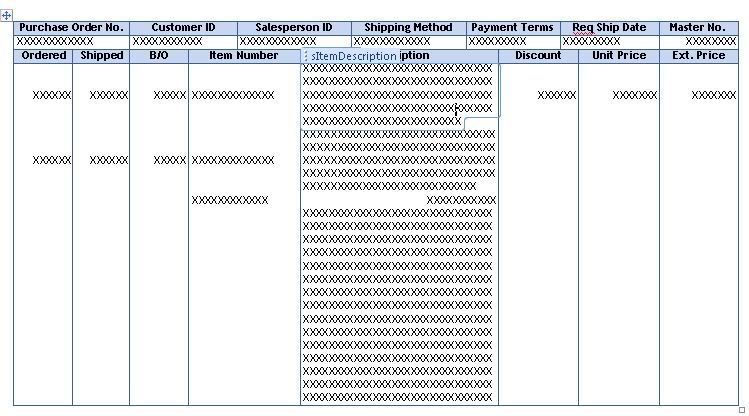
I know this sounds like a very simple question but could someone please help us with this..? Is there a link on how to modify the Word template as we like?


Thanks for your help

*This post is locked for comments

I have the same question (0)
  • Ritesh Maharaj Profile Picture
    945 on at

    I haven't played with the Word templates yet...we're upgrading in a few weeks, but have you checked whether the field is restricted in length in the view / stored proc that this report runs on?

    You can find the view / sp by running a sql trace.

    If not that, then you can at least rule out sql as the problem.

  • Santosh Profile Picture
    766 on at

    Hi,

    Please follow Mariano's blog he has expalin about GP2010 word template

    dynamicsgpblogster.blogspot.com/.../microsoft-dynamics-gp-2010-word.html

    This might help you.

    dynamicsgpblogster.blogspot.com/.../how-to-add-terms-and-conditions-page-to.html

    dynamicsgpblogster.blogspot.com/.../debugging-microsoft-dynamics-gp-2010.html

    Regards,

    Santosh

  • Community Member Profile Picture
    on at

    I agree,

    You should follow the blogs Mariono has done about the templates.  I can tell you that for your particular situation, you will have to modify the original invoice in Report Writer.  Lengthen the field that you want, and then create a modified Word template from that.  

    Regards,

    Aaron

  • kuroneko1313 Profile Picture
    2,119 on at

    Thank you all for your answers.

    Aaron, could you please elaborate more about modifying the invoice in Report Writer? I think this is the direction that we're going to do..

    Thanks, greatly appreciate your help,

    Elizabeth K.

  • Community Member Profile Picture
    on at

    Elizabeth,

    If you open the Invocie in RW, you will be able to extend the field size of the description within the report.  In order to do this, you will probably have to shorten the field size of some of the other fields to make everything fit.  Keep in mind, you will not be able to change the character length of the fields, but you can adjust the font size and the field size so that more text can been seen on each description.

    Once you have the report modified, make sure you set security so that users are able to see the modified version of the invoice.  Go into template maintenance and create a new Word Template based on the modified verison of the invoice that you created in RW (Refer to the GP documentation on how to create this).  

    You might still have some customizing to do once you create the Word template, with getting the field sizes to be the same, but that's the way that I did it and it worked.  

    Regards,

    Aaron

  • kuroneko1313 Profile Picture
    2,119 on at

    Aaron, thank you for your reply. I've been following the Word Template and Report Writer User Guide to the t but I'm still not getting it.. I think I'm still missing something.

    I created a modified report for Invoice report using RW and enabled it for the user. Then I tried to create a new Word Template based on the modified version of that invoice. I see there is no default template with the start * sigh for this modified report so I created from Existing Template which is from the Original version of the report (not modified using RW yet).

    When I open the Word template, then go to the GP Field List, it returns nothing... even though this user has full access to modify the reports and already using the modified version of the report for printing the Invoice.. Could anyone please help me with this issue?

    Thanks so much for your help, greatly appreciate it.

    -Elizabeth

  • MG-16101311-0 Profile Picture
    26,225 on at

    Elizabeth,
    There are couple things you need to know before you get started. The reason your item description is being truncated is because RW limits string calculated fields to 80 characters. Since the item description is a 100-character string, it's obvious that not all will fit in the field on the standard RW report.

    To overcome this first obstacle, you will need to parse the item description into 2 fields. You can create 2 string calculated fields for this purpose, say ItemDesc_1 and ItemDesc_2. Once you have created these calculated fields, you will want to use the RW_ParseString user-defined function to parse the item description into 2. Take a look at https://mbs.microsoft.com/knowledgebase/KBDisplay.aspx?scid=kb;en-us;862345 for more information on how to use this function on your report.

    Now, once you have the fields positioned on the modified report and formatted according to your needs, you can follow the instructions outlined in Chapter 38 of the Report Writer manual to have the changes reflected on the template.

    Please let us know if you have further questions.

  • kuroneko1313 Profile Picture
    2,119 on at

    Thanks for your suggestion Mariano, I'll give this a try and let you know.

    -Elizabeth

  • Sandy Wickman Profile Picture
    10 on at

    Mariano,

    Thanks for the great information.  I have successfully parsed the string to allow for 100 character Vendor Item Description in POs, and it looks good in Report Writer (three fields).  However in attempting to add to the Word template, I have tried to split the cells (one field per cell), add rows (into the correct report section), and everything else that I can think of while not getting the results desired.   Will you further elaborate on the specific steps to add the fields to the Word Template?

    Thank you,

    Sandy

Under review

Thank you for your reply! To ensure a great experience for everyone, your content is awaiting approval by our Community Managers. Please check back later.

Helpful resources

Quick Links

Responsible AI policies

As AI tools become more common, we’re introducing a Responsible AI Use…

Neeraj Kumar – Community Spotlight

We are honored to recognize Neeraj Kumar as our Community Spotlight honoree for…

Leaderboard > 🔒一 Microsoft Dynamics GP (Archived)

#1
mtabor Profile Picture

mtabor 1

Last 30 days Overall leaderboard

Featured topics

Product updates

Dynamics 365 release plans



