web
You’re offline. This is a read only version of the page.
close
Skip to main content

Announcements

No record found.

News and Announcements icon
Community site session details

Community site session details

Session Id :
Supply chain | Supply Chain Management, Commerce
Suggested Answer

How to change Store Transaction default period ?

(0) ShareShare
ReportReport
Posted on by 311

Hello everyone,

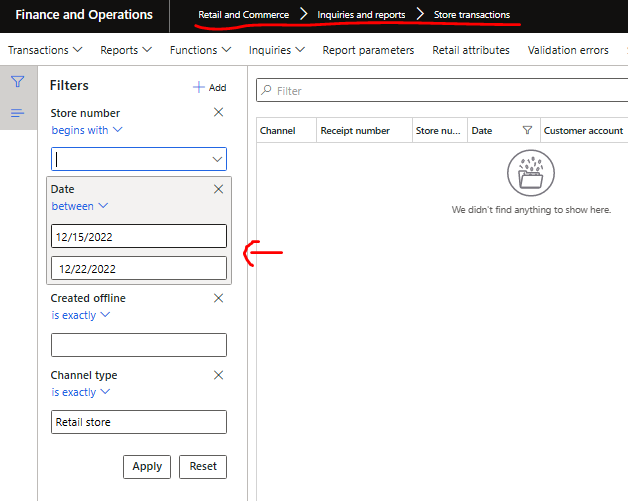
Hope this is the right forum to ask, in D365 F&O Retail & commerce > Inquiries > Store transaction, there is a default filter set as Today's date - 7 to Today's date ->
pastedimage1671679802903v1.png

May I know how we can change this default value ? especially From date. My transaction is not per daily and need to make the period in wider range like 1 or 2 months ago so it feel tedious to every time open this screen I need to open this filter (or Report parameters button) to adjust the From Date as I wanted. I can't find any setting for this default From date : today's - 7

Thanks,

  • Suggested answer
    Shafeeque P. Profile Picture
    6,533 Moderator on at

    There is no configuration available OOB to set the default periods. This is done more from the performance POV. If a user with 10000 daily transactions opens the form without any date filter it can take forever to open even though it supports infinite scrolling. Maybe you can check with your technical developer if something can be changed from the back.

    Side Note: I often receive support requests from end users saying they don't see any transactions cos there is a 7-day filter set by default. 

  • Axel Cage Profile Picture
    311 on at

    Yes, Understand the situation, that is why I'm not going to totally remove the filter but to adjust depend on my situation as well.

    However thank you for your confirmation about no OOB settings.

    It looks it need some customization.

Under review

Thank you for your reply! To ensure a great experience for everyone, your content is awaiting approval by our Community Managers. Please check back later.

Helpful resources

Quick Links

Season of Sharing Community Challenge Winners!

Congratulations to our community stars!

Women in Power Builds Momentum

Expanding mentorship, skilling, and AI innovation

Congratulations to the July Top 10 Community Leaders

These are the community rock stars!

Leaderboard > Supply chain | Supply Chain Management, Commerce

#1
André Arnaud de Calavon Profile Picture

André Arnaud de Cal... 99 Super User 2026 Season 2

#2
Paolo Cecchelli Profile Picture

Paolo Cecchelli 79 Super User 2026 Season 2

#3
Aayush Tiwari Profile Picture

Aayush Tiwari 71

Last 30 days Overall leaderboard

Product updates

Dynamics 365 release plans



