web
You’re offline. This is a read only version of the page.
close
Skip to main content

Announcements

No record found.

News and Announcements icon
Community site session details

Community site session details

Session Id :
Finance | Project Operations, Human Resources, ...
Unanswered

How to edit address from LogisticsLocation?

(0) ShareShare
ReportReport
Posted on by 843

Hello,

I have a custom form where the main datasource is MyTable, which contains i.e: some apartments. As an additional datasource is the LogisticsPostalAddress table - there is a relationship: MyTable.Location == LogisticsLocation.RecId.


In the form, I added buttons to add and edit (standard LogisticsPostalAddressEdit menuitem) address to each apartment - creating a new address works very well. Unfortunately, editing does not work as I expect...
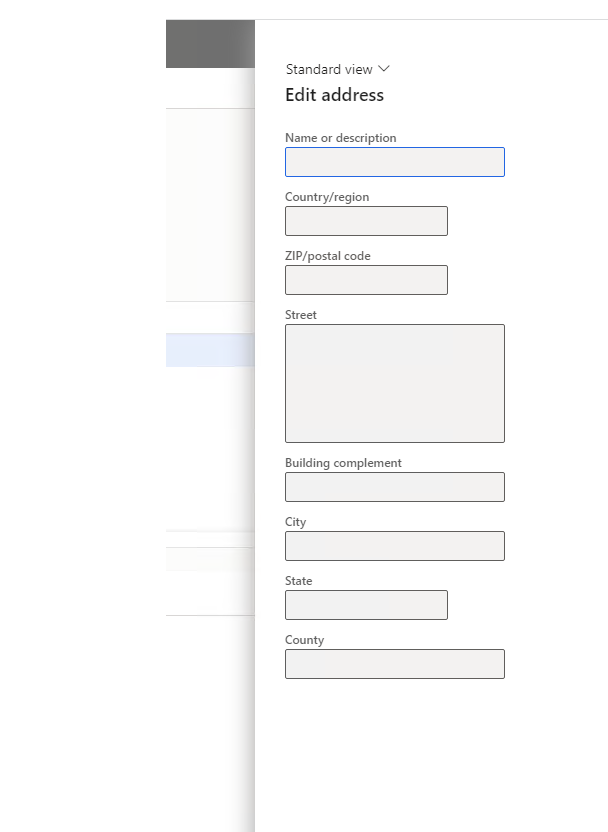
If I add an address to an apartment and immediately click edit - everything works OK. But in case I refresh the format after adding the address, when I try to edit, all the fields on the format that appears are disable/ uneditable....
Could someone please suggest What could be the reason for this?

Thanks.
1004.edit.png

I have the same question (0)
  • André Arnaud de Calavon Profile Picture
    303,446 Super User 2026 Season 1 on at

    Hi Shooowtek,

    Can you explain what you mean with "I refresh the format after adding the address"? What actions do you perform for this in detail?

  • Shooowtek Profile Picture
    843 on at

    Hello Andre,

    Sure. I will try to explain more:

    I have a custom table (MyTable) that has, among other things, a Location field. This field has a relationship with LogisticsLocation.RecId.

    I have a form where I have a grid with records from MyTable. I added standard buttons to create and edit LogisticsLocation for each row of my table. After creating the address (LogisticsLocation line), without refreshing the forms I can edit the address. But if I refresh the form then unfortunately editing is no longer possible....

    I don't know where the reason of this ... maybe the caller or cursor is missing at some point?

  • Shooowtek Profile Picture
    843 on at

    I did some debugging and it appears that in the init() method of my form, the element.args().record is not being passed because no condition is met. 

    if(element.args().record() && element.args().record().TableId == TableNum(CustTAble))
    {
        CustTable =  element.args().record();
    }
    else if(element.args().record() && element.args().record().TableId == TableNum(MyTable))
    {
        myTable = element.args().record();
    }


    Where is the mistake here?

  • Mohit Rampal Profile Picture
    12,565 Moderator on at

    Hi, If I understood your issue correctly, you have a form grid and button to Edit address. If you click on Edit button, it opens dialog and fields are editable. However when you refresh the browser, the fields become non editable. If my understanding is correct then the Edit address dialog should be closed in that event just like standard forms. You can check Address tab in Inventory management-->Setup-->Inventory breakdown-->Warehouses and see the standard behavior.

  • Shooowtek Profile Picture
    843 on at

    Hello Mohit Rampal. Thank you for this suggestion with the similar address case in inventory management. I will check it out.

    You understand well. With one other detail.

    If I refresh the browser and then click on the edit button, the dialog box will open, but all the fields will be disable.

    But if I add a new address, and without refreshing the form I click on edit, then I can edit the address on the current line or any other.

    If I refresh the browser, editing again becomes impossible for all lines on that form.

  • Mohit Rampal Profile Picture
    12,565 Moderator on at

    I believe it's because of the way you have customized the form and calling this dialog. Closing the dialog on browser refresh should solve your problem as well maintain consistency with standard.

Under review

Thank you for your reply! To ensure a great experience for everyone, your content is awaiting approval by our Community Managers. Please check back later.

Helpful resources

Quick Links

Introducing the 2026 Season 1 community Super Users

Congratulations to our 2026 Super Stars!

Congratulations to our 2025 Community Spotlights

Thanks to all of our 2025 Community Spotlight stars!

Leaderboard > Finance | Project Operations, Human Resources, AX, GP, SL

#1
André Arnaud de Calavon Profile Picture

André Arnaud de Cal... 517 Super User 2026 Season 1

#2
Giorgio Bonacorsi Profile Picture

Giorgio Bonacorsi 440

#3
Adis Profile Picture

Adis 266 Super User 2026 Season 1

Last 30 days Overall leaderboard

Product updates

Dynamics 365 release plans
