web
You’re offline. This is a read only version of the page.
close
Skip to main content

Announcements

No record found.

News and Announcements icon
Community site session details

Community site session details

Session Id :
Microsoft Dynamics AX (Archived)

PO has missing line items when I try to Product receipt

(0) ShareShare
ReportReport
Posted on by 245

Good Day

We have a PO with a number of line items. Each month we receipt a quantity of one from each line item.
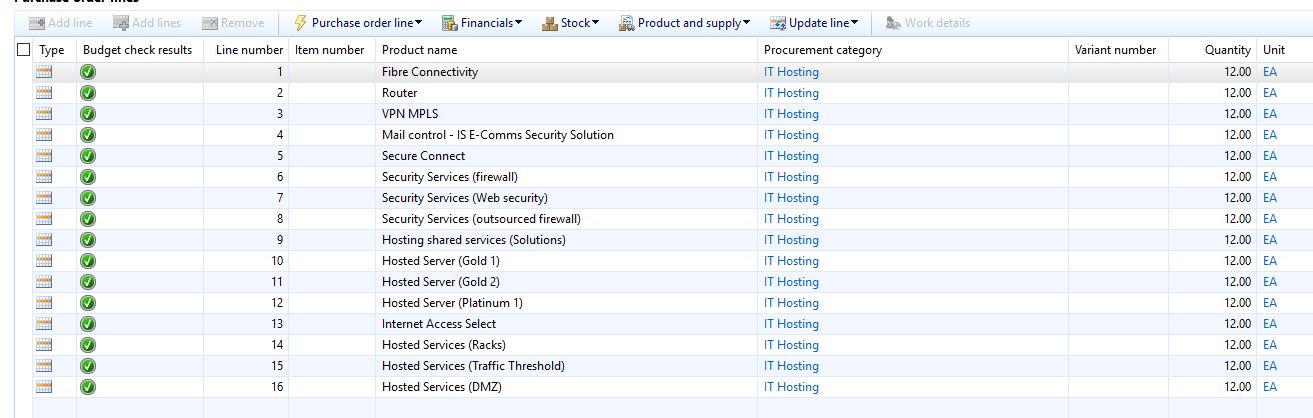
IS-PO.JPG

We tried to product receipt but we noticed that there are line items missing 5,6,7 and 8
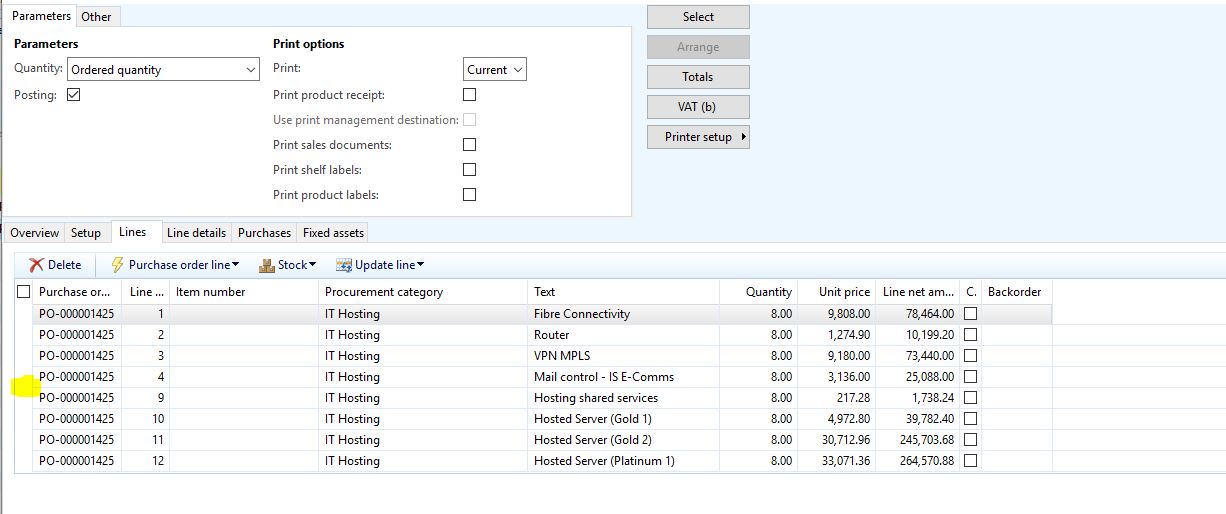
is-missing-PO.JPG

*This post is locked for comments

I have the same question (0)
  • Suggested answer
    Community Member Profile Picture
    on at

    Hi Angel,
    Check PO product receipts. See if the lines haven't been fully received by mistake or delivery reminder removed from purchase order lines.
    Regards,
    V

  • Suggested answer
    Mahmoud Hakim Profile Picture
    17,887 on at

    you can check delivery reminder

  • AngelAX Profile Picture
    245 on at

    Hi I checked deliver remainder on those missing lines and there's nothing to deliver. This is weird as the user says they did not receipt everything on those line items. I should be 8 remainder

  • Suggested answer
    Community Member Profile Picture
    on at

    Check product receipts as well for any outstanding balance. Or click General tab- Line quantity to get additional information where you are with received/delivered quantities etc.

    if needed - change delivery reminder to what you think you need to receive.

    Regards,

    V

  • AngelAX Profile Picture
    245 on at

    Hi Viesturs

    This is what we see

    5-missing-lines.JPG

    Remaining quantity is still 12 for those 4 items that do not show when we want to receipt them.

  • Suggested answer
    Community Member Profile Picture
    on at

    Hi Angel,

    It's from your previous product receipt, however someone could change delivery reminders after it was received or there's additional product receipt you want to look into.

    Can you share the screen from General tab - Related Information - Line Quantity  ... from there you will get better overview what`s received and what's left to receive.

    Capture.JPG54545.JPG

    Capture.JPG54545.JPG

    Regards,

    V

  • AngelAX Profile Picture
    245 on at

    Hi V

    Herewith is the screenshot

    missing-lines-remain.JPG

    Regards

    AngelAX

  • Suggested answer
    Community Member Profile Picture
    on at

    Hi Angel,

    As you can see line 5/6/7/8 was received and there's no outstanding balance (Delivery reminder) to be received. out of those 12 units 3 have been invoiced and there's 9 remaining to be invoiced. I would suggest you to check all product receipts, find the one with incorrect quantities and ask personnel who's in charge of receiving the goods/product receipts to get proof of delivery. If it was done by mistake and it's not the stock item, you should be able to cancel incorrect product receipts without major issues and receive one unit for each line per month.

    Regards,

    V

  • AngelAX Profile Picture
    245 on at

    Hi V

    The personnel in Procurement has seen the quantity that was incorrectly receipted but is unable to correct it as the button is greyed out. This happened in the 30 June2017 Journal.

    receipting.JPGreceipting.JPG

  • AngelAX Profile Picture
    245 on at

    If I go to the last Journal it shows a quantity of one because of the mistake that was done on the 30th June Journal.The option is to post a new product receipt if I want to raise the quantity, but that means the incorrect one is not sorted.

Under review

Thank you for your reply! To ensure a great experience for everyone, your content is awaiting approval by our Community Managers. Please check back later.

Helpful resources

Quick Links

Introducing the 2026 Season 1 community Super Users

Congratulations to our 2026 Super Stars!

Meet the Microsoft Dynamics 365 Contact Center Champions

We are thrilled to have these Champions in our Community!

Congratulations to the April Top 10 Community Leaders

These are the community rock stars!

Leaderboard > 🔒一 Microsoft Dynamics AX (Archived)

#1
CP04-islander Profile Picture

CP04-islander 39

#2
Michel ROY Profile Picture

Michel ROY 14

#3
imran ul haq Profile Picture

imran ul haq 8

Last 30 days Overall leaderboard

Featured topics

Product updates

Dynamics 365 release plans
