web
You’re offline. This is a read only version of the page.
close
Skip to main content

Announcements

No record found.

News and Announcements icon
Community site session details

Community site session details

Session Id :
Microsoft Dynamics AX (Archived)

Status of "Cost category price" & "Indirect cost" in the Costing version setup

(0) ShareShare
ReportReport
Posted on by

Hello,

Can anyone here explain me about the status of "Cost Category Price" & "Indirect cost" in Costing version setup? I found that the calculation of BOM cost is still using the cost with "Pending" status, so do I need to activate this?
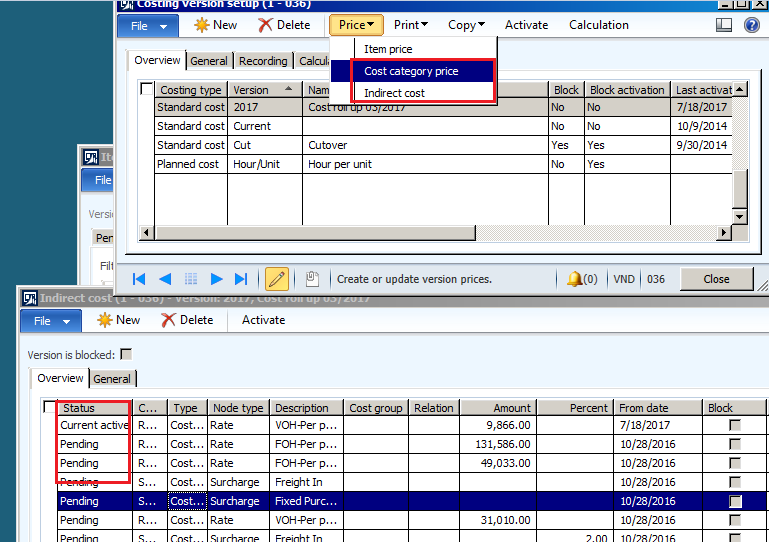
8103.0.PNG

*This post is locked for comments

I have the same question (0)
  • Suggested answer
    Ludwig Reinhard Profile Picture
    Microsoft Employee on at

    Hi nglehang,

    There is a current active Version, which should be used.

    You can also identify this from your costing sheet.

    At the very bottom of the costing sheet you should see the active ones that are used for surcharges, rates, etc.

    Best regards,

    Ludwig

  • Community Member Profile Picture
    on at

    Hi Ludwig,

    I mean that, all the cost price with status "Pending" here is already used to calculate BOM cost.

    When do I need to click  "Active" for these "Pending" status?

    Thank you

  • Suggested answer
    Ludwig Reinhard Profile Picture
    Microsoft Employee on at

    Hi nglehang,

    I do not think that pending prices are used for your BOM calculations.

    Do you have a fallback costing version defined that references a previously used costing version for example from last year?

    I would imagine that the other ('old') costing version includes the active prices that are used in your BOM calculations especially when you are making use ofsStandard costs.

    Can you double check that for example by entering a new pending cost price without activating it?

    Best regards,

    Ludwig

  • Community Member Profile Picture
    on at

    Hi Ludwig,

    Thank you a lot for your answer.

    But as checked I found that system used the Indirect cost with Pending status for BOM calculation.

    You can check as below screen shot:

    Indirect cost "Rate-11F" with Current Activate status is 52,421:

    8551.00.PNG

    But when I do calculate BOM system used "Pending" cost 49,033:

    8551.00.PNG

    I don't know why system used that Pending status to calculate BOM cost?

    Please let me know is there any wrong in setup?

    Thank you

  • Verified answer
    Ludwig Reinhard Profile Picture
    Microsoft Employee on at

    Hi,

    The current active rate is linked to your version 12/2015 (Please see the second column).

    You opened the costing version '2017'.

    I think that is the confusing thing here.

    Can you open your '12/2015' version and check whether the price is active there. I would bet that this is the case.

    Best regards,

    Ludwig

  • Community Member Profile Picture
    on at

    Thank you, Ludwig.

    I will do check on costing version "12/2015".

  • Ludwig Reinhard Profile Picture
    Microsoft Employee on at

    Hi nglehang,

    Just wondering whether you have found the active price in version 12/2015 and whether this thread can be closed or whether other open issues exist.

    Would be great if you could keep us updated.

    Many thanks,

    Ludwig

  • Community Member Profile Picture
    on at

    Hi Ludwig,

    You are correct, the costing version that I used to calculate BOM cost affect to cost price. When I used the version "12/2015", system calculate BOM cost by using "Current active" indirect cost from screen short above.

    Thank you very much.

Under review

Thank you for your reply! To ensure a great experience for everyone, your content is awaiting approval by our Community Managers. Please check back later.

Helpful resources

Quick Links

Introducing the 2026 Season 1 community Super Users

Congratulations to our 2026 Super Stars!

Meet the Microsoft Dynamics 365 Contact Center Champions

We are thrilled to have these Champions in our Community!

Congratulations to the March Top 10 Community Leaders

These are the community rock stars!

Leaderboard > 🔒一 Microsoft Dynamics AX (Archived)

#1
Basit Profile Picture

Basit 1

#1
GL-01081504-0 Profile Picture

GL-01081504-0 1

#1
Roya Profile Picture

Roya 1

Last 30 days Overall leaderboard

Featured topics

Product updates

Dynamics 365 release plans
