web
You’re offline. This is a read only version of the page.
close
Skip to main content

Notifications

Announcements

No record found.

Community site session details

Community site session details

Session Id :
Microsoft Dynamics CRM (Archived)

Unified Service Desk - User Notes not wrapping

(0) ShareShare
ReportReport
Posted on by 2,822

Good day all,

Thanks for reading my query.  

QUESTION: In USD Notes hosted control, when user is typing the text, it is not text wrapping and keep going in the single line and bring the vertical scroll bar.

 Can we stop this behavior and automatically bring the text in the next line? Thanks.
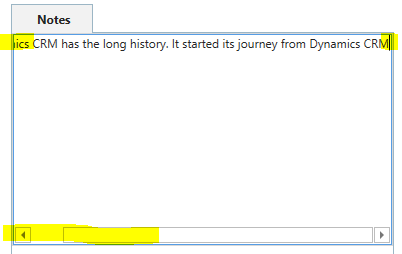
USD_2D00_UserNotes_2D00_0.PNG

*This post is locked for comments

I have the same question (0)
  • Verified answer
    ansrikanth Profile Picture
    3,115 on at

    That's an interesting one. I bet, this could be a small "developery" mistake at Microsoft :).

    Ok, here is a fix. Add a new action to your Notes control named "SetVisualProperty" (make sure it is exactly the same). And call it on your SessionNew (Preferably after all actions) with the following data params. It should work...

    elementname=UserText
    propertyname=TextWrapping
    value=Wrap

    Here is a screenshot...

    2019_2D00_02_2D00_19_5F00_00_2D00_50_2D00_17.png

  • Alex Fun Wei Jie Profile Picture
    33,628 on at

    Hi,

    Please mark your answer as verified , as it will help other people in future. Thanks

  • ansrikanth Profile Picture
    3,115 on at

    i dont think i can mark my answer as verified :)

  • Zohaib Uddin Khan Profile Picture
    2,822 on at

    Thanks @Srikanth Alluri for the heck!

    Do you mind to tell us how to find the actions such as "SetVisualProperty" which are not defined in the default setup? Plus, how you find

    elementname, propertyname & value?

    Thanks again for the quick fix. :)

  • Suggested answer
    ansrikanth Profile Picture
    3,115 on at

    SetVisualProperty is a documented Action, here is the link - https://docs.microsoft.com/en-us/dynamics365/customer-engagement/unified-service-desk/panel-layout-hosted-control?view=dynamics-usd-4.1#setvisualproperty (NOTE: Check the notes section under this action).

    Coming to how do I know the Control Name - I used Snoop (https://github.com/cplotts/snoopwpf) to find out what is the control name MS used. And Properties & values are same any where for a wpf control.

    -Srikanth

  • Zohaib Uddin Khan Profile Picture
    2,822 on at

    Thanks Srikanth for the information.

Under review

Thank you for your reply! To ensure a great experience for everyone, your content is awaiting approval by our Community Managers. Please check back later.

Helpful resources

Quick Links

Responsible AI policies

As AI tools become more common, we’re introducing a Responsible AI Use…

Neeraj Kumar – Community Spotlight

We are honored to recognize Neeraj Kumar as our Community Spotlight honoree for…

Leaderboard > 🔒一 Microsoft Dynamics CRM (Archived)

#1
SA-08121319-0 Profile Picture

SA-08121319-0 4

#1
Calum MacFarlane Profile Picture

Calum MacFarlane 4

#3
Alex Fun Wei Jie Profile Picture

Alex Fun Wei Jie 2

Last 30 days Overall leaderboard

Featured topics

Product updates

Dynamics 365 release plans



