web
You’re offline. This is a read only version of the page.
close
Skip to main content

Announcements

No record found.

News and Announcements icon
Community site session details

Community site session details

Session Id :
Microsoft Dynamics AX (Archived)

Production Order: Update registration one time with full quantity but system has split to two lines with one line is 1Qty

(0) ShareShare
ReportReport
Posted on by

Dear All,

When I do Update registration in Production Order, I did register one time with full quantity, I didn't split the line.

But later that, I opened to check I found that this transaction has been split to two lines with one line is 1 Qty
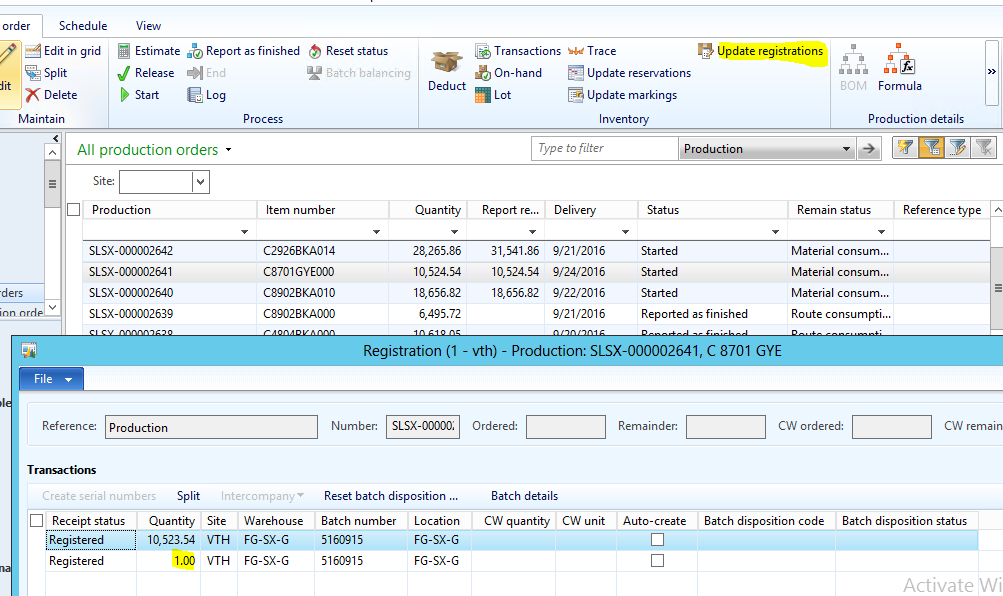
SX1.PNG

I did check in transactions and found that the line that have 1Qty don't have Lot Reference to Quarantine Order

sx2.PNG

Does anyone here have experience on this issue, please share with me the root cause and solution to solve this.

Thank you

*This post is locked for comments

I have the same question (0)
  • Suggested answer
    ColbyGallagher Profile Picture
    3,668 on at

    Do you mean Quality order instead of Quarantine order?  If your sampling plan on the quality association is for a fixed quantity of 1 piece, it will cause this scenario from the inventory blocking that occurs.  The inventory transaction record for 1 piece will go away once you close the quality order.  

  • Community Member Profile Picture
    on at

    No, we are using Quarantine order instead of Quality order. When we do Update registration from Production order, system will generate a Quarantine order automatically.

    I don't know when system do split the Registered quantity, sometime issue occur before we do R.A.F Quarantine order, sometime occur after we do R.A.F.

    Can you please share with me the solution to avoid this issue?

    Thank you

  • ColbyGallagher Profile Picture
    3,668 on at

    Does your quarantine order generate a quality order?  Can you share a screenshot of the quarantine order? I don't see that quarantine orders alone will cause this situation.  

    What problems does this actually cause you?

  • Community Member Profile Picture
    on at

    Related Quarantine order:

    QO.PNG

    I checked again and found that there is existing Related Quality Order:

    QO.PNG

    And there are existing inventory blocking also:
    inv.PNG

    Please let me know the root cause of this issue, how to a void system auto split 1 quantity in transaction?

    Thank you

  • Suggested answer
    ColbyGallagher Profile Picture
    3,668 on at

    The split is coming from the inventory blocking that is created by your quality order.  The split qty of 1 is based on your sampling plan assigned in your Quality Association.  You can't get rid of this unless you write some code to stop the inventory blocking from happening.  

    Questions for you:  

    1. I see you have a Quality Association to create a quality order from a production order, and separately are registering the production order to a quarantine warehouse to generate a quarantine order.  Why are you doing both?  
    2. I still don't understand what problem the split inventory transaction causes you.  I've not seen it cause problems at clients except having to explain why if someone is looking at transactions like you are. 

  • Community Member Profile Picture
    on at

    Thank you a lot for sharing with me, Colby Gallagher.

    1. I am researching another way to do instead of doing both Quarantine order & Quality like this

    2. This split inventory transaction is the root cause of wrong status in Quarantine transactions, then I couldn't do End Quarantine order.

    As below screen shot you can see the correct status should be SOLD instead of "Reserved physical".

    I did face many incorrect status in quarantine orders like this.

    QrO1.PNG

  • Verified answer
    ColbyGallagher Profile Picture
    3,668 on at

    Yes, Quarantine orders make financial transactions into and out of quarantine warehouses because you can use a quarantine orders to add cost to an item (rework cost, inspection cost, etc).    If you don't need to add additional cost to the item, I would suggest not using quarantine orders and just use Quality Orders.  

Under review

Thank you for your reply! To ensure a great experience for everyone, your content is awaiting approval by our Community Managers. Please check back later.

Helpful resources

Quick Links

Introducing the 2026 Season 1 community Super Users

Congratulations to our 2026 Super Stars!

Meet the Microsoft Dynamics 365 Contact Center Champions

We are thrilled to have these Champions in our Community!

Congratulations to the April Top 10 Community Leaders

These are the community rock stars!

Leaderboard > 🔒一 Microsoft Dynamics AX (Archived)

#1
CP04-islander Profile Picture

CP04-islander 39

#2
Michel ROY Profile Picture

Michel ROY 14

#3
imran ul haq Profile Picture

imran ul haq 8

Last 30 days Overall leaderboard

Featured topics

Product updates

Dynamics 365 release plans
