web
You’re offline. This is a read only version of the page.
close
Skip to main content

Announcements

No record found.

News and Announcements icon
Community site session details

Community site session details

Session Id :
Microsoft Dynamics AX (Archived)

Add New Language to Label from File

(2) ShareShare
ReportReport
Posted on by 126

Dear All,

I'm trying Russian Language add to my label files. But I'm getting an error "A file with the name AxBUZru.ald already exists on the AOS. The import could not be completed.", I can't use wizard because this language added other label files previously.

How can i add ru language to my label file?
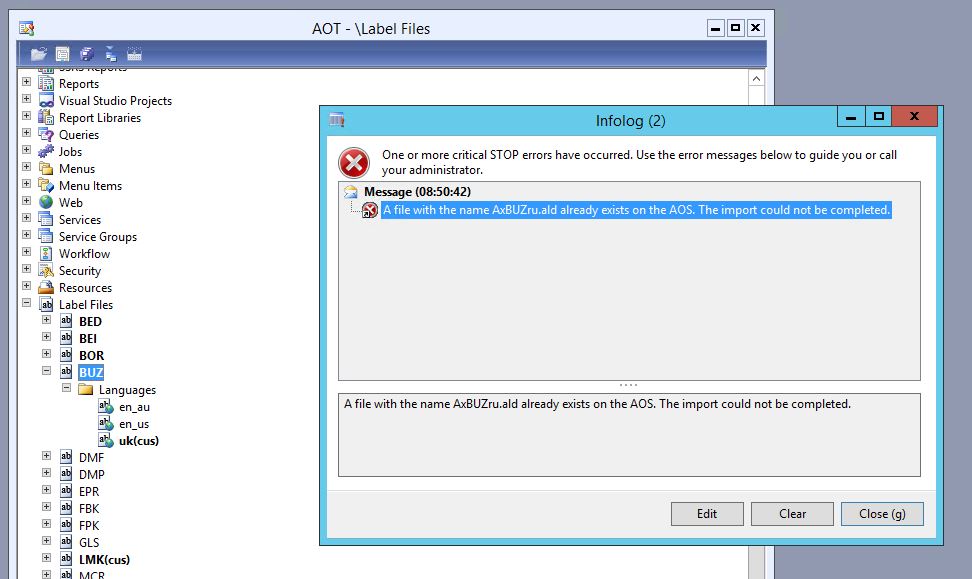
62718.Capture.JPG

*This post is locked for comments

I have the same question (0)
  • Martin Dráb Profile Picture
    239,178 Most Valuable Professional on at

    I assume you can simply delete the file and try it again.

  • MuratGulerMG Profile Picture
    126 on at

    Thank you Martin, are you mention label file in AOT?

  • Martin Dráb Profile Picture
    239,178 Most Valuable Professional on at

    No, I mean the actual file on disk mention by the error message: AzBUZru.ald.

  • MuratGulerMG Profile Picture
    126 on at

    I tried create new file at many times. Bu i can't import new language.

    Is there another way?

  • Martin Dráb Profile Picture
    239,178 Most Valuable Professional on at

    Have you tried my suggestion? The system complains that the file you're trying to create already exists, therefore deleting it might help. Just trying to the same steps many times won't give you different results, because the problem is still there.

  • Suggested answer
    MuratGulerMG Profile Picture
    126 on at

    You didn't understand me. I tried delete the file and create again.

    I found the problem, this method working with "-". My language file doesn't exist "-", because language only RU.

    1376.Capture2.JPG

Under review

Thank you for your reply! To ensure a great experience for everyone, your content is awaiting approval by our Community Managers. Please check back later.

Helpful resources

Quick Links

Introducing the 2026 Season 1 community Super Users

Congratulations to our 2026 Super Stars!

Meet the Microsoft Dynamics 365 Contact Center Champions

We are thrilled to have these Champions in our Community!

Congratulations to the March Top 10 Community Leaders

These are the community rock stars!

Leaderboard > 🔒一 Microsoft Dynamics AX (Archived)

#1
CP04-islander Profile Picture

CP04-islander 16

#2
GiacomoRovai Profile Picture

GiacomoRovai 4

#3
Douglas Noel Profile Picture

Douglas Noel 2

Last 30 days Overall leaderboard

Featured topics

Product updates

Dynamics 365 release plans
