web
You’re offline. This is a read only version of the page.
close
Skip to main content

Notifications

Announcements

No record found.

Community site session details

Community site session details

Session Id :
Microsoft Dynamics 365 | Integration, Dataverse...
Answered

Non-Admin Users Are Missing Offline Options in D365 Mobile App..

(0) ShareShare
ReportReport
Posted on by 1,589

I have created a Unified Interface Mobile Offline App for use in the D365 for Phones and Tablets App and everything works "Perfect" when I am logged in as myself (System Administrator role) using the "Sign in with a web address instead" sign in option as well as logging in the traditional way via the option "Enter your work or school email account".

All the relevant  entities are configured properly for mobile and the relevant mobile offline profiles exist and the appropriate users have been added to them in accordance with the material at https://docs.microsoft.com/en-us/dynamics365/mobile-app/setup-mobile-offline-for-admin.

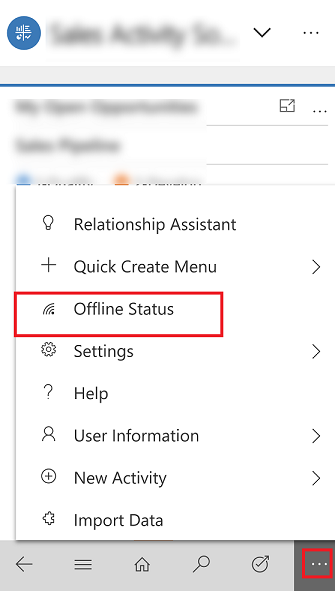
I am able to see the following offline settings and click them inside of the D365 mobile app (for IOS).
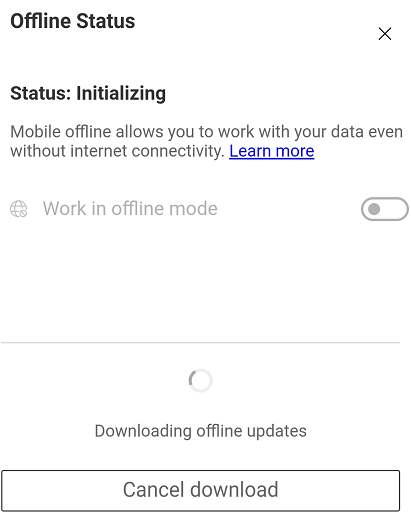
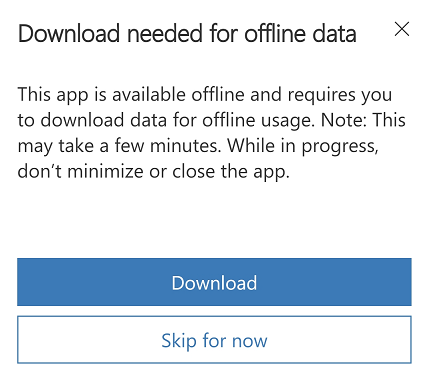
mobile_5F00_offline_5F00_download_5F00_updates_5F00_complete.pngdownloadupdates.pngofflinestatussettings.png

However, when I log in as one of my test users using the "Sign in with a web address instead" sign in option as well as logging in the traditional way via the option "Enter your work or school email account", that user does not see any of the offline options in the screen shots above.

Is this a security role issue of some kind?

What is preventing the non-admin users from seeing and configuring the offline settings in the mobile app?

Any help, suggestions, or advice would be greatly appreciated.

I have the same question (0)
  • Verified answer
    RajarajanS Profile Picture
    on at

    Hello Partner, 

    Thank you for reaching out. 

    Can you verify the following: A user must have a security role that has Read permissions on the mobile offline profile to be able to use their mobile device in offline mode.

    This is from the reference document: https://docs.microsoft.com/en-us/dynamics365/mobile-app/setup-mobile-offline-for-admin#:~:text=from%20MyApps%20page.-,In%20the%20Dynamics%20365%20%2D%20custom%20app%2C%20go%20to%20Settings%20%3E,choose%20a%20mobile%20offline%20profile. 

    Also kindly make sure the steps in the above article are followed as a best practice. Also, profile and the users in the profile have access to the data as well and once that is done publish the profile again as well. 

    Hope this helps. 

    Warm Regards, 

    Raj

    Please mark as verified if the answer is helpful. Welcome to join hot discussions in Dynamics 365 Forums.

  • ACECORP Profile Picture
    1,589 on at

    Read Privilege on 'Mobile Offline Profile' was the fix. Thanks!

Under review

Thank you for your reply! To ensure a great experience for everyone, your content is awaiting approval by our Community Managers. Please check back later.

Helpful resources

Quick Links

Responsible AI policies

As AI tools become more common, we’re introducing a Responsible AI Use…

Neeraj Kumar – Community Spotlight

We are honored to recognize Neeraj Kumar as our Community Spotlight honoree for…

Leaderboard > Microsoft Dynamics 365 | Integration, Dataverse, and general topics

#1
Martin Dráb Profile Picture

Martin Dráb 41 Most Valuable Professional

#2
iampranjal Profile Picture

iampranjal 39

#3
Satyam Prakash Profile Picture

Satyam Prakash 35

Last 30 days Overall leaderboard

Product updates

Dynamics 365 release plans