web
You’re offline. This is a read only version of the page.
close
Skip to main content

Announcements

No record found.

News and Announcements icon
Community site session details

Community site session details

Session Id :
Microsoft Dynamics CRM (Archived)

Unable to create case from portal - "You don't have the appropriate permissions."

(0) ShareShare
ReportReport
Posted on by 105

Hi All,

We tried all possible ways of resolving this issue but to no avail. We've ran out of ideas and looking for help. 

Issue: Unable to create case from portal, getting below issue "you don't have the appropriate permissions."
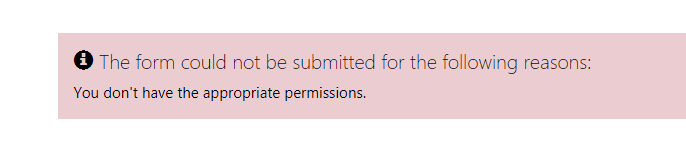
6758.Capture.PNG

Hit and Miss:

1. Checked all mandatory fields are present on the form and the corresponding values have been provided.

2. 'Entity Permission' has been enabled on the corresponding 'Entity Form'

3. In Entity Permission list, we have added a new record with all six privileges (check all checkboxes) for 'incident' entity.

4. Checked the web-roles are associated with the 'Entity Permission'

Just FYI, 

 i have went through below articles, but none of them provided solution in my case..

http://abhinavranjan.xyz/2017/08/21/you-dont-have-the-appropriate-permissions-dynamics-365-portal/

Any help would be greatly appreciated.

*This post is locked for comments

I have the same question (0)
  • Mahendar Pal Profile Picture
    45,095 on at

    Hi,

    Make sure you have set permissions for all the the related entities as well (for example all the lookup entities)

  • Suggested answer
    Adrian Begovich Profile Picture
    1,027 Moderator on at

    Hi Kranthi G,

    You must enable "Append" and "Append To" privileges on any Entity Permission records where the "Write" or "Create" privileges are enabled. You can find more information on this here.

  • Community Member Profile Picture
    on at

    Please share the Entity Permission record screenshot. Also check if you are using correct portal name in entity permission.

  • Suggested answer
    sandeepstw Profile Picture
    4,601 on at

    Hi,

    Permission is not only for that entity, please check relationship as well, so you need to provide permission to create relationship entities. Please check this article or also you need to check customer portal roles and permission for create cases.

    community.adxstudio.com/.../entity-permissions

Under review

Thank you for your reply! To ensure a great experience for everyone, your content is awaiting approval by our Community Managers. Please check back later.

Helpful resources

Quick Links

Introducing the 2026 Season 1 community Super Users

Congratulations to our 2026 Super Stars!

Meet the Microsoft Dynamics 365 Contact Center Champions

We are thrilled to have these Champions in our Community!

Congratulations to the March Top 10 Community Leaders

These are the community rock stars!

Leaderboard > 🔒一 Microsoft Dynamics CRM (Archived)

#1
AS-17030037-0 Profile Picture

AS-17030037-0 2

Last 30 days Overall leaderboard

Featured topics

Product updates

Dynamics 365 release plans
