web
You’re offline. This is a read only version of the page.
close
Skip to main content

Notifications

Announcements

No record found.

Community site session details

Community site session details

Session Id :
Microsoft Dynamics CRM (Archived)

How to tax calculate when i am adding a product?

(0) ShareShare
ReportReport
Posted on by

Hi,

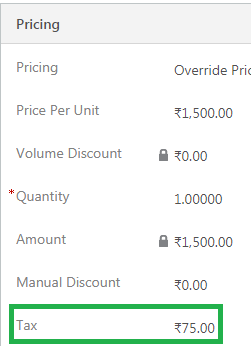
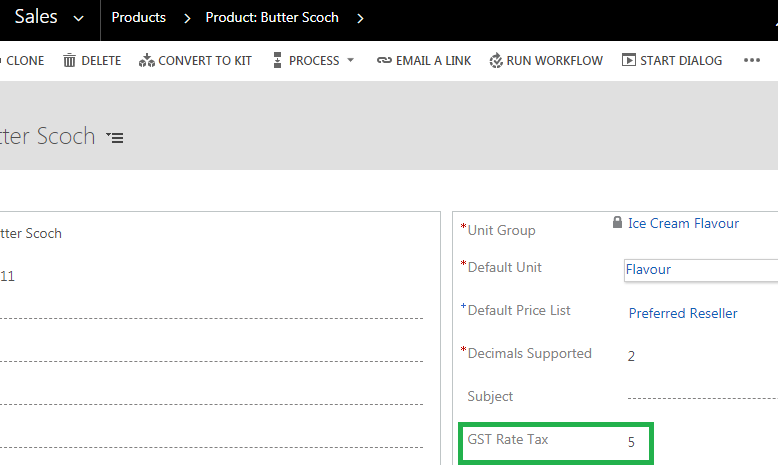
I add a field "GST Rate TAX" in Product Catalog entity, suppose I set a GST Rate TAX: 5% and my product rate is Rs.1500.

Now I am want when I am adding a product in opportunity and tax would be calculate automatic and i think this task should be completed by Plugins.

Please give me suggestion how to solve.gst-rate.pngopptax.png
Thanks in advance.

*This post is locked for comments

I have the same question (0)
  • Aric Levin - MVP Profile Picture
    30,190 Moderator on at

    Did you set the Tax as a Calculate Field?

    What is the relationship between Pricing and Product?

    Is Product the parent entity of Pricing?

    Based on your answers, you can likely do this using a calculate field?

  • David Jennaway Profile Picture
    14,065 on at

    I think you'll need a plugin to do this. There are a couple of limitations on calculated fields that mean you probably can't use them here:

    • Calculated fields work off fields on the entity (in this case the opportunity product), whereas you'll need to get the tax rate from the product. For many entities you can get around this by putting a tax rate field on the opportunity product, and populating it from the product via a workflow, but the opportunity product entity does not support updates via the Update step of a workflow
    • To include the tax in the overall amount, you'd want to update the system field 'tax'. However, you can't change an existing field to a calculated field

    The main plugin logic you could create is:

    • Create a plugin to run on Create and Update on the opportunityproduct
    • For the Update message, set filteringattributes so that it runs when the productid or the quantity field changes
    • The plugin should run on a pre-stage
    • The plugin would retrieve the Tax Rate from the product, apply the calculation, and write the results to the tax attribute in the Target InputParameter
  • Aric Levin - MVP Profile Picture
    30,190 Moderator on at

    If you are using the Out of the box entities, then you have to use a Plugin as David says.

    It seemed like you were using a custom entity.

    You can try the calculated field approach by following this article:

    community.dynamics.com/.../calculated-fields-and-parent-entities

    If that does not work for you, then you have to use Plugins.

    Thanks David.

    Hope this helps.

Under review

Thank you for your reply! To ensure a great experience for everyone, your content is awaiting approval by our Community Managers. Please check back later.

Helpful resources

Quick Links

Responsible AI policies

As AI tools become more common, we’re introducing a Responsible AI Use…

Neeraj Kumar – Community Spotlight

We are honored to recognize Neeraj Kumar as our Community Spotlight honoree for…

Leaderboard > 🔒一 Microsoft Dynamics CRM (Archived)

#1
SA-08121319-0 Profile Picture

SA-08121319-0 4

#1
Calum MacFarlane Profile Picture

Calum MacFarlane 4

#3
Alex Fun Wei Jie Profile Picture

Alex Fun Wei Jie 2

Last 30 days Overall leaderboard

Featured topics

Product updates

Dynamics 365 release plans