web
You’re offline. This is a read only version of the page.
close
Skip to main content

Notifications

Announcements

No record found.

Community site session details

Community site session details

Session Id :
Small and medium business | Business Central, N...
Suggested Answer

Insert Customer Name with Special Characters using API Page

(0) ShareShare
ReportReport
Posted on by 597

Hi,

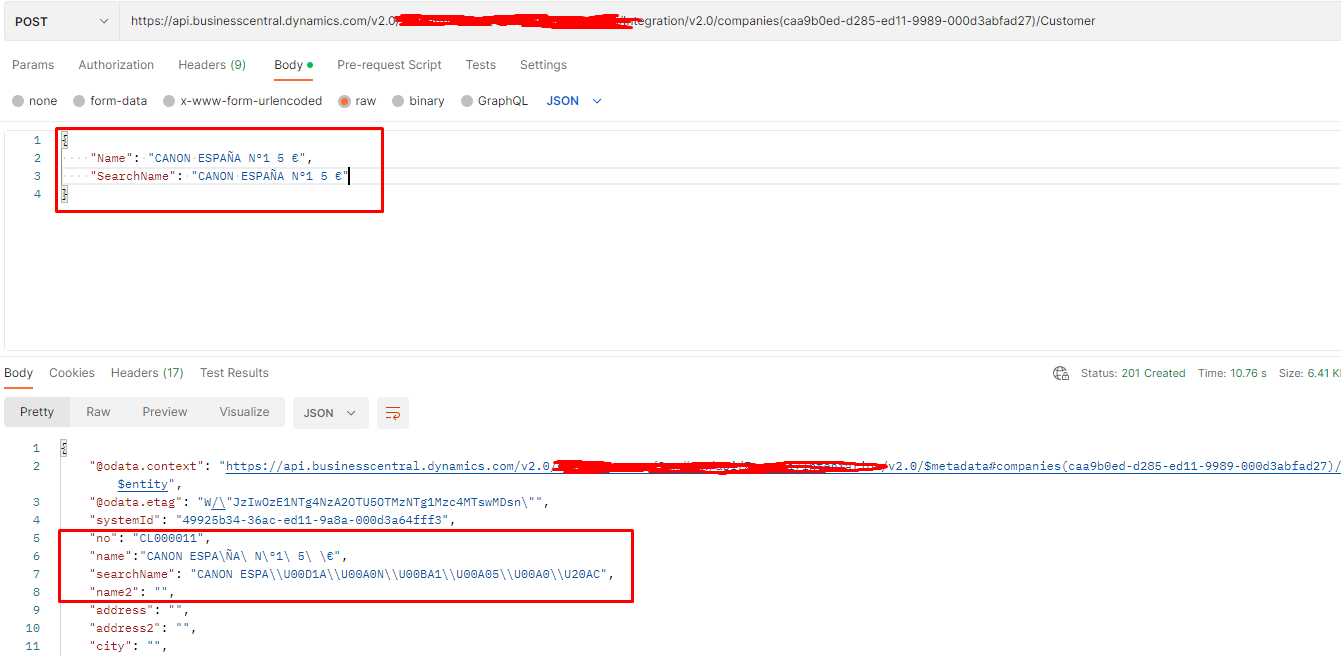
I have a POST request to create a customer with special characters in its name using API. I created an API page of customer and published it. 

When I am sending a POST request with special characters, its not creating it correctly. I am testing with Postman and below are my results.
pastedimage1676359485717v1.png


How can this be done? Do I need to add any header value?


I have the same question (0)
  • Suggested answer
    Nitin Verma Profile Picture
    21,708 Moderator on at

    Hi,

    Try to add below method in your Header Tab?

    Accept-Charset  'UTF-8'

    pastedimage1676359921233v1.png

  • Ramiz Profile Picture
    597 on at

    Hi Nitin Verma 

    Thanks for your response.

    I have tried that but doesn't work.


    pastedimage1676360867096v1.png

  • Suggested answer
    Nitin Verma Profile Picture
    21,708 Moderator on at

    Give me your special characters in Txt format, let me try my side.

    Thanks

  • Ramiz Profile Picture
    597 on at

    Hi.

    Its CANON ESPAÑA Nº1 5 â‚¬.

    I am using it with Customer API as a name of Customer

  • Suggested answer
    DAnny3211 Profile Picture
    11,397 on at

    hi

    look this

    community.dynamics.com/.../api-filter-with-characters-in-display-name

    DAniele

  • Suggested answer
    Nitin Verma Profile Picture
    21,708 Moderator on at

    In My side its working fine.

    Also its seems me wrong the url you are working

    the correct url is - api.businesscentral.dynamics.com/.../customers

    pastedimage1676361817840v3.png

    pastedimage1676361736923v2.png

  • Ramiz Profile Picture
    597 on at

    Hi Nitin Verma

    I can see its working at your end. Have you used the standard customer api page? I am testing it with a custom created api page.

    Could that be the issue?

  • Suggested answer
    Nitin Verma Profile Picture
    21,708 Moderator on at

    Yes, I am doing with standard one, if you are using custom one, you need to check what is wrong your side.

    Thanks.

  • Ramiz Profile Picture
    597 on at

    Hi Nitin Verma 

    Its a strange thing for me but the problem got solved by putting the field name in LOWERCASE letters.

    previously my Json body was

    {
        "Name": "CANON ESPAÑA Nº1 5 €"
    }

    After changing it to the LOWERCASE it works fine.

    pastedimage1676385307578v1.png

    Thanks

  • Suggested answer
    Nitin Verma Profile Picture
    21,708 Moderator on at

    Its strange. Are you using standard Customer table behind the API?

Under review

Thank you for your reply! To ensure a great experience for everyone, your content is awaiting approval by our Community Managers. Please check back later.

Helpful resources

Quick Links

Responsible AI policies

As AI tools become more common, we’re introducing a Responsible AI Use…

Neeraj Kumar – Community Spotlight

We are honored to recognize Neeraj Kumar as our Community Spotlight honoree for…

Leaderboard > Small and medium business | Business Central, NAV, RMS

#1
OussamaSabbouh Profile Picture

OussamaSabbouh 2,135

#2
YUN ZHU Profile Picture

YUN ZHU 733 Super User 2025 Season 2

#3
Sumit Singh Profile Picture

Sumit Singh 612

Last 30 days Overall leaderboard

Featured topics

Product updates

Dynamics 365 release plans
