web
You’re offline. This is a read only version of the page.
close
Skip to main content

Notifications

Announcements

No record found.

Community site session details

Community site session details

Session Id :
Small and medium business | Business Central, N...
Answered

WIP associated with Job Card

(0) ShareShare
ReportReport
Posted on by 40

Hi all, 

When I went to a Job Card and update the Job Task Number, I came across this error: 

"Validation Results: The Job Task cannot be modified because the job has associated job WIP entries. "

pastedimage1638250693919v2.png

We don't use any WIP method, and this error could be a mistake from early days using Business Central. 

When I scrolled down to the bottom of this Job Card, I can see in the WIP and Recognition section there is a Job WIP entry resulting in $34.36:
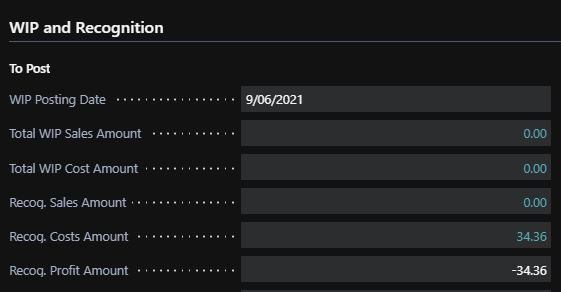
pastedimage1638250899920v3.png

Here is that entry:

pastedimage1638251052208v5.png

Do you have any ideas how to fix this? Otherwise I cannot change the Job Task Number at all (neither can I indent the lines).

Thank you

I have the same question (0)
  • Suggested answer
    Bryan Tschosik Profile Picture
    on at

    Hi VoiciK,

    Thank you for posting your question on Communities.  This is Bryan and I can help.

    Doesn't look like there is anything in the front end to delete/remove WIP Entries when calculated.  So we'll need to get fancy:)

    1. Go to Configuration Package and create a new one for Table 1004 - Job WIP Entries.
    2. Be sure to click the 'Delete Table Records before Processing' field (But for future reference, for whoever else reads this too, be VERY CAREFUL with this field.)
    3. Then Export to Excel
    4. Open the Excel spreadsheet.  You will see the job wip entries for this Job, as well as any other job for which WIP was calculated (and not posted to G/L).
    5. Be sure to Save this Excel file for safe keeping and then make a copy of it for your changes.

    6. Now, let's stop here and ask, do all your jobs not use Job WIP?
    7.  If some of your other jobs use WIP where you calc. WIP and Post WIP, then in your Excel for making changes, just remove the Job WIP Entries for this Job, but please first read the *exception* below.
    ....If none of your jobs are using WIP, then you can remove all the lines in this Excel File except for 1 line (*EXCEPTION*).
    *EXCEPTION* - The exception is that if we have the  'Delete Table Records before Processing' field marked from step 2, we cannot import an Excel file with 0 lines.  We need 1 line.

    8. If it is true that we can remove all the lines in this Excel for this table, again because you are not utilizing the WIP functionality, then you must keep at least 1 record in this Excel.  (if you have another JOB with WIP Entries and they are supposed to be there, then leave them there, that is ok, and you do not need to worry about the next step 9).
    9. The trick then is to change a key field to a a bogus/dummy value.  So in this case, you can give the Job. No. field something that does not exist.
    10. Save that file and then import it back in and Apply Package.

    11. Then check to confirm no WIP Entries exist and go ahead and renumber the task.

    Let me know if you have any questions.

    Regards,
    Bryan Tschosik

  • voiciK Profile Picture
    40 on at

    Thanks Bryan!

    Before I go ahead and test this out, may I ask if I go to the sandbox and change the Configuration Package, it would not have any effect on the live environment? I just want to make sure that I try your method in the test environment first so I will not somehow crash the live system - Im pretty new to BC :)

  • Bryan Tschosik Profile Picture
    on at

    Hi VoiciK,

    No problem, good to double check.

    The Sandbox will have no affect on the Production Database.   What you do in Sandbox will not affect Production.  

    Have a nice weekend :)

    Bryan

  • voiciK Profile Picture
    40 on at

    Awesome. It works!

    Thank you

Under review

Thank you for your reply! To ensure a great experience for everyone, your content is awaiting approval by our Community Managers. Please check back later.

Helpful resources

Quick Links

Responsible AI policies

As AI tools become more common, we’re introducing a Responsible AI Use…

Neeraj Kumar – Community Spotlight

We are honored to recognize Neeraj Kumar as our Community Spotlight honoree for…

Leaderboard > Small and medium business | Business Central, NAV, RMS

#1
OussamaSabbouh Profile Picture

OussamaSabbouh 3,151

#2
Jainam M. Kothari Profile Picture

Jainam M. Kothari 1,443 Super User 2025 Season 2

#3
YUN ZHU Profile Picture

YUN ZHU 1,092 Super User 2025 Season 2

Last 30 days Overall leaderboard

Featured topics

Product updates

Dynamics 365 release plans




