web
You’re offline. This is a read only version of the page.
close
Skip to main content

Announcements

No record found.

News and Announcements icon
Community site session details

Community site session details

Session Id :
Finance | Project Operations, Human Resources, ...
Answered

Error creating inventory transactions

(0) ShareShare
ReportReport
Posted on by 4,005

Hi everyone-

All of a sudden, users are receiving an error when doing inventory transactions. 

In RMA/Entry Update > click the Process button and select Inventory Scrap, this error appears:
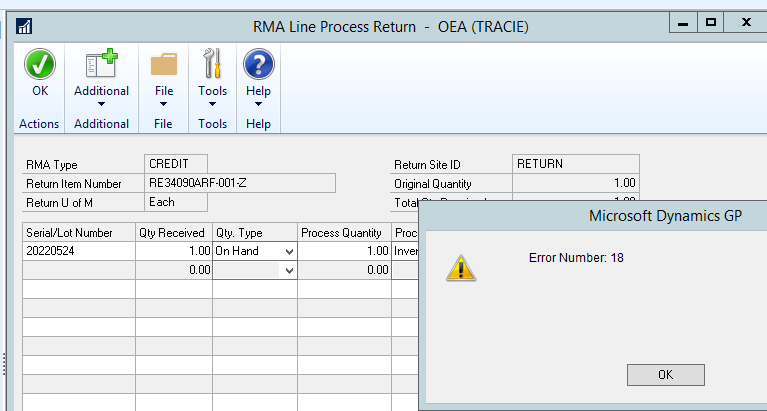
pastedimage1672947581680v1.png

In Inventory > Transactions > Transaction Entry. Select Adjustment, this error appears:
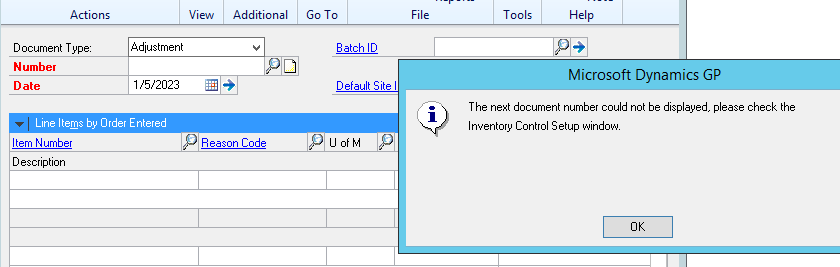
MicrosoftTeams_2D00_image-_2800_1_2900_.png

If I select Variance instead, the next number appears just fine. Same for inventory transfers and assembly transactions.

What is causing these errors? Running GP 18.4.1384 on SQL Server 2016.

Thank you.

Joe

Categories:
I have the same question (0)
  • Juan Bonilla Hn Profile Picture
    55 on at

    Hello,

    This has happened to me recently and I think your problem is that the numeric correlative of the transaction exceeded the maximum number that was defined. Go to the inventory control window and increase the numeric correlative to the type of transaction in which you have a problem.

    Greetings.

  • Verified answer
    Juan Bonilla Hn Profile Picture
    55 on at

    Hello,

    This has happened to me recently and I think your problem is that the numeric correlative of the transaction exceeded the maximum number that was defined. Go to the inventory control window and increase the numeric correlative to the type of transaction in which you have a problem.

    Greetings.

  • Suggested answer
    Shannon Aune Profile Picture
    Microsoft Employee on at

    Hi Joseph,

    Did something happen to cause the next document numbers to be blanked out? Have you verified the next document numbers are populated for RMA (Field Service > Setup > Field Service > Service Setup > Return button, Next RMA Number). Also, for Inventory check the next document number there as well (Inventory >> Setup >> Inventory Control). You will need to find the highest document number that was used in Inventory and RMA, you can run a smartlists to see what the highest document number used was.

  • Joseph Markovich Profile Picture
    4,005 on at

    Thank you Juan and Shannon for your help!

    It was the numbering sequence -- ran out of numbers! All of the numbers between 0001 and 9999 were finally used up. GP has been filling in gaps in the sequence, but the next number showing in Inventory Control setup was already used. I changed the next number to 10,000 and all is fine again.

    Joe

Under review

Thank you for your reply! To ensure a great experience for everyone, your content is awaiting approval by our Community Managers. Please check back later.

Helpful resources

Quick Links

Introducing the 2026 Season 1 community Super Users

Congratulations to our 2026 Super Stars!

Meet the Microsoft Dynamics 365 Contact Center Champions

We are thrilled to have these Champions in our Community!

Congratulations to the April Top 10 Community Leaders

These are the community rock stars!

Leaderboard > Finance | Project Operations, Human Resources, AX, GP, SL

#1
Giorgio Bonacorsi Profile Picture

Giorgio Bonacorsi 771

#2
André Arnaud de Calavon Profile Picture

André Arnaud de Cal... 629 Super User 2026 Season 1

#3
Subra Profile Picture

Subra 496

Last 30 days Overall leaderboard

Product updates

Dynamics 365 release plans
