web
You’re offline. This is a read only version of the page.
close
Skip to main content

Notifications

Announcements

No record found.

Community site session details

Community site session details

Session Id :
Small and medium business | Business Central, N...
Answered

Posting Date in Job Queue using Report Request Page of Report 297: Batch Post Sales Invoices

(0) ShareShare
ReportReport
Posted on by 891

Can the Posting Date be set to use the run date, (i.e.) it updates itself every day?

i typed Today into the Posting Date in the Request Page, and it changed itself to a literal: '27/01/2022'. So the Job Queue is only good for today. I want it to run once a day and use whatever today's date is as the Posting Date?

I have the same question (0)
  • Suggested answer
    Community Member Profile Picture
    on at

    Nick,

    You will need to contact your Partner to setup a custom Job Queue that will update the Posting Date to Work Date as the days change and the Job Queue runs each day.

    Thank you,

    Steve

  • MarilynG Profile Picture
    70 on at

    Hi Nick!

    Any suggestion on how this job queue / codeunit should looks like?

    Thanks!

  • Suggested answer
    divyeshchitte Profile Picture
    968 on at

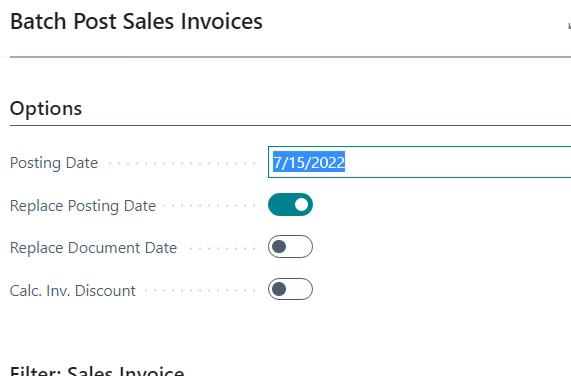
    You can extend the report 297 Batch Post Sales Invoices

    Add extension to the report that will updated the posting date to Today and Replace the Posting date as True.

    Create a Codeunit Subscriber

    add below mentioned code 

    [EventSubscriber(ObjectType::Report, Report::"Batch Post Sales Invoices", 'OnAfterOnOpenPage', '', false, false)]
    local procedure OnAfterOnOpenPage(var CalcInvDisc: Boolean; var ReplacePostingDate: Boolean; var ReplaceDocumentDate: Boolean; var PrintDoc: Boolean; var PrintDocVisible: Boolean; var PostingDateReq: Date)
    begin
    ReplacePostingDate := True;
    PostingDateReq := Today;
    end;

    Above code will make the posting date to Today and replace it as well. 
    pastedimage1657900117037v1.png

  • Nick Webb Profile Picture
    891 on at

    The way I got round this was, instead of running the report straight from the job queue, I configured it to call a codeunit that I had created instead. This filtered the table to records with a Posting date of today and then executed the report with no requestpage. Hope this helps.

  • Verified answer
    Marco Mels Profile Picture
    on at

    Thank you for sharing final answer! Great work!

Under review

Thank you for your reply! To ensure a great experience for everyone, your content is awaiting approval by our Community Managers. Please check back later.

Helpful resources

Quick Links

Responsible AI policies

As AI tools become more common, we’re introducing a Responsible AI Use…

Neeraj Kumar – Community Spotlight

We are honored to recognize Neeraj Kumar as our Community Spotlight honoree for…

Leaderboard > Small and medium business | Business Central, NAV, RMS

#1
OussamaSabbouh Profile Picture

OussamaSabbouh 3,143

#2
Jainam M. Kothari Profile Picture

Jainam M. Kothari 1,694 Super User 2025 Season 2

#3
YUN ZHU Profile Picture

YUN ZHU 1,067 Super User 2025 Season 2

Last 30 days Overall leaderboard

Featured topics

Product updates

Dynamics 365 release plans



