web
You’re offline. This is a read only version of the page.
close
Skip to main content

Notifications

Announcements

No record found.

Community site session details

Community site session details

Session Id :
Microsoft Dynamics CRM (Archived)

Hiding the field hide whole row

(0) ShareShare
ReportReport
Posted on by 85

I'm facing one issue, Trying to Hide the "Place of Birth - City" using Javascript but System is Hiding whole row as shown below
Any idea, why its happening ?

Screenshot:
5811.12.jpg

0677.13.jpg

I found system is making display=none whole row, however I just have added on Js function that only hide one field
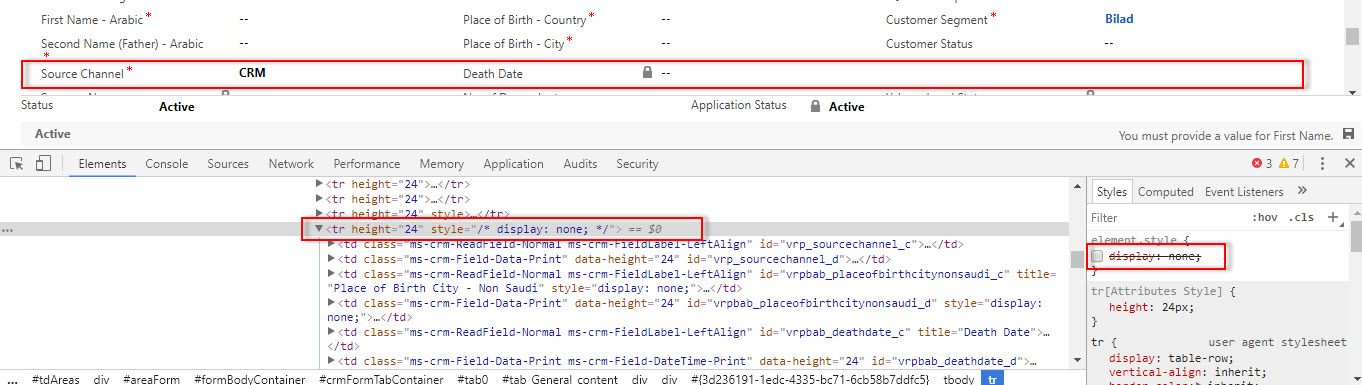
14.jpg

Thanks

*This post is locked for comments

I have the same question (0)
  • Alex Fun Wei Jie Profile Picture
    33,628 on at

    Share your code

  • Rawish Kumar Profile Picture
    13,758 on at

    Hi Shafi,

    without having to look at your code - we cant help much.

  • syed sms Profile Picture
    85 on at

    Hi,

    This is my simple line that is hiding the field

    Xrm.Page.getControl(fieldName).setVisible(false);

  • Suggested answer
    Alex Fun Wei Jie Profile Picture
    33,628 on at

    Hi ,

    I've tried in my environment, i don't have this problem

    7534.1.png

    7534.1.png

    2783.2.png

    Suggestion


    - Check for all browsers, are they behave the same?

    - if yes, try the below steps.

    - Remove the Place of Birth - City field from form.

    - Save and Publish.

    - Drag the Place of Birth - City field to form again.

    - Save and Publish.

    see does it help?

  • syed sms Profile Picture
    85 on at

    I checked on IE and Chrome the same issues happens everywhere,

    Also checked by removing the field from Form, still issue is facing.

    In the end I decided to Enable/Disable field instead of Show/Hide.

    - What is the root cause, why whole row is getting hide, this is still a Question.

    Thank you guys for your support.

  • HajiraRoshan Profile Picture
    550 on at

    Hi Shafi ,

    Please try this code .May be it works .

    Xrm.Page.ui.controls.get("fieldname").setVisible(true/false);

    Thanks,

    Hajira.

Under review

Thank you for your reply! To ensure a great experience for everyone, your content is awaiting approval by our Community Managers. Please check back later.

Helpful resources

Quick Links

Responsible AI policies

As AI tools become more common, we’re introducing a Responsible AI Use…

Neeraj Kumar – Community Spotlight

We are honored to recognize Neeraj Kumar as our Community Spotlight honoree for…

Leaderboard > 🔒一 Microsoft Dynamics CRM (Archived)

#1
SA-08121319-0 Profile Picture

SA-08121319-0 4

#1
Calum MacFarlane Profile Picture

Calum MacFarlane 4

#3
Alex Fun Wei Jie Profile Picture

Alex Fun Wei Jie 2

Last 30 days Overall leaderboard

Featured topics

Product updates

Dynamics 365 release plans




