web
You’re offline. This is a read only version of the page.
close
Skip to main content

Announcements

No record found.

News and Announcements icon
Community site session details

Community site session details

Session Id :
Microsoft Dynamics AX (Archived)

Populate office address against worker

(0) ShareShare
ReportReport
Posted on by 1,171 User Group Leader

Hi all

I'm trying to work out how to populate the 'Office address' field against a worker. When editing details under 'Profile / Worker summary' on form HcmWorker, the office location field is editable but the office address field is not enabled. Presumably this is to force the selection of a previously entered location, but I don't see how to select that address.
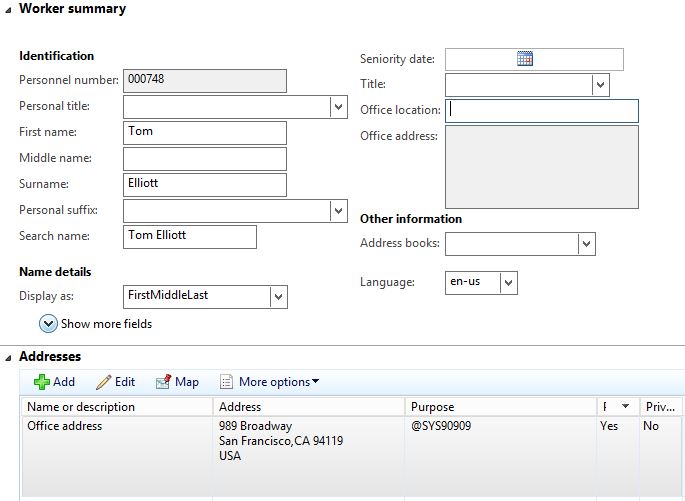
Address.JPG

I've tried selecting an address under addresses, and giving it the role of 'Business', but that didn't seem to work.

Any pointers gratefully appreciated - I'm hoping I'm just missing something really obvious...

Tom

*This post is locked for comments

I have the same question (0)
  • Verified answer
    Mea_ Profile Picture
    60,286 on at

    Hi Tom,

    You need to click on "Assign to office location" button to populate this field

    4442.Untitled.png 

  • Verified answer
    HRTom Profile Picture
    1,171 User Group Leader on at

    Suspected it might be obvious - answered my own question with a bit more fiddling but thought I'd post my findings here for the future reference of others.

    When an address is entered in the addresses section, when the address is selected, click 'other options'. There an option called 'assign to office location' becomes available, and the pulls the address details through into the office location box.

    Solved.jpg

  • Suggested answer
    HRTom Profile Picture
    1,171 User Group Leader on at

    Thank you! Found it myself at about the same time - really appreciate your response.

Under review

Thank you for your reply! To ensure a great experience for everyone, your content is awaiting approval by our Community Managers. Please check back later.

Helpful resources

Quick Links

Introducing the 2026 Season 1 community Super Users

Congratulations to our 2026 Super Stars!

Meet the Microsoft Dynamics 365 Contact Center Champions

We are thrilled to have these Champions in our Community!

Congratulations to the April Top 10 Community Leaders

These are the community rock stars!

Leaderboard > 🔒一 Microsoft Dynamics AX (Archived)

#1
CP04-islander Profile Picture

CP04-islander 24

#2
Michel ROY Profile Picture

Michel ROY 14

#3
Jagadabi Profile Picture

Jagadabi 6

Last 30 days Overall leaderboard

Featured topics

Product updates

Dynamics 365 release plans
