web
You’re offline. This is a read only version of the page.
close
Skip to main content

Notifications

Announcements

Community site session details

Community site session details

Session Id :
Microsoft Dynamics CRM (Archived)

The specified record type does not exist in MS Dynamics CRM - Error when trying to set regarding in Outlook

(0) ShareShare
ReportReport
Posted on by 440

Hello all-

We are having an issue with several users that are trying to set regarding to emails (and some appointments) in the Outlook client and getting an error message that says "The specified record type does not exist in MS Dynamics CRM. Item Name'subject of email' "  I have been working with MS to resolve this and they told me it was because of some rollup fields on the account entity, and if I deleted those fields it would resolve the issue.
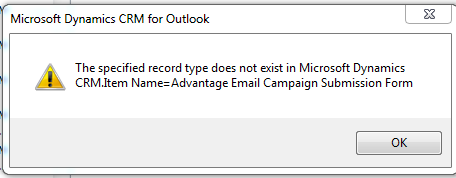
Error_2D00_Outlook.png

Makes no sense to me why that would be a resolution.  Please help if you have had this issue, and if you have been able to resolve it.

We're on Outlook 2010 and CRM Online 2015, update 1.

Thank you

*This post is locked for comments

I have the same question (0)
  • Tim Dailey Profile Picture
    440 on at

    I am guessing this is due to unresolved email addresses. I've had my users test this. When they get the error when trying to set regarding, I asked they enter the person they're trying to email in CRM as a contact. Then if they wait 5-10 minutes for the contact to sync with OUtlook, they are able to set regarding with no errors.

    I have my system setting to "Allow users to send emails to unresolved email addresses - YES" - Microsoft has told me there is a problem causing this that they are going to have a fix for in the next update, but for now, my users are still experiencing this wide-spread. Any help would be great, is there anyone from Microsoft listening/reading this?  I see 140 views, nobody seems to know how to fix it. Thanks

  • Community Member Profile Picture
    on at

    I am having the same issue, when attempting to track an email from the Sent folder

  • Verified answer
    Tim Dailey Profile Picture
    440 on at

    Do you have any custom roll-up fields on your account or contact entities?   If so, you will need to remove those completely (not just from the form, delete them). You will lose any data they have supplied you.

    What version are you on?  Are you online or on-premise?

    I was told they have a fix coming out for this sometime in March (1.2 update for 2015 online), or you can upgrade to 2016 and it has been resolved for that version as well.

    Hope that helps!

  • Suggested answer
    Alex Nosiara Profile Picture
    125 on at

    We have CRM 2016.1 online and still experience the problem. There has been no fix from Microsoft for our problem. However, after we deleted our custom rollups on account and contact, we are now able to track email again for an email address that was not in our database. I guess this has been broken in our system since we added the rollup fields late last year. We had no idea that a rollup field could cause this problem and were trying all sorts of other avenues to fix the problem.

    Thank you very much for your post, you have made people here very happy.

  • Tim Dailey Profile Picture
    440 on at

    Thanks, Alex. It is a weird problem that makes no sense to me why it happens. At least there is a fix. Do you mind marking my answer as "yes" on the post? thank you

  • MezMarianne Profile Picture
    1,267 on at

    I have seen the same behaviour in a customer org since December 2015. It has taken for ever for Microsoft to fix it. I found your post and sent it to the supporter on my case.

    Now it seems like it is a known bug. And the roll up fields with data type whole number are to blame. They are saying it will be fixed in next update.

    I have deleted all roll up fields of type whole number - and all roll up fields from contact and account of all data types. The error still persist to be there.

    Work around is to set the "Allow users to send emails to unresolved email addresses - NO" setting.

    Customer is on CRM Online 2016 and Outlook client 2016 so the issue was not resolved in this version.

  • Tim Dailey Profile Picture
    440 on at

    I had to remove my custom roll-up fields from Contact and Account entity to get the problem to stop, as well as the o.o.b. rollup fields you mentioned.

    Checking the box to allow un-resolved emails did nothing for us.

    Hope that helps

  • MezMarianne Profile Picture
    1,267 on at

    Finally!!! removed two more roll up fields from Opportunity - and now CRM can deal with emails to unresolved recipients. The two roll up fields were not of data type whole number.

  • Tim Dailey Profile Picture
    440 on at

    That's great! If you upgrade to 2016, MS said they fixed it for that version so you can put your roll-up fields back on. (don't take my word for it though) :)

  • MezMarianne Profile Picture
    1,267 on at

    Sorry, but I won't take your word for it. The org is already 2016.

    The issue should be fixed in CRM 2015 Update Rollup 1.2 Microsoft told me. It wasn't.

    I am keeping away from Roll Up fields concerning Activities from now on.

Under review

Thank you for your reply! To ensure a great experience for everyone, your content is awaiting approval by our Community Managers. Please check back later.

Helpful resources

News and Announcements

Season of Giving Solutions is Here!

Quick Links

Responsible AI policies

As AI tools become more common, we’re introducing a Responsible AI Use…

Neeraj Kumar – Community Spotlight

We are honored to recognize Neeraj Kumar as our Community Spotlight honoree for…

Leaderboard > 🔒一 Microsoft Dynamics CRM (Archived)

#1
SA-08121319-0 Profile Picture

SA-08121319-0 4

#1
Calum MacFarlane Profile Picture

Calum MacFarlane 4

#3
Alex Fun Wei Jie Profile Picture

Alex Fun Wei Jie 2

Last 30 days Overall leaderboard

Featured topics

Product updates

Dynamics 365 release plans



