web
You’re offline. This is a read only version of the page.
close
Skip to main content

Announcements

No record found.

News and Announcements icon
Community site session details

Community site session details

Session Id :
Business Central forum

Deactivate following code of Codeunit 81

(0) ShareShare
ReportReport
Posted on by 40

I want to deactivate following code of Codeunit 81  , as I want to ConfirmPost the sales , the dialog box showed just 'Ship' 
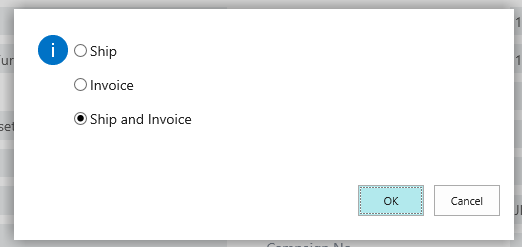
 3225.tt.png

Please let me know how can we see existing code of CU 81 using business central 365,

I try create an overloading function with the same name of procedure and with a subscriber event 'OnBeforeConfirmSalesPost' but it doesn't work when I publish the two functions run .

Thanks

I have the same question (0)
  • Verified answer
    I Gusti Made Ari Profile Picture
    3,608 on at

    You need to hide the standard dialog and show your custom dialog which will only show 'Ship'.

    Please try following subscriber function :

        [EventSubscriber(ObjectType::Codeunit, 81, 'OnBeforeConfirmSalesPost', '', false, false)]
        local procedure OveridePostingPrompt(var SalesHeader : Record "Sales Header";var HideDialog : Boolean)
        var
            Selection : Integer;
        begin
             HideDialog := true;
             Selection := STRMENU('&Ship',1);
             SalesHeader.Ship := Selection IN [1];
             IF Selection = 0 THEN
                Error('');
        end;


  • Hasnaa1234 Profile Picture
    40 on at

    Thanks I try this code it work 

    codeunit 70134 Message
    {
        [EventSubscriber(ObjectType::Codeunit, Codeunit::"Sales-Post (Yes/No)", 'OnBeforeConfirmSalesPost', '', true, true)]
        local procedure MyConfirmPost(VAR SalesHeader: Record "Sales Header"; VAR HideDialog: Boolean)
        var
            selection: Integer;
            ShipInvoiceQst: Label '&Ship';
            PostConfirmQst: Label 'D you want to post the %1';
            ReceiveInvoiceQst: Label '&Receiveeeeee,&Invoiceeeee,Receiveeeeeee &and Invoiceeeeeee';
        begin
            HideDialog := true;
            WITH SalesHeader DO BEGIN
                CASE "Document Type" OF
                    "Document Type"::Order:
                        BEGIN
                            Selection := STRMENU(ShipInvoiceQst, 1);
                            Ship := Selection IN [1, 1];
                            Invoice := Selection IN [2, 3];
                            IF Selection = 0 THEN
                                Error('');
                        END;
                    "Document Type"::"Return Order":
                        BEGIN
                            Selection := STRMENU(ReceiveInvoiceQst, 1);
                            IF Selection = 0 THEN
                                Error('');
                            Receive := Selection IN [1, 3];
                            Invoice := Selection IN [2, 3];
                        END
                    ELSE
                        IF NOT CONFIRM(PostConfirmQst, FALSE, LOWERCASE(FORMAT("Document Type"))) THEN
                            Error('');
                END;
                "Print Posted Documents" := FALSE;
            END;
        end;
    }

    EP.png

    best regards 

  • Romryan Profile Picture
    on at

    Hasnaa1234,

    I was following this post and I can see you achieved great.

    My question is,  do you need to call your codeunit 70134 or once you build the al package and publish is enough to effect the change?.

    RomRyan

Under review

Thank you for your reply! To ensure a great experience for everyone, your content is awaiting approval by our Community Managers. Please check back later.

Helpful resources

Quick Links

November Spotlight Star - Khushbu Rajvi

Congratulations to a top community star!

Forum Structure Changes Coming on 11/8!

In our never-ending quest to help the Dynamics 365 Community members get answers faster …

Dynamics 365 Community Platform update – Oct 28

Welcome to the next edition of the Community Platform Update. This is a status …

Leaderboard > Business Central

Last 30 days Overall leaderboard

Featured topics

Product updates

Dynamics 365 release plans
