web
You’re offline. This is a read only version of the page.
close
Skip to main content

Announcements

No record found.

News and Announcements icon
Community site session details

Community site session details

Session Id :
Microsoft Dynamics AX (Archived)

What is the Method/Code that puts ItemGroup in Sales Order Line

(0) ShareShare
ReportReport
Posted on by

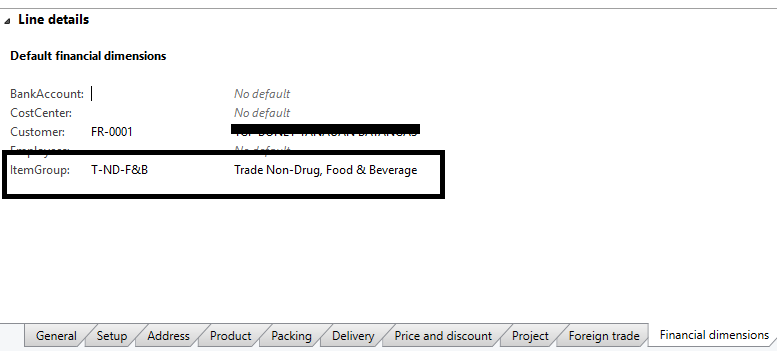
6136.Untitled.png

Im testing some code to use for inserting Sales Order Lines

but my code does not automatically put the Item Group (It shows in manual adding)

can i know what code/method used to put the Item Group Financial Dimension of the Sales Order Line?

my code for testing (1 item only):

{

SalesLine.clear();
SalesLine.SalesId = SalesTable.SalesId;
SalesLine.ItemId = '100407';
SalesLine.SalesQty = 5;

SalesLine.itemIdChanged();


SalesLine.InventDimId = InventDim::findOrCreate(inventDim).inventDimId;
salesline.initFromSalesTable(salestable);
SalesLine.createLine();

SalesLine_ds.refresh();
SalesLine_ds.executeQuery();

}


what should i add to get the ItemGroup?

help. thanks.

*This post is locked for comments

I have the same question (0)
  • Sohaib Cheema Profile Picture
    49,677 Super User 2026 Season 1 on at

    its something  environment specific. i.e any setup which is bringing this behavior.
    may be your sales order header has dimensions
    may be you are using dimension link in inventory setup under posting

  • Suggested answer
    Faqruddin Profile Picture
    1,909 on at

    To display ItemGroup use this code...

    display ItemGroupId itemGroupId()
    {
        InventItemGroupItem inventItemGroup;
    
        select ItemGroupId from inventItemGroup where inventItemGroup.ItemId == this.ItemId
             &&  inventItemGroup.ItemDataAreaId  == this.dataAreaId;
    
        return inventItemGroup.ItemGroupId;
    }


  • Verified answer
    Brandon Wiese Profile Picture
    17,788 on at

    Your code is out of order.

    The ItemGroup financial dimension, assuming that it's stored on the Released product, is copied during SalesLine.initFromInventTable(..), which is called from SalesLine.itemIdChanged().  But, in your code, you call SalesLine.initFromSalesTable(salesTable) after that, which copied the DefaultDimension field directly from the sales order header, erasing the financial dimensions copied from the Released product.

    SalesLine.initFromSalesTable(..) should be called very soon after SalesLine.initValue() and SalesLine.SalesId = SalesTable.SalesId, which should immediately follow SalesLine.clear();  Then set your ItemId, and then call .itemIdChanged().  You should follow the same sequence of events in your code that would occur if you were entering the order from the UX.

  • Verified answer
    Brandon Wiese Profile Picture
    17,788 on at

    In other words, move the .initFromSalesTable as shown.

    SalesLine.clear();
    SalesLine.initValue(); // add this line SalesLine.SalesId = SalesTable.SalesId; salesline.initFromSalesTable(salestable); // moved here SalesLine.ItemId = '100407'; SalesLine.SalesQty = 5; SalesLine.itemIdChanged(); SalesLine.InventDimId = InventDim::findOrCreate(inventDim).inventDimId;
  • Community Member Profile Picture
    on at

    @Brandon

    it worked. thanks!!

    and also thanks everyone for the suggestions!

Under review

Thank you for your reply! To ensure a great experience for everyone, your content is awaiting approval by our Community Managers. Please check back later.

Helpful resources

Quick Links

Introducing the 2026 Season 1 community Super Users

Congratulations to our 2026 Super Stars!

Meet the Microsoft Dynamics 365 Contact Center Champions

We are thrilled to have these Champions in our Community!

Congratulations to the March Top 10 Community Leaders

These are the community rock stars!

Leaderboard > 🔒一 Microsoft Dynamics AX (Archived)

#1
Joris dG Profile Picture

Joris dG 5

#2
Alexey Lekanov Profile Picture

Alexey Lekanov 2

#2
Henrik Nordlöf Profile Picture

Henrik Nordlöf 2 User Group Leader

Last 30 days Overall leaderboard

Featured topics

Product updates

Dynamics 365 release plans
