web
You’re offline. This is a read only version of the page.
close
Skip to main content

Notifications

Announcements

No record found.

Community site session details

Community site session details

Session Id :
Small and medium business | Business Central, N...
Suggested Answer

Fixed Assets not processing depreciation

(0) ShareShare
ReportReport
Posted on by 103

Hi,

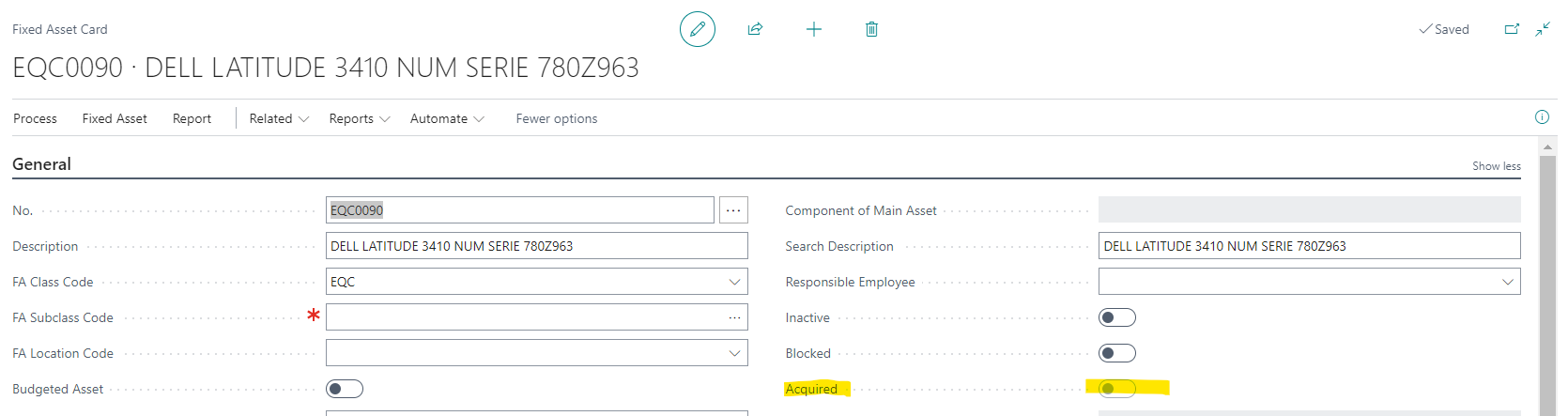
I have several FA that were incorporated through a purchase process, when it is time to start processing depreciation, they are no taken for the process, when I check information related to this FA I see that Aquired flag is off

pastedimage1669824340193v2.png

Then if i go into this specific register I see this:
pastedimage1669824387408v3.png

It appears as if it wasn't aquired yet, but I have the purchase register:

pastedimage1669824464164v4.png

I'm missing some step so FA shoul be marked as aquired?

TIA!!

I have the same question (0)
  • Suggested answer
    DAnny3211 Profile Picture
    11,397 on at

    hi

    look this

    learn.microsoft.com/.../fa-how-depreciate-amortize

    Daniele

  • MarisolC Profile Picture
    103 on at

    I know how to run this process, theme is that some of my FA doesn't get processed. :(

  • Suggested answer
    YUN ZHU Profile Picture
    95,327 Super User 2025 Season 2 on at

    Hi, It seems to be related to the following question. Hope that gives you some hints.


    Thanks

    ZHU

  • MarisolC Profile Picture
    103 on at

    It seems there is no other way to fix this but programmaticaly, so sad.

  • Suggested answer
    Dallefeld Profile Picture
    211 User Group Leader on at

    Can you reverse the entries and redo them?

  • MarisolC Profile Picture
    103 on at

    I don't thing so, this has been happening since last march, so manually users have been registering monthly depreciation, and also purchasing process was processed in march, so there is so many months to be affected, and in this case I have 13 fixed assets in two different companies....

  • Suggested answer
    YUN ZHU Profile Picture
    95,327 Super User 2025 Season 2 on at

    Hi, I just tested if I can solve this problem with Configuration Package and not selecting Validate Field. But it seems that Microsoft does not allow this field to be selected in the Configuration Package.
    If this is a bug of Microsoft itself, I suggest submitting an SR to Microsoft to let him solve the problem in the background.

    pastedimage1670370065049v1.png

    pastedimage1670370100036v2.png

    Thanks.

    ZHU

  • MarisolC Profile Picture
    103 on at

    I tried that too, it didn´t work. :(

  • Suggested answer
    YUN ZHU Profile Picture
    95,327 Super User 2025 Season 2 on at

    Hi, I checked again, this is a fLowfield, so it cannot be imported with Configuration Package.

    pastedimage1670390264319v1.png

    So you should find Table "FA Depreciation Book"  and export this fixed asset. At this time, "Acquisition Date" should be empty, just import this value.
    Hope this helps.
    Thanks.
    ZHU

Under review

Thank you for your reply! To ensure a great experience for everyone, your content is awaiting approval by our Community Managers. Please check back later.

Helpful resources

Quick Links

Responsible AI policies

As AI tools become more common, we’re introducing a Responsible AI Use…

Neeraj Kumar – Community Spotlight

We are honored to recognize Neeraj Kumar as our Community Spotlight honoree for…

Leaderboard > Small and medium business | Business Central, NAV, RMS

#1
OussamaSabbouh Profile Picture

OussamaSabbouh 3,226

#2
Jainam M. Kothari Profile Picture

Jainam M. Kothari 2,047 Super User 2025 Season 2

#3
YUN ZHU Profile Picture

YUN ZHU 1,257 Super User 2025 Season 2

Last 30 days Overall leaderboard

Featured topics

Product updates

Dynamics 365 release plans
